


- Home>
- Ai Email Assistant For Executives
Emailify: An AI Email Assistant That Turns Gmail and Calendar Into a Daily Action Plan

Bitontree built Emailify, an AI email assistant for executives that connects multiple Gmail mailboxes and Google Calendars in one workspace. Rule-based filters clear bulk and automated mail first, then AI email triage sorts what is left into 8 attention categories. The system extracts proposed action items, links meetings to the right email threads and writes a daily executive brief. Every AI output links back to its source email, and nothing is sent, scheduled or deleted without the user's approval.
Services Used:
Team:
1 AI engineer + 1 full-stack engineer + 1 project manager
Location: USA
Industry:Healthcare
Project Type:Marketplace
Duration:5 months
Services Used:AI Agent Development, AI Automation Development
Team:1 AI engineer + 1 full-stack engineer + 1 project manager
About The Client
The client is a senior clinician and executive who runs clinical, research and business work across more than one Gmail account. Their inbox mixes patient-related correspondence, research collaboration, supplier and partner threads, meeting invitations and a steady stream of newsletters and automated notifications.
They came to Bitontree for an AI email assistant for executives that would read across every mailbox and calendar, surface what needs a decision or reply, and prepare them for each day and each meeting. The product was built so the same platform could later serve other executives as a multi-tenant AI SaaS.
The Challenge: When the Inbox Becomes the To-Do List
The client's working day was being run from the inbox. Decisions, promised deliverables and meeting context were buried in threads across separate accounts, and nothing tied email to the calendar.
Signal lost in volume
Newsletters, notifications, auto-replies and automated updates arrived in the same inbox as messages that needed a decision. Important threads were easy to miss unless every message was read.
Commitments hidden in threads
Owners, due dates and promised deliverables lived inside long conversations. There was no tracked list of what the client owed others, or of what others had promised in return.
Meetings without context
Before each call, the relevant email history had to be searched for by hand across mailboxes. The calendar showed who was attending, but not what had already been discussed with them.
Multiple mailboxes, no single view
Work and other Google accounts had to be checked one by one, with each calendar separate again. Priorities in one account were invisible from another.
Low trust in full automation
An AI inbox management tool that sends replies, changes events or deletes mail on its own was not acceptable. The assistant had to suggest, show its evidence and leave the final action to the client.
Sensitive correspondence
Clinical and research mail required strict separation of each user's data. Disconnecting a mailbox also had to remove its stored messages and everything derived from them.
What Was at Stake
A missed decision email or a forgotten follow-up delays work with partners and research teams. Generic email tools could sort mail, but they could not explain why a message mattered, turn it into a tracked action or link it to the right meeting. The client needed an assistant that cut the noise, kept every suggestion traceable to its source email, and left every consequential action in their hands.
The Solution: From Inbox Overload to a Daily Action Plan
Bitontree designed and built Emailify as a custom AI agent development project: a web application that reads connected Gmail mailboxes and Google Calendars, filters out noise with deterministic rules, and uses Claude AI for classification, summaries, action extraction and briefs. The user reviews everything in focused views (Today, Inbox intelligence, Actions & waiting-for, Meetings, Executive brief and Clear out) and approves every action that changes their mail or calendar. It applies AI workflow automation to the inbox without taking control away from the user.
Architecture Decisions
Rules before AI
Code rules check sender preferences, list-unsubscribe and bulk headers, auto-reply and no-reply senders and Gmail bulk labels before any AI call. Only eligible inbox mail reaches the model, which keeps AI cost and noise down.
Selective deep processing
Only threads classified as action, decision, response, meeting or deadline/risk go on to thread summarization and action extraction.
Evidence-checked extraction
Every proposed action carries an evidence quote that must match the source thread before it is accepted. Confidence bands decide whether an item is surfaced for review.
Human in the loop AI
Replies, calendar event changes and moving mail to Trash only happen through explicit, user-approved steps. User edits to AI proposals are stored as corrections.
Gmail and Google Calendar integration through Composio
Each mailbox and calendar has its own managed Google consent flow, and a server-side allowlist restricts which operations the app can call.
Multi-tenant AI SaaS foundation
PostgreSQL row-level security adds a tenant boundary on top of per-user scoping. Passwords are bcrypt-hashed, sessions use HTTP-only cookies, and disconnecting a mailbox removes its stored messages and derived intelligence.
Deterministic meeting matching
A ranker proposes related email threads for each meeting using participant overlap, subject and timing signals. The user accepts or rejects each match before a briefing is written.
How the Intelligence Pipeline Works
The pipeline runs in seven stages, deterministic rules first and AI second, so only high-attention mail reaches the model and every output stays traceable.
- 01
Retrieve and store
Enabled Gmail folders fetched and normalized
- 02
Deterministic filters
Bulk, automated and ignored senders set aside
- 03
Classify inbox mail
Category, priority, confidence, reason
- 04
Select conversations
Only high-attention categories go forward
- 05
Extract actions
Title, owner, due date, evidence quote
- 06
Build Today and briefs
Daily view plus AI-written briefs
- 07
Record corrections
User edits saved as feedback
Core Features We Built

Unified Daily Priority Dashboard
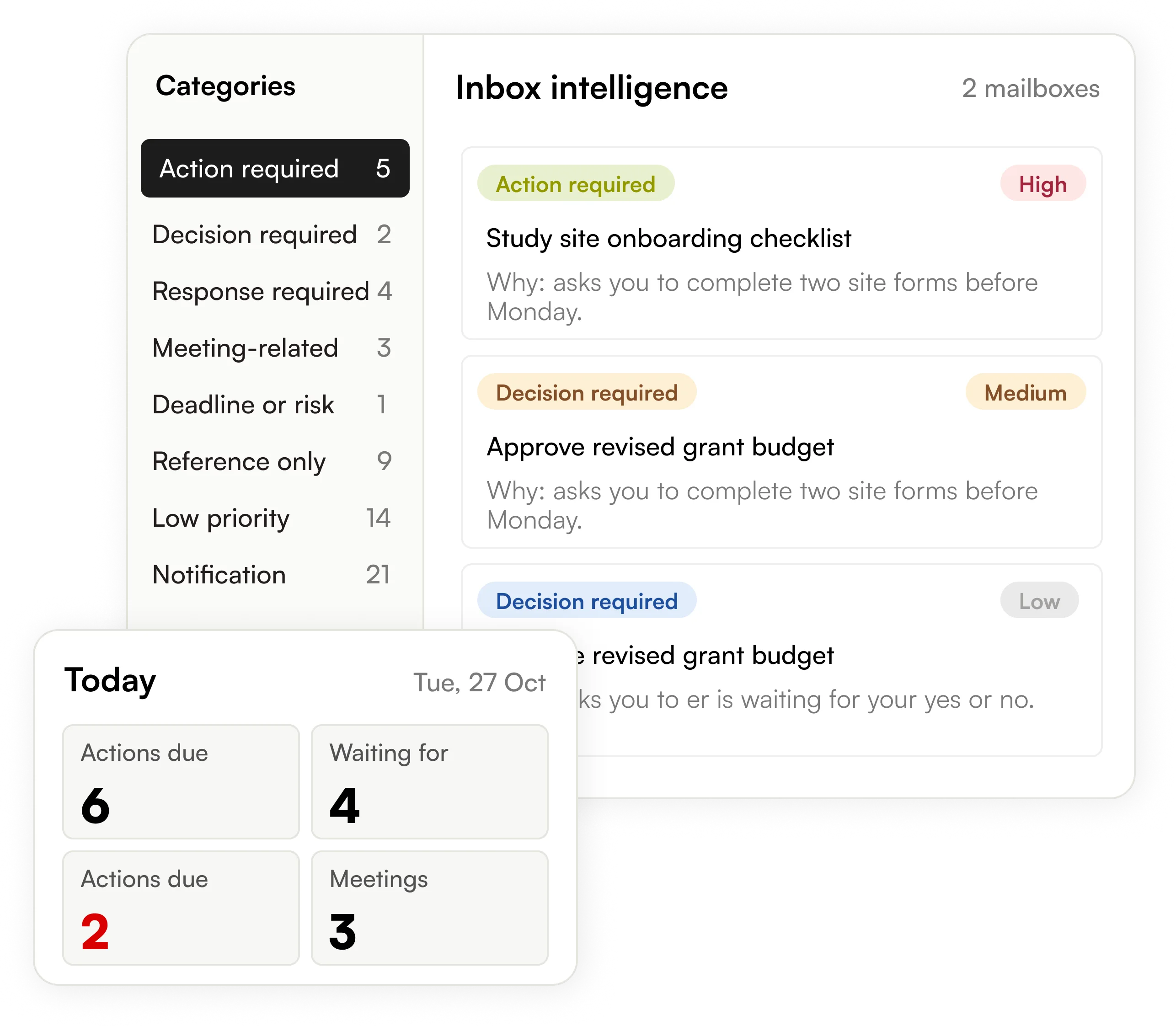
A date-specific view of actions due, items waiting on others, open risks and the day's meetings. Every card links to the email or event behind it. The view loads from the app's own stored data, so it does not wait on Gmail. The user starts the day from one screen instead of several inboxes.
AI Email Triage and Classification
Rule-based filters first remove bulk and automated mail. AI email classification then sorts the rest into 8 categories, from action required and decision required to reference only and notification. Each message gets a priority, a confidence score and a one-line reason. The user can reclassify any message at any time.
AI Action Item Extraction and Waiting-For Tracking
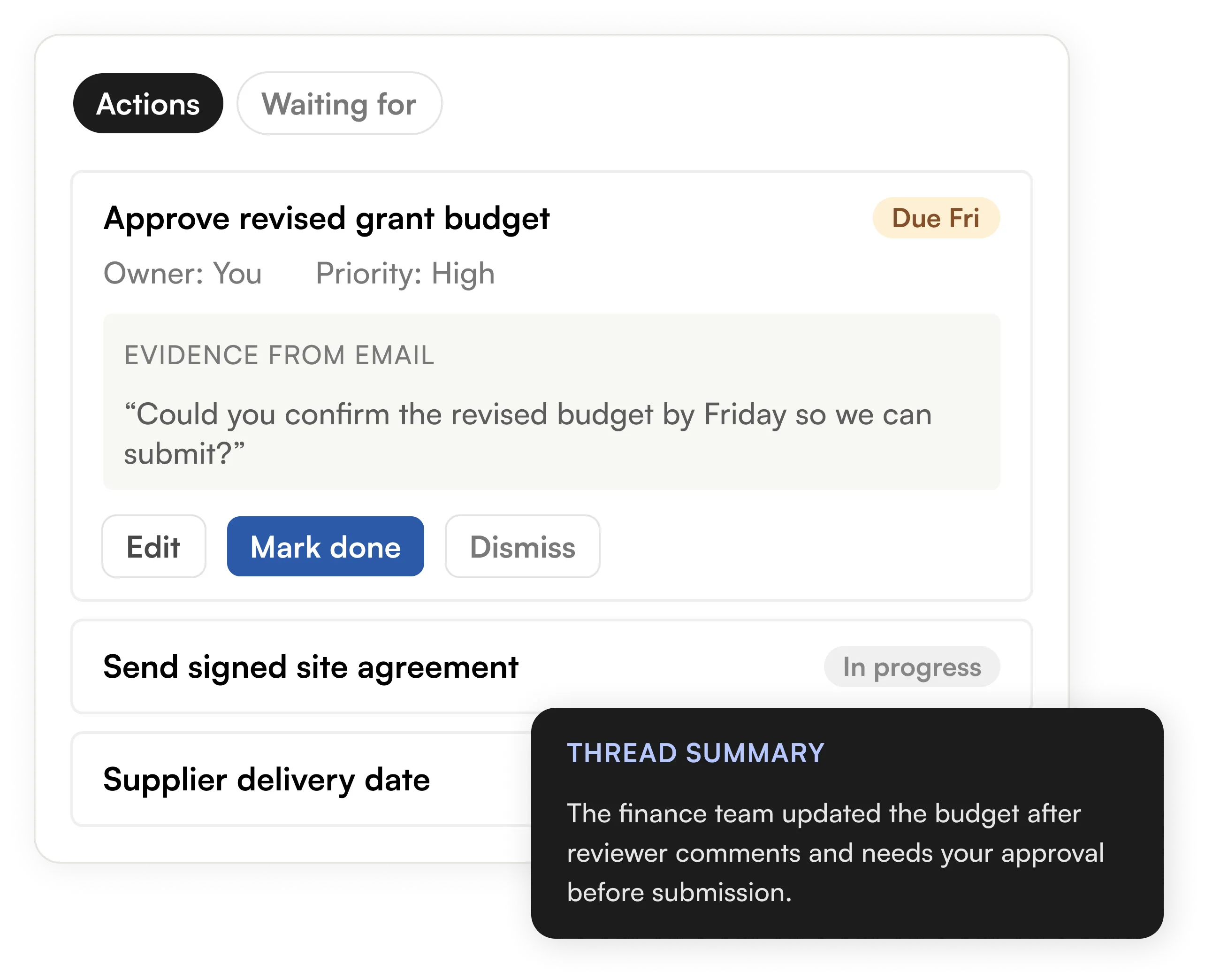
For high-attention threads, the assistant proposes action items with an owner and a due date. Each item carries an evidence quote and is accepted only when the quote matches the email. Users can edit, complete or dismiss items, or add their own. A waiting-for view tracks work assigned to others.
AI Email Summarization
Conversations that need action, a decision or a reply are summarized in plain language. Each summary sits next to the thread's proposed actions. The user knows where a discussion stands without reading every message.
Meeting Context and AI Meeting Briefings
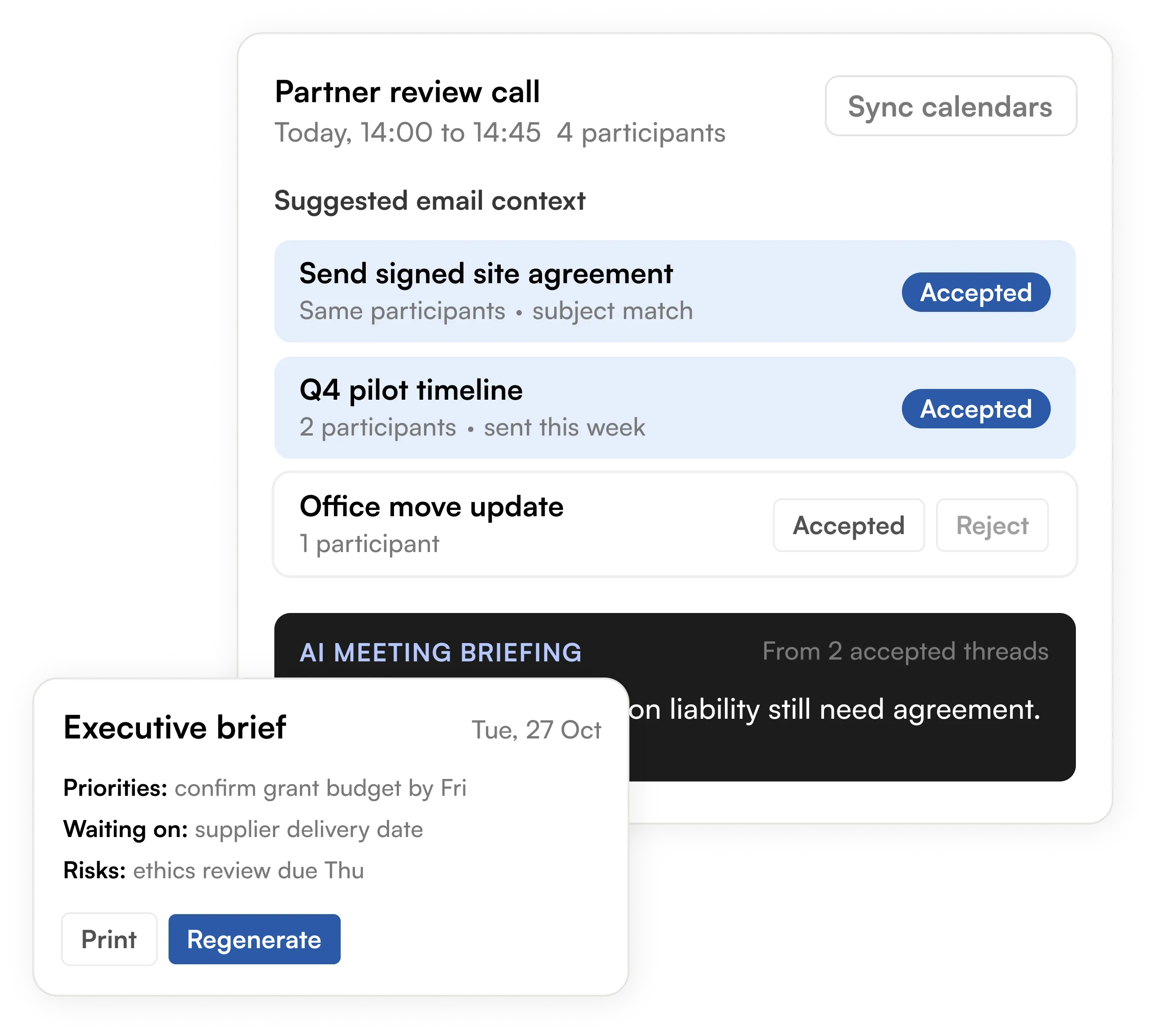
A ranker matches each calendar event to related email threads using participants, subject and timing. The user accepts the relevant threads, and the AI meeting briefing is written only from that context. Invitations found in email appear as proposals to approve or decline. Events are created or cancelled only after the user confirms.
AI-Generated Daily Executive Briefing
A written summary for any chosen date. It covers selected actions, waiting-for items, risks and calendar context. Briefings are saved to history and can be regenerated when new mail arrives. Each one can be printed straight from the browser.
AI Email Reply Drafts with Approval
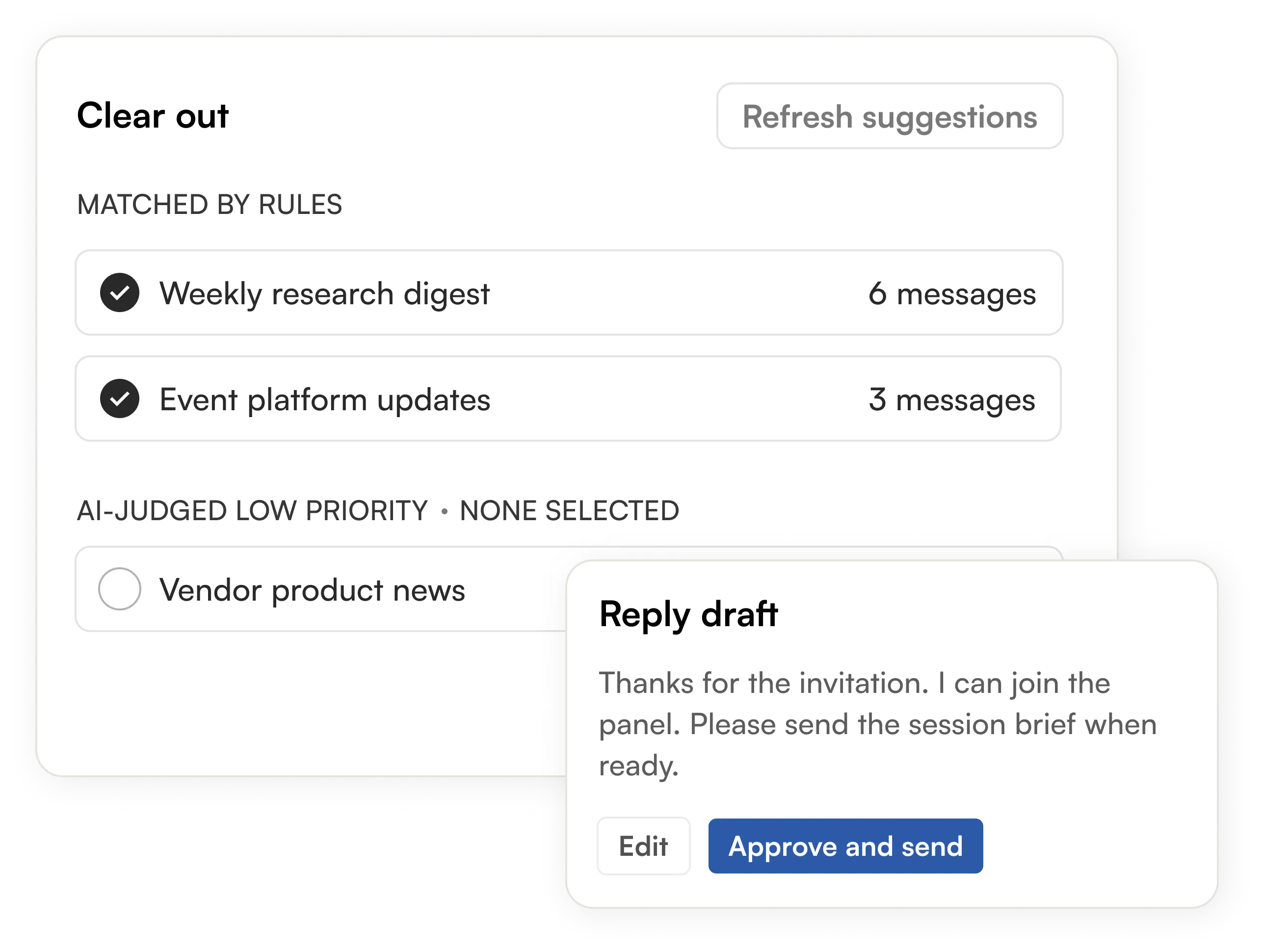
Where a reply is needed, the assistant drafts it in the context of the thread. The draft includes the user's saved signature and booking links. Drafts can be saved and edited at any time. Nothing is sent until the user approves the final text.
Sender-Based Bulk Email Cleanup
Newsletters and automated mail are grouped by sender. Rule-based and AI-judged groups are labelled separately, and nothing in the AI-judged section is pre-selected. The user picks the exact messages and confirms the count. Selected mail moves to Gmail Trash, where it remains recoverable.
Manual Inbox Management vs AI Email Assistant
| Dimension | Manual Inbox Management | Emailify (AI Email Assistant) |
|---|---|---|
| Mailbox coverage | Each Gmail account checked separately | Multiple mailboxes in one combined view |
| Bulk and automated mail | Mixed in with important messages | Filtered by rules before AI triage |
| Prioritization | Read every message to judge it | AI email classification into 8 categories with a reason |
| Action items | Remembered or copied by hand | Extracted with owner, due date and source quote |
| Waiting-for items | Tracked in memory or notes | Dedicated waiting-for view |
| Meeting prep | Search old threads before each call | Matched email context and AI meeting briefing |
| Daily overview | Built by scanning inbox and calendar | Today view and AI daily executive brief |
| Replies | Written from scratch | AI drafts with signature and booking links, user approves |
| Inbox cleanup | Message by message | Grouped by sender, user-selected move to Trash |
The Results
Emailify gives the client one place to see what needs attention today, what they owe others and what they are waiting on. Rule-based filtering takes routine mail out of view before AI triage, so the client's time goes to the messages that need a decision or a reply. Because every classification, action and briefing links back to its source email, the client can trust the output and check it in one click.
1.5 hrs*
Time saved per day on inbox triage
40%
Inbox mail filtered automatically before AI triage
100%
AI outputs linked back to their source email
0
Replies sent or mail trashed without user approval
Technologies Used
Emailify brings together AI, email and calendar integrations, and a modern web stack to turn inbox activity into a clear daily action plan. Claude AI powers the intelligence, Composio connects Gmail and Google Calendar, Next.js and Node.js power the application, PostgreSQL stores its data, and Hostinger hosts the platform.





Looking For More Case Studies?
Don't just take our word for it - our track record reflects our expertise and success.


LogisticsSingapore: 
Smart AI Invoice Processing System
AI-powered invoice processing for a Singapore-based logistics enterprise. OCR and ML automate data extraction, validate against business rules, and process invoices end-to-end across multiple formats and currencies.
PythonLangGraphCrewaiStreamlitAzure
Frequently Asked Questions
What is an AI email assistant?
An AI email assistant reads your inbox, sorts messages by what they need from you, and turns them into actions, summaries and drafts. Emailify also links email to your calendar and writes daily and meeting briefs.
How does AI email triage work in Emailify?
Code rules first set aside bulk, automated and ignored senders. Claude AI then classifies the remaining inbox mail into 8 categories with a priority, a confidence level and a short reason.
Can the AI email assistant send emails or delete mail on its own?
No. Replies, calendar changes and moving mail to Trash only happen after the user reviews and approves them. AI output is treated as a suggestion.
How does AI action item extraction work?
For threads that need action, a decision or a reply, the model proposes an action with an owner, a due date and a quote from the email. The quote must match the source thread before the action is accepted.
Does it support multiple Gmail accounts and Google Calendar?
Yes. Users can connect several Gmail mailboxes and a Google Calendar for each one through Gmail and Google Calendar integration, then work from one combined view.
How are AI meeting briefings created?
The system suggests email threads related to each meeting based on participants, subject and timing. The user accepts the relevant threads, and the AI writes a briefing from that context.
How is email data kept secure?
Each user's data is scoped to their account, with PostgreSQL row-level security as an extra tenant boundary. Passwords are hashed, sessions use HTTP-only cookies, and disconnecting a mailbox removes its stored messages and derived data.
Can Bitontree build a custom AI email assistant for our team?
Yes. Through our custom AI agent development and AI chatbot development services, we build email and workflow assistants around your mailboxes, calendars and business tools.