October 11, 2025
OpenAI Agent Builder (AgentKit): Build Multi-Agent Workflows Without Code

Yash Vibhandik
CEO
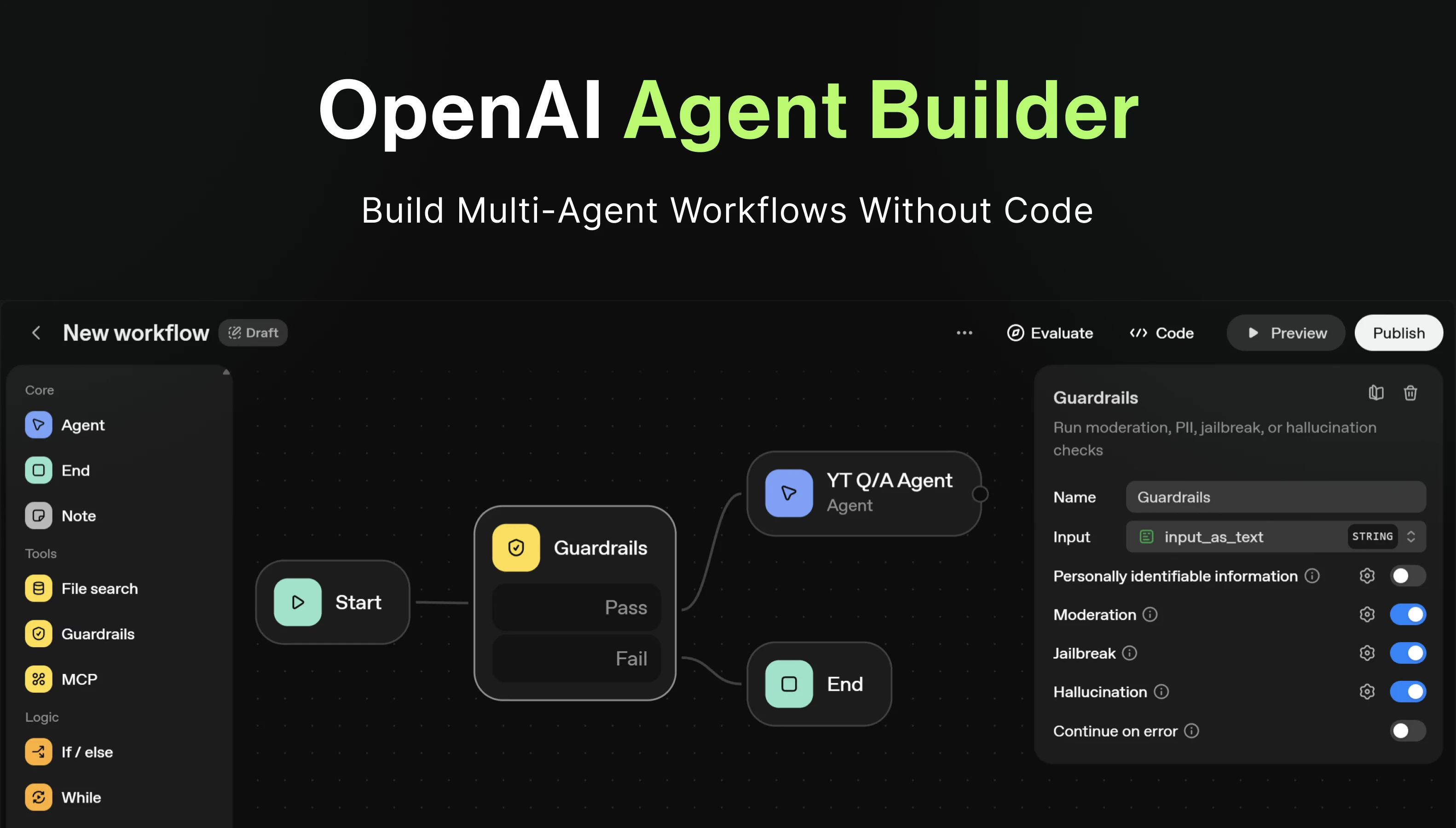


Here’s what changed everything: three weeks ago, I spent an entire weekend trying to connect our support bot to our CRM. After writing hundreds of lines of code and debugging endless integration issues, I nearly gave up. Then OpenAI launched AgentKit, and what used to take me 16 hours now takes about 30 minutes via a drag-and-drop, visual interface.
OpenAI’s Agent Builder (part of AgentKit) marks a genuine turning point. You no longer need to wire up complex code or stitch APIs together manually. With a visual canvas, built-in guardrails, and embeddable chat UI, AgentKit dramatically lowers the barrier for non-technical users to build multi-agent workflows.
In this article, you’ll learn:
- What Agent Builder / AgentKit comprises
- How it works under the hood (nodes, logic/branching, connectors, guardrails)
- A demo walkthrough (lead classification + support agent)
- Best practices, limitations, and future outlook
By the end, you’ll know whether Agent Builder is the right tool for your next AI-driven automation.
What Is AgentKit & Agent Builder?
OpenAI officially introduced AgentKit on October 6, 2025, at DevDay. AgentKit is a cohesive suite of building blocks for designing, deploying, and optimizing agents and orchestrations.

The core components include:
-
Agent Builder: A visual, drag-and-drop canvas for composing multi-agent workflows with branching logic, node orchestration, inline evaluation, and version control.
-
ChatKit: The embeddable UI/SDK that lets you plug your agent workflows into a website or app chat interface.
-
Connector Registry / MCP (Model Context Protocol): Built-in support for safely connecting agents to external systems (CRMs, Slack, Google Drive, databases) via standardized connectors.
-
Evals / Performance Tools: Integrated tools to test, grade, and optimize agent flows and behaviors over time.
-
Guardrails & Safety Layers: Per-node safety, human approval steps, content filtering, logging, and audit trails.
One of the biggest shifts here is that what once required weeks of engineering-front-end chat UI wiring, connector writing, prompt orchestration, failover logic-can now be prototyped, iterated, and deployed in hours.
How Agent Builder Actually Works
To maximize your success with Agent Builder, it helps to understand the building blocks behind its visual interface. Let’s break down nodes, logic, connectors, and safety.
Visual Workflow Canvas & Nodes
Agent Builder is built around nodes and visual wiring. Each node is a discrete step or capability, and you connect them to form a directed flow.
Common Node types:
- Input nodes: capture user utterances or messages.
- Classifier nodes: categorize or route based on message content.
- Tool / API nodes: call built-in tools (web search, file search) or external systems via MCP.
- Transform / Formatter nodes: convert data into structured schemas (e.g. JSON).
- Approval / Human-in-the-loop nodes: pause workflow for manual review.
- Guardrail nodes: enforce safety, content moderation, or constraints.
You can preview your flow in “test mode” before publishing, inspect intermediate reasoning states, and roll back versions if needed. Templates and version history accelerate iteration.
Logic, Branching & Conditional Flow
Agent workflows can adopt complex logic: if-else branches, loops, or conditional routing based on classifier output or external data. For example:
- If the classifier labels someone as an existing customer, route to the support agent.
- Else (new lead), route to the sales / lead-qualification agent.
You can also define schema-based outputs so downstream connectors or tools can consume agent outputs more reliably.
Connectors & MCP (Model Context Protocol)
A key innovation in AgentKit is MCP (Model Context Protocol), which standardizes how agents talk to external systems. Think of MCP like a “USB-C port” for AI: a universal interface for connecting agents to data sources, tools, and APIs.
With MCP support now in the Responses API and Agents SDK, OpenAI lets you hook up remote MCP servers (e.g. Slack, HubSpot, Shopify) with minimal code.
In practice, you authenticate an MCP connector, map fields, and include that node in your flow to push or pull data.
Built-In Tools (Web, File Search, Code Execution)
Agent Builder includes a set of built-in “managed tools” - e.g. web search, file search, or code execution - so you don’t always need to build custom connectors for common tasks.
For example, the agent can dynamically search a document corpus (vector store) or external web to respond to user queries.
Safety & Guardrails
Production agents need safety baked in. AgentKit enables guardrails at multiple levels:
- PII masking / filtering
- Content moderation / jailbreak detection
- Human approval steps for critical decisions
- Fallback or retry nodes
- Logging, auditing, and trace collection
These safety layers are especially important given the risk of hallucination, prompt injection, or misuse.
Demo Walkthrough: Lead vs Support Agent Workflow
Let’s build an example flow using the same logic you walked through in your podcast transcript.
Step 1: Define the Use Case & Flow Sketch
Goal: A chatbot on your site that:
a. Accepts user input (message).
b. Classifies: support request from existing customer vs new lead.
c. If support: uses vector store / knowledge base to answer or escalate.
d. If lead: ask qualification questions (company name, email, site traffic).
e. Push lead data into CRM or Slack.
f. Return confirmation or schedule a demo.
Step 2: Build the Workflow in Agent Builder
Node A: Input - user enters message (e.g. “I have an issue” or “I want a demo”).
Node B: Classifier - with prompt examples, this node outputs a label like support or lead.
Node C: Branch / Logic - route to two subflows:
1. Support Agent Branch
- Tool / vector retrieval node: fetch context from your document store.
- Answer node: respond or escalate to human if confidence low.
2. Lead Agent Branch
- Question nodes: ask for company, website, email, monthly visits, current tools.
- Transform node: format data into structured JSON.
- MCP connector node: push data to CRM / Slack / DB.
- Final message node: “Thanks, we’ll follow up / book a demo”.
You can test this flow in preview mode, watch the classifier reasoning, and simulate edge-case inputs before going live.
Step 3: Embed via ChatKit
Once the workflow is ready and published:
- Capture the workflow or template ID.
- Using ChatKit, embed your chat interface on your website or app with minimal front-end code.
- The chat UI will invoke your agent workflow behind the scenes.
This setup eliminates the need for a custom chatbot frontend or developer support for updates. You can update the agent in Agent Builder, publish, and the UI changes live without redeploying front-end code.
Step 4: Monitor, Evaluate & Iterate
- Use Evals to define test cases, trace logs, prompt grading, and edge-case evaluation.
- Monitor false classifications, guardrail violations, or hallucinations.
- Iterate: adjust prompts, branching logic, connect more MCPs, expand subflows
Over time, you can scale with additional agents, deeper branching, or fine-tuned guardrails.
Here’s a sample user interaction (preview mode):

What Agent Builder Actually Changes
-
Lower Barrier / No-Code Friendly
Product leads, analysts, or ops teams can prototype agent workflows without needing full engineering support. (Though MCP setup or custom connectors may still require technical assistance.)
-
Faster Iteration & Collaboration
Visual canvas, inline previews, templates, versioning, and traceability speed up experimentation and reduce back-and-forth with engineering.
-
Unified Stack
AgentKit combines prompt logic, tool orchestration, connector registry, guardrails, evaluation, and UI in one integrated platform - versus stitching together multiple services.
-
Built-In Safety & Governance
With guardrails, human approval nodes, and logging, it’s safer to run agents with real users.
-
Performance Optimization
Evals and performance dashboards help you monitor classification accuracy, prompt drift, and mistakes - enabling continuous improvement.
-
Competitive Edge vs Workflow Tools
AgentKit positions OpenAI to compete with tools like Zapier, n8n, or workflow automators-but with deep AI orchestration built in.
For AI-centric automations (support bots, lead funnels, knowledge assistants), this unified stack is compelling.
Trade-Offs, Limitations & What to Watch Out For
-
Connector Ecosystem at Launch Is Limited
AgentKit launches with a curated set of MCP connectors. You might need to build custom connectors for niche systems.
-
Platform Lock-In
If you deeply embed your logic and connectors in AgentKit, migrating to another system may be nontrivial.
-
Unclear Cost / Pricing Model
As a beta product, pricing for token usage + pipeline execution may be premium. Early usage could surprise you.
-
Beta Stability & Scaling Risk
Edge-case bugs, latency at scale, or concurrency issues may appear in real world usage.
-
Customization vs Simplicity Tradeoff
For highly complex logic, you may still need custom code or fallback integration outside Agent Builder.
-
Hallucinations & Prompt Drift
Even with guardrails, LLMs drift over time. Rigorous evaluation and prompt tuning remain mandatory.
-
Non-Technical Onboarding Challenges
Non-engineers may struggle initially-some understanding of prompting, logic, and data context is still needed.
Also, some early comparisons suggest AgentKit’s routing is more rigid than platforms like n8n, especially in complex workflow interleaving.
Nevertheless, for many use cases, the trade-offs are acceptable given the speed and flexibility gains.
Best Practices & Tips for Success
1. Start Small & Iterate
Build one simple pipeline first (e.g. lead qualification), then expand.
2. Use Templates & Examples
Kick off workflows using AgentKit’s starter templates.
3. Incorporate Guardrails Early
Validate edge cases, block bad inputs, and add human approval for critical components.
4. Write the Evals Before the Agent
Define test cases, monitor trace logs, and grade outputs early.
5. Minimize Context Where Possible
Overloading the model with context increases cost and risks drift.
6. Version & Backup Logic
Always keep exportable backups and version history.
7. Segment Reasoning Levels
Use heavy reasoning only where needed; simpler logic nodes reduce cost and latency.
8. Monitor Usage & Costs Closely
Start with a usage cap or alerts to prevent runaway spend.
9. Maintain Observability
Use logs, dashboards, anomaly detection to catch misclassifications or weird behavior.
10. Gradually Expand MCP / Connectors
Don’t try to integrate every external tool at once-add connectors iteratively.
Future Outlook & Opportunities for Founders
This moment feels reminiscent of early GUI adoption-just as desktop computing abstracted away command-line complexity, AgentKit abstracts away the plumbing of agent orchestration.
Here are a few strategic opportunities:
-
Let Non-Technical Teams Build the First Draft
Give product folks, support leads, sales ops, or growth teams direct access to build automations via Agent Builder + ChatKit.
-
Use ChatKit as a Growth Channel
Embed your agent workflows as distribution-turn chat agents into interactive onboarding, support, or lead capture tools.
-
Differentiate with Unique MCP Connectors
Stand out by building custom MCP connectors into niche systems (industry CRMs, ERPs, internal tools).
-
Focus on High-Value Domains
Use multi-agent workflows for complex processes (escalation, decision routing, coordination).
-
Monitor & Monetize Performance
Track agent accuracy, ROI, cost per execution - you can even monetize templates, agent packages, or vertical stacks.
As AgentKit evolves and connector variety grows, the gap between “simple chatbot” and “full autonomous agent suite” will narrow rapidly.
Final Thoughts & Call to Action
Wondering where OpenAI’s Agent Builder for your business or which technologies to choose for your multi-agent workflows? We’re here to help. With deep AI agent development expertise, we guide you from conceptualization to deployment - transforming your ideas into powerful, AI-driven solutions.
Whether it’s building support bots, lead qualification funnels, internal assistants, or complex domain-specific automation, we provide end-to-end support: designing workflows, integrating connectors, ensuring safety and governance, and optimizing performance.
Let us help you unlock the full potential of AgentKit and bring your AI automation ideas to life - efficiently, securely, and at scale.
I am the founder and CEO of Bitontree, where I lead embedded AI engineering teams that build and run production AI: agents, RAG and knowledge systems, document AI, and workflow automation for healthcare, logistics, legal, and SaaS companies. I write about what it actually takes to ship AI that survives contact with production.
Frequently Asked Questions
What is the difference between AgentKit and Agent Builder?
AgentKit is the overall suite that powers multi-agent orchestration, it includes all components like Agent Builder, ChatKit, and the Connector Registry.
Agent Builder, on the other hand, is the visual workflow editor within AgentKit that lets you design and connect multi-agent flows without writing code. It’s where you map nodes, define logic, and manage branching workflows.
What kinds of automations can you build with Agent Builder?
You can build both customer-facing and internal automations, including:
Support bots that answer from a vector store or escalate to a human
Lead qualification agents that collect and push data into a CRM
Workflow coordinators that trigger alerts, tasks, or reports
Internal assistants that summarize documents or fetch data from tools
How can Bitontree help businesses get started with AgentKit?
Bitontree guides businesses from strategy to implementation. We help identify automation opportunities, design multi-agent workflows, and configure Agent Builder for your specific use cases, whether it’s customer support, lead qualification, or internal workflow automation.
Why should businesses partner with Bitontree for AgentKit projects?
Bitontree combines deep AI expertise with practical business insights. We don’t just implement technology, we align it with your goals, reduce automation costs, and accelerate adoption across teams. Our clients gain a competitive edge in building intelligent, adaptive workflows.