October 24, 2026
AI Email Assistant: How It Classifies Emails, Extracts Tasks, and Drafts Replies

Yash Vibhandik
CEO


Most inbox tools sort mail by sender, date or folder. None of those tell you the thing you actually need to know, which is whether a message requires a decision from you today.
An AI email assistant answers that question. It reads the messages you already receive, decides what kind of attention each one needs, pulls out the commitments buried inside long threads, and prepares replies you approve before they go anywhere.
That sounds simple from the outside. Inside, it is a pipeline with several stages, and most of the engineering effort goes into the parts that have nothing to do with the language model. This article walks through how AI email classification actually works, how email task extraction stays grounded in the source message, and how AI generated reply drafts stay under human control.
If you are looking at AI email management as a business problem rather than a technical one, start with the outcomes instead. This article is about the mechanics.
We build these systems, so the explanation below reflects architecture decisions we have had to make rather than a feature list.
What an AI Email Assistant Does Beyond Sorting Your Inbox
A conventional mail client gives you filters. You write a rule, the rule matches, the message moves. That works until the rule needs judgement, and business email is almost entirely judgement.
Consider three messages that arrive in the same minute. A supplier confirms a delivery date. A client asks a question that needs a decision from you. A platform sends an automated billing notification. A folder rule can catch the third one. It cannot reliably separate the first two, because the difference between them is meaning, not metadata.
An AI email assistant adds four capabilities on top of your existing mailbox:
- AI email classification, which assigns each eligible message a category, a priority and a short rationale
- Email task extraction, which converts commitments inside a thread into tracked work items with an owner and a due date
- AI generated reply drafts, which prepare a response you edit and send yourself
- A daily brief, which assembles everything above into one view of what needs attention today
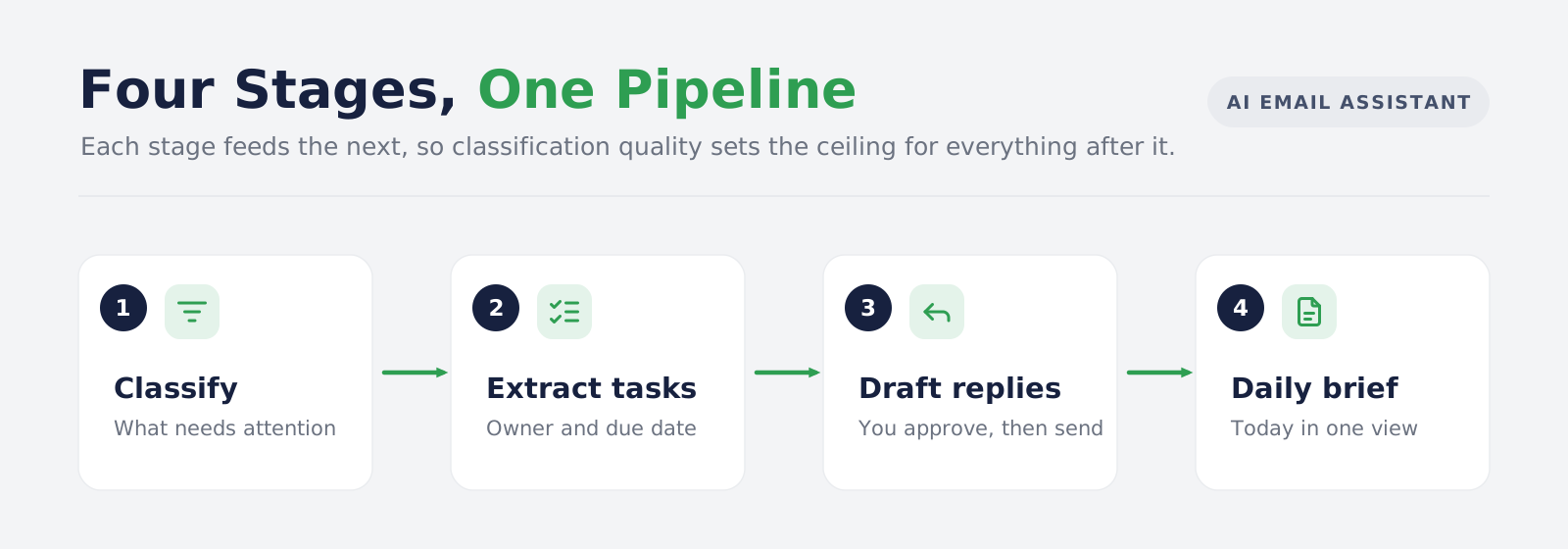
Each capability depends on the one before it. Classification decides what is worth reading closely. Close reading produces extracted tasks. Extracted tasks and calendar context produce the brief. Get the first stage wrong and everything downstream inherits the error.
How AI Email Classification Works: Filters Before the Model
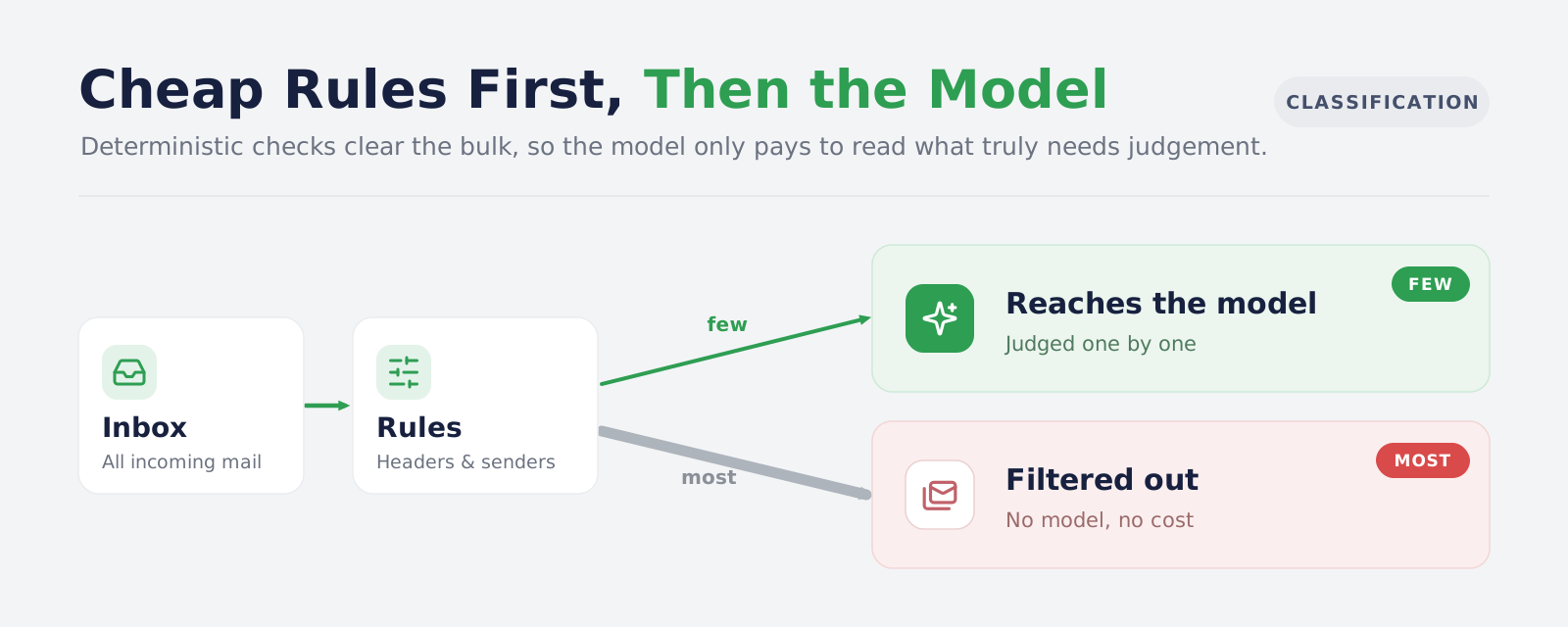
Here is the mistake almost every first build makes. The team connects a mailbox, loops over every message, and sends each one to a language model for classification.
It works in a demo with fifty messages. It fails in production for two reasons.
-
Cost: A real business mailbox receives a large share of bulk mail: newsletters, platform notifications, delivery receipts, calendar invitations that were already answered. Paying a model to read each one is paying to be told what a header already says.
-
Accuracy: Bulk mail floods the classification distribution. When most of what the model sees is routine, its sense of what counts as urgent drifts, and genuinely important messages get flattened into the same bucket as a marketing email.
The fix is to put deterministic code in front of the model.
Deterministic Email Filtering Rules That Run Before AI Classification
Before any message reaches a language model, ordinary code checks a set of signals that email standards already provide. These are rules, not predictions, and they are cheap to evaluate.
-
List and bulk headers: The
List-Idheader identifies mailing list traffic and is defined in RFC 2919. AList-Unsubscribeheader, and particularly the one-click form standardised in RFC 8058, is a strong signal that a message came from a bulk sending system rather than a person. -
Automated response headers: The
Auto-Submittedheader, defined in RFC 3834, exists specifically so that automatic responses can identify themselves and avoid mail loops. Out-of-office replies, bounce notifications and system acknowledgements frequently carry it. -
Sender shape: Addresses in the
no-replyanddonotreplyfamily, and bounce-style return paths, are structurally incapable of being a conversation. -
Provider labels: Where the mail provider has already categorised a message as promotional, social or a forum update, that classification is free information.
-
Resolved calendar invitations: An invitation you have already accepted or declined does not need a model to tell you it is handled.
-
User sender preferences: A rule the user set, such as always ignoring a particular sender or always categorising another one a fixed way.
Everything matched by these rules is labelled and set aside. What remains is the mail that genuinely needs judgement, and that is what the model sees.
The practical effect is that the expensive layer only runs on the fraction of your inbox where it adds value. The same principle applies well beyond email, and it is the same reasoning behind the pre-processing stages in intelligent document processing pipelines.
The division of labour between the two layers comes down to this:
| Rule-based filtering | LLM classification | |
|---|---|---|
| Input | Headers, labels, sender patterns, user preferences | Message content and context |
| Output | A deterministic match | A judgement with a confidence value |
| Cost | Effectively zero | Per message, per token |
| Repeatability | Identical every run | Can vary between runs |
| Fails by | Missing cases nobody anticipated | Being confidently wrong |
| Use it for | Anything a header, label or stated rule can decide | Anything requiring an understanding of meaning |
The test is straightforward. If a decision can be made from structured data that already exists, a rule should make it. A model should only be asked questions that genuinely require reading.
AI Email Classification Categories That Make Business Triage Useful
Once the filters have run, the model classifies what is left. The category set matters more than the model choice, because the categories decide whether the output is actionable or just decorative.
Categories like "important" and "unimportant" are useless. They describe a feeling, not a next step. A category set built for AI email triage describes the kind of attention a message needs:
| Category | What it means in practice |
|---|---|
| Action required | Something needs doing, and it is yours |
| Decision required | Someone is waiting on a choice from you |
| Response required | A reply is expected, no decision involved |
| Meeting related | Scheduling, agendas, or preparation for a booked event |
| Deadline or risk | A date, a dependency or an escalation to watch |
| Reference only | Useful to keep, nothing to do |
| Low priority | Can wait indefinitely without consequence |
| Notification | Automated, informational, no human sender behind it |
These AI email classification categories are the part worth arguing about internally before any code is written, because they encode how your business actually triages work. A support-led organisation needs different categories from a sales-led one, which is why we define them per engagement rather than shipping a fixed set, the same way we scope categories for a customer support AI assistant.
Alongside the category, the classifier returns a priority, a confidence value and a short written rationale explaining its reasoning.
The rationale is not decoration. When a user disagrees with a classification, the rationale is what tells you whether the model misread the content or whether your category definitions are ambiguous. Those are different problems with different fixes.
One distinction worth holding onto: a category is not a status. "Decision required" describes what the message needs. "Dismissed" and "Completed" describe what the user did about it. Conflating the two produces an interface where users cannot tell whether something is unhandled or simply uncategorised.
Why User Sender Rules Must Override the AI Email Classifier
Any AI email assistant will misjudge a sender at some point. The recovery path has to be immediate and permanent.
When a user says that mail from a particular sender should always be ignored, or should always carry a particular category, that instruction has to sit above the model in the processing order, not alongside it. The sender rule is applied in the deterministic stage, so the model never gets a chance to overrule it.
This is a product decision as much as a technical one. A user who corrects the same mistake three times and sees it recur a fourth will stop trusting the system, and a tool that is not trusted is not used.
How an AI Email Assistant Extracts Tasks From Email Threads
Classification tells you a message needs action. Email task extraction tells you what the action is.
This is where most AI email tools stop short, because extraction is harder than classification and the failure mode is worse. A wrong category is a mild annoyance. An invented deadline that someone acts on is a real problem.
What a Useful Email Task Extraction Record Contains
An extracted task that only contains a description is close to worthless. You cannot sort it, schedule it, or assign it. A usable email task extraction record needs four fields:
- Title, a short statement of the work
- Owner, the party responsible, which may be the user or the other side
- Due date, where the thread states or implies one
- Evidence, the specific text in the source message that produced this record
The fourth field is the one that makes the other three trustworthy.
Evidence Quotes: Grounding AI Task Extraction in the Source Email
A language model asked to extract action items from a thread will produce plausible action items whether or not the thread contains any. That is the nature of the tool. The architectural answer is not to ask the model to be more careful. It is to make the claim checkable.
In the systems we build, the model must return a direct quote from the source thread as evidence for every extracted task. That quote is then matched against the actual message text before the task is accepted. If the quote does not appear in the source, the extraction is rejected, regardless of how reasonable the task looked.
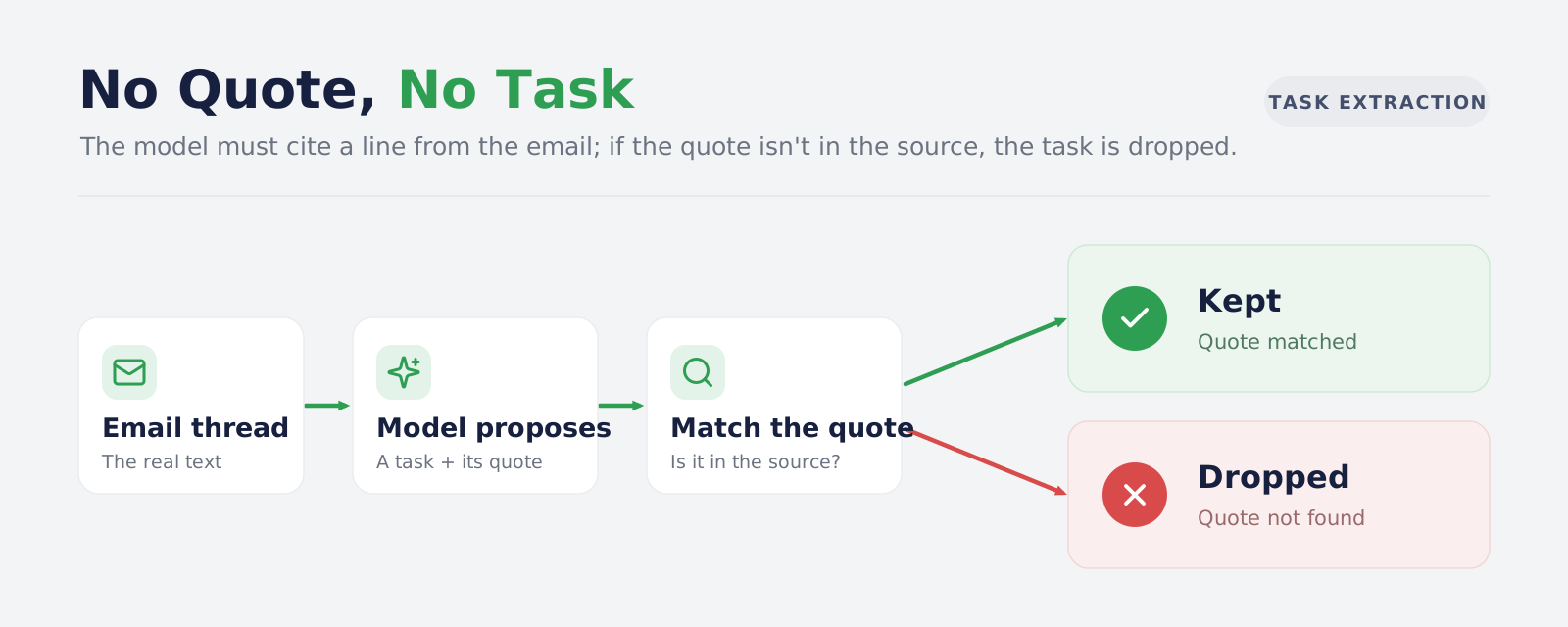
This single constraint removes an entire class of failure. The model can still misinterpret a quote, which is a judgement error a human reviewer can catch. It can no longer manufacture a commitment that was never made, which is the error nobody catches until it causes damage.
It also changes the user experience. Every task links back to the sentence that created it, so verification takes two seconds instead of a hunt through a forty-message thread.
The same grounding principle governs how we build retrieval systems, where every generated answer has to trace back to a retrieved source. If that architecture is relevant to your use case, our guide to retrieval augmented generation covers it in depth.
Confidence Scores in AI Action Item Extraction
Not every extraction is equally certain, and treating them all the same wastes the signal.
A workable design uses confidence bands with three different behaviours:
- High confidence: Surface the task directly in the user's action list.
- Medium confidence: Surface it, but marked for review, so the user confirms before it counts as real work.
- Low confidence: Store it for evaluation without showing it. These records are how you measure whether your extraction quality is improving over time.
The third band is the one teams skip, and it is the one that makes the system improvable. Without stored low-confidence extractions you have no record of what the model nearly caught, which means no way to tell whether a prompt change helped or hurt.
Waiting-For Tracking: Commitments Other People Owe You
Most task tools track what you owe other people. Business email is full of the reverse: a supplier promising a date, a client agreeing to send a document, a colleague saying they will confirm by Friday.
An AI email assistant that extracts an owner for each task can separate these automatically. Tasks owned by the user go to the action list. Tasks owned by a counterparty go to a waiting-for view.
Be precise about what this is. A waiting-for list built from extracted commitments shows things other people said they would do. It is not a detector of every email you sent that nobody answered. Those are different problems, and claiming the first delivers the second is the kind of overstatement that erodes trust in the whole product.
Waiting-for tracking is the capability that tends to justify the project commercially. Chased deliveries, unreturned documents and unconfirmed dates are where revenue leaks in most operations, which is why the same pattern appears in AI sales workflow automation builds.
How an AI Email Assistant Drafts Replies Without Sending Them
AI generated reply drafts are the capability buyers ask about first and the one that needs the firmest boundary.
The rule we apply is simple: the system prepares, the user commits.
What Goes Into an AI Generated Reply Draft
A draft that only answers the last message in a thread is rarely usable. Generating one that a person will actually send requires assembling several inputs:
- Thread context: the conversation, not just the newest message, so the draft does not repeat a point already settled three replies ago
- The extracted tasks on that thread: if the assistant has identified an open commitment, the draft should acknowledge it rather than contradict it
- The user's signature: stored as text or HTML per user, appended rather than invented
- Booking links: where the user has configured one, a draft proposing a meeting can include it instead of suggesting times the calendar cannot honour
- Calendar availability, where relevant: a draft that proposes a time the user is not free creates work rather than saving it
Why AI Generated Reply Drafts Are Saved, Not Sent
Nothing is transmitted until the user submits it through an explicit send control. A draft can be saved and returned to later, so a reply the user wants to think about does not have to be rewritten from scratch.
The same boundary applies to every other consequential operation:
- Moving mail to trash: requires explicit selection of individual messages, a shown count, and a confirmation step
- Creating a calendar event: happens only through a user-approved workflow, after the user has supplied or confirmed the details
- Cancelling a calendar event: same, and never as a side effect of another action
- Accepting meeting context: the user accepts or rejects each proposed thread before it informs a briefing
Suggestion vs Confirmed Action: The Distinction That Makes This Safe
This is not caution for its own sake. It reflects a design distinction that matters in every agent system:
| Suggestion | Confirmed action |
|---|---|
| A proposed classification | A classification the user accepted or corrected |
| An extracted task | A task the user kept, edited or dismissed |
| A generated draft | A reply the user submitted |
| A matched meeting thread | Context the user explicitly accepted |
Everything on the left is reviewable data. Everything on the right required a human. Building this separation into the data model from the start, rather than bolting it on later, is what allows an AI email assistant to be useful without being dangerous. We apply the same boundary across AI agent development engagements generally, because the question of which actions need human confirmation comes up in every one of them.
A second control sits underneath this. Before the application calls any operation on the connected mail or calendar account, it checks the operation name against a server-side allowlist of permitted calls. Reads are permitted broadly. Writes are limited to the specific operations that user-approved workflows need. A bug in the application layer cannot escalate into an operation the allowlist does not contain.
Connecting Gmail and Google Calendar to an AI Email Assistant
The integration layer is where a lot of AI email assistant projects quietly go wrong, usually for reasons that have nothing to do with AI.
Why Mailbox and Calendar Access Are Authorised Separately
Connecting a mailbox does not connect its calendar. These are separate authorisations with separate consent flows, and treating them as one leads to a system that assumes calendar data it does not have.
Keeping them separate has a second benefit. A user who is comfortable granting mail access but not calendar access can still use most of the product. Forcing an all-or-nothing permission grant loses users at the first screen.
Each connected mailbox also needs its own folder configuration, because which folders to read is a user decision, not a default. Some users want sent mail processed. Some want spam excluded entirely. The configuration determines what is fetched, and changing it affects future reads rather than retroactively removing what is already stored. That distinction needs stating plainly in your interface, because users reasonably assume otherwise.
Why an AI Email Assistant Reads From a Stored Copy, Not the Gmail API
The naive design calls the mail provider's API every time a user opens a list view. In production this is slow, hits rate limits, and makes the interface hostage to provider latency.
The workable design normalises messages into your own database on a sync schedule and serves every read from there. Provider calls happen in the background. Writes, such as marking a message read, update local state immediately and propagate asynchronously so the user never waits on a round trip.
This has consequences you have to design for:
- Initial backfill is bounded: You load a defined window of history, not the entire mailbox. An unbounded first sync on a large mailbox is both slow and expensive.
- Subsequent sync uses paging and cursors: The Gmail API returns results in pages with a continuation token, as its list messages documentation describes, and your sync has to track position per folder.
If you are connecting AI systems to other business platforms, the same architectural questions apply, and our work on MCP server development covers the protocol-level version of this problem.
How an AI Email Assistant Turns Classified Mail Into a Daily Brief
The final stage combines everything above into one view.
The assembly itself is ordinary application logic, not AI. The sequence runs in this order:
- Query stored records: open tasks and their due dates, waiting-for items, flagged deadlines and risks, today's calendar events, and the classifications attached to recent mail
- Filter to the date in question: a brief for today contains what is due, overdue or scheduled today, not everything outstanding
- Assemble the context package: structured records only, each one already linked to its source message
- Ask the model to write from that package: not from the mailbox, and not from anything it was not given
- Store the generated brief with its date: so it can be reopened, compared against later days, or printed
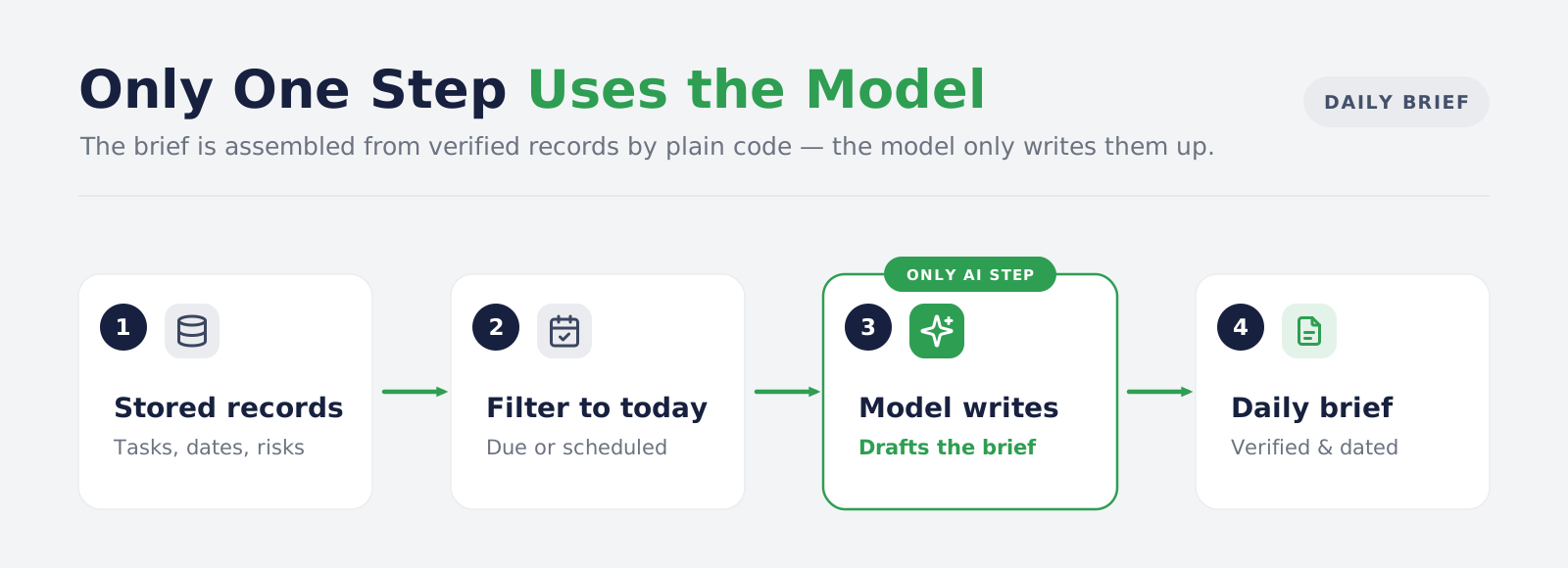
Only step four involves a language model. Steps one to three and five are database queries and application code.
None of this is a reference architecture written from documentation. We have built it. The pipeline described in this article, from the deterministic pre-filter through to evidence-grounded extraction, the approval boundary and the dated daily brief, was designed and delivered by our team for an executive assistant product running over connected Gmail and Google Calendar accounts. That build is written up in our AI email assistant for executives case study, including the architecture decisions we made and the ones we reversed.
That ordering matters. A model asked to summarise an inbox will produce something readable and partly invented. A model asked to summarise a prepared set of verified records produces something readable and checkable.
The quality ceiling of the brief is therefore set by the data underneath it, not by the model. If classification is noisy or extraction is thin, a better writing model produces a more eloquent description of incomplete information. This is the same constraint that governs an internal knowledge assistant, where answer quality is bounded by the underlying content rather than by the model doing the writing.
Because corrections are captured when a user reclassifies a message, edits a priority or dismisses an extracted task, you accumulate a record of where the system and the user disagree. Treat that honestly: storing corrections gives you an evaluation dataset and a feedback signal. It does not mean the model retrains itself. Those are separate pieces of work, and we cover the distinction in our article on chatbot feedback loops and learning systems.
What an AI Email Assistant Cannot Do Reliably
Any honest description of this technology has to include its limits.
-
Classification is not guaranteed correct: It is a judgement with a confidence value attached. Design the interface so a wrong category is visible and one click from being fixed.
-
Automated sender detection is incomplete: Header-based rules catch most bulk mail. Senders who do not follow email conventions will slip through, and legitimate senders who use bulk infrastructure will occasionally be caught.
-
Extraction is a proposal, not a commitment: Evidence grounding stops invention. It does not stop misinterpretation of a genuine quote.
-
Waiting-for is not unanswered-email detection: It tracks commitments the system extracted, nothing more.
-
Meeting context matching can be wrong: Candidate threads need user review before they become briefing context.
-
Deleted mail follows the provider's rules: Moving a message to trash places it in the provider's trash. Recovery windows and permanent deletion timing are governed by the provider, not your application.
Stating these clearly is not a weakness in the sales conversation. Buyers who have been through one failed AI project are specifically looking for a vendor who knows where the edges are.
How to Evaluate an AI Email Assistant Before You Build One
If you are scoping a project in this space, these are the questions that separate a demo from a system.
-
Does anything deterministic run before the model? If every message goes to a language model, your running cost scales with your inbox volume rather than with the useful work.
-
Are extracted tasks grounded in source text? Ask to see the evidence trail. If there is not one, you are being shown a system that can invent commitments.
-
What happens at low confidence? A system with one confidence threshold and no review band will either flood users with noise or silently discard real work.
-
Which actions can it take without a human? Get a specific list. "It asks before doing anything important" is not a specification.
-
What is the permission boundary at the integration layer? Application logic is not a security control. Ask whether there is an allowlist of permitted operations enforced below the application.
-
Where is mail stored, and what leaves the system? Under GDPR Article 5, personal data must be adequate, relevant and limited to what is necessary for the purpose. An assistant that sends entire message bodies to a model for a task that needs only headers fails that test.
-
What happens on disconnect? Disconnecting a mailbox should remove its stored messages and derived data. Confirm what is removed and what is retained.
Conclusion
An AI email assistant is not one model doing clever things with your inbox. It is a pipeline, and the quality of the result is decided by the parts of that pipeline that are not AI at all.
Deterministic filters decide what the model ever sees, which controls both cost and accuracy. A category set built around required attention decides whether the output is actionable. Evidence grounding decides whether extracted tasks can be trusted. An explicit approval boundary decides whether the system is safe to connect to a live mailbox. The model writes well, which matters, but it matters last.
If you are evaluating this for your business, the useful question is not which model a vendor uses. It is what runs before the model, what gets checked after it, and which actions require a human in between.
Bitontree builds these systems end to end, from the deterministic filter layer through to the approval boundary and the permission controls underneath it. We have made the architecture decisions described in this article on real mailboxes, and we will tell you which of them your use case actually needs rather than selling you all of them.
I am the founder and CEO of Bitontree, where I lead embedded AI engineering teams that build and run production AI: agents, RAG and knowledge systems, document AI, and workflow automation for healthcare, logistics, legal, and SaaS companies. I write about what it actually takes to ship AI that survives contact with production.
Frequently Asked Questions
What is an AI email assistant?
An AI email assistant is a system that connects to your existing mailbox and applies classification, task extraction and draft generation to the mail you already receive. It does not replace your email provider. It adds a layer of judgement on top of it.
Will an AI email assistant send emails on my behalf?
In a properly designed system, no. Drafts are generated and saved for you to edit. Nothing is sent until you submit it through an explicit send action. Any product that sends autonomously by default should be evaluated very carefully before deployment.
Can an AI email assistant work with multiple mailboxes?
Yes. Each mailbox is authorised separately, with its own folder settings and its own optional calendar connection, and the interface can present a combined view across all of them.
Does an AI email assistant read all of my email?
It reads the folders you enable. A well-built system lets you choose which folders are processed, lets you exclude senders entirely, and limits what content is sent to a model to what each task actually requires.
How long does it take to build a custom AI email assistant?
The classification and extraction pipeline is usually not the long pole. Integration, authorisation handling, sync reliability and the review interface are. Scope accordingly, and expect the first production release to follow a discovery phase rather than to start on day one.
Do we need our own engineering team to run one?
Not to run it, but you will want someone who owns category definitions and reviews correction data periodically. If you do not have that capacity in house, teams often engage AI and ML developers on a sprint basis for the build and keep a lighter maintenance arrangement afterwards.
Ready to Build an AI Email Assistant for Your Business?
We design and build AI email assistants that classify business mail, extract commitments with their source evidence, and prepare replies your team approves before sending. Bring us your mail volume, your systems and your edge cases, and we will tell you honestly what is worth automating.