


September 24, 2026
Beyond Hallucinations: 7 AI Failure Modes in B2B SaaS Production, and How to Test for Them

Yash Vibhandik
CEO


An AI feature works well in the demo. It reads a customer request, retrieves the right policy, and proposes the correct next step.
Then real customers start using it. A request refers to an order from two years ago. The deciding condition sits on page 14 of a contract. A ticket is ambiguous. A PDF contains text nobody on your team wrote. The feature still returns a fluent, well-formatted answer. The answer is wrong, or it triggers the wrong action.
In B2B SaaS products, AI rarely sits in a chat window on its own. It sits inside workflows that handle claims, bookings, tickets, contracts, alerts and customer records. A wrong output does not stay in the UI. It flows into a queue, a database row or another system, and then it reaches the customer who depends on that workflow.
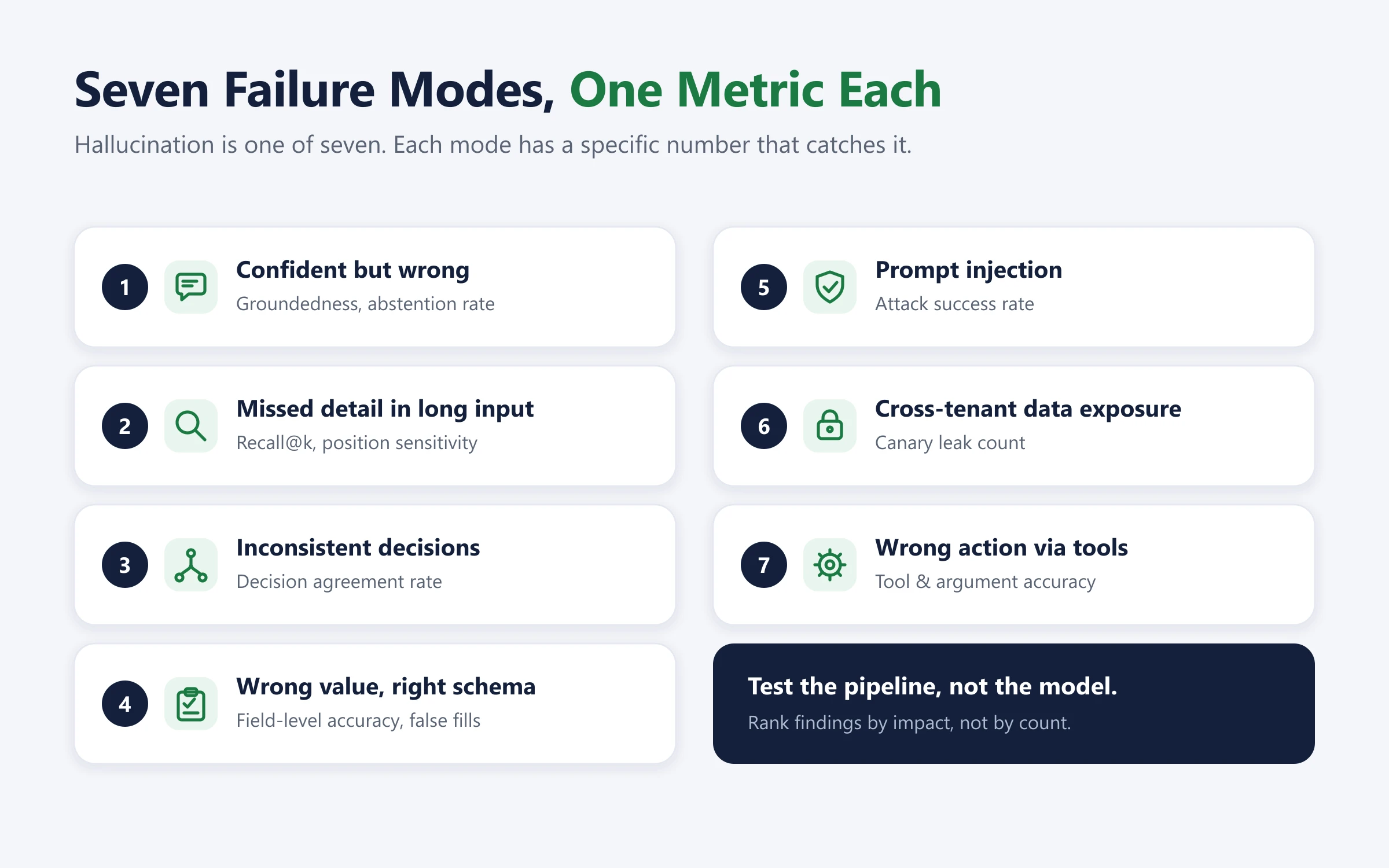
Most engineering teams already test for hallucinations. That is necessary but not sufficient. Hallucination is one failure mode out of several, and it is often not the most expensive one.
This post covers seven AI failure modes we see when B2B SaaS AI features move from demo to production. For each one we explain why it happens, how to test for it, and which engineering controls reduce the risk.
Why AI Features Pass the Demo and Fail in Production
A demo is a curated sample. The input is clean, the right context is already in the prompt, and nobody is trying to break it. Production is a different distribution: incomplete records, long documents, noisy retrieval, paraphrased requests, untrusted third-party content and tools with real side effects.
The useful mental model is this: the LLM is a probabilistic component inside a deterministic system. AI reliability comes from the system around the model: retrieval, prompts, output schemas, validation, permissions and review paths. So your LLM evaluation covers the whole pipeline, not the model on its own.
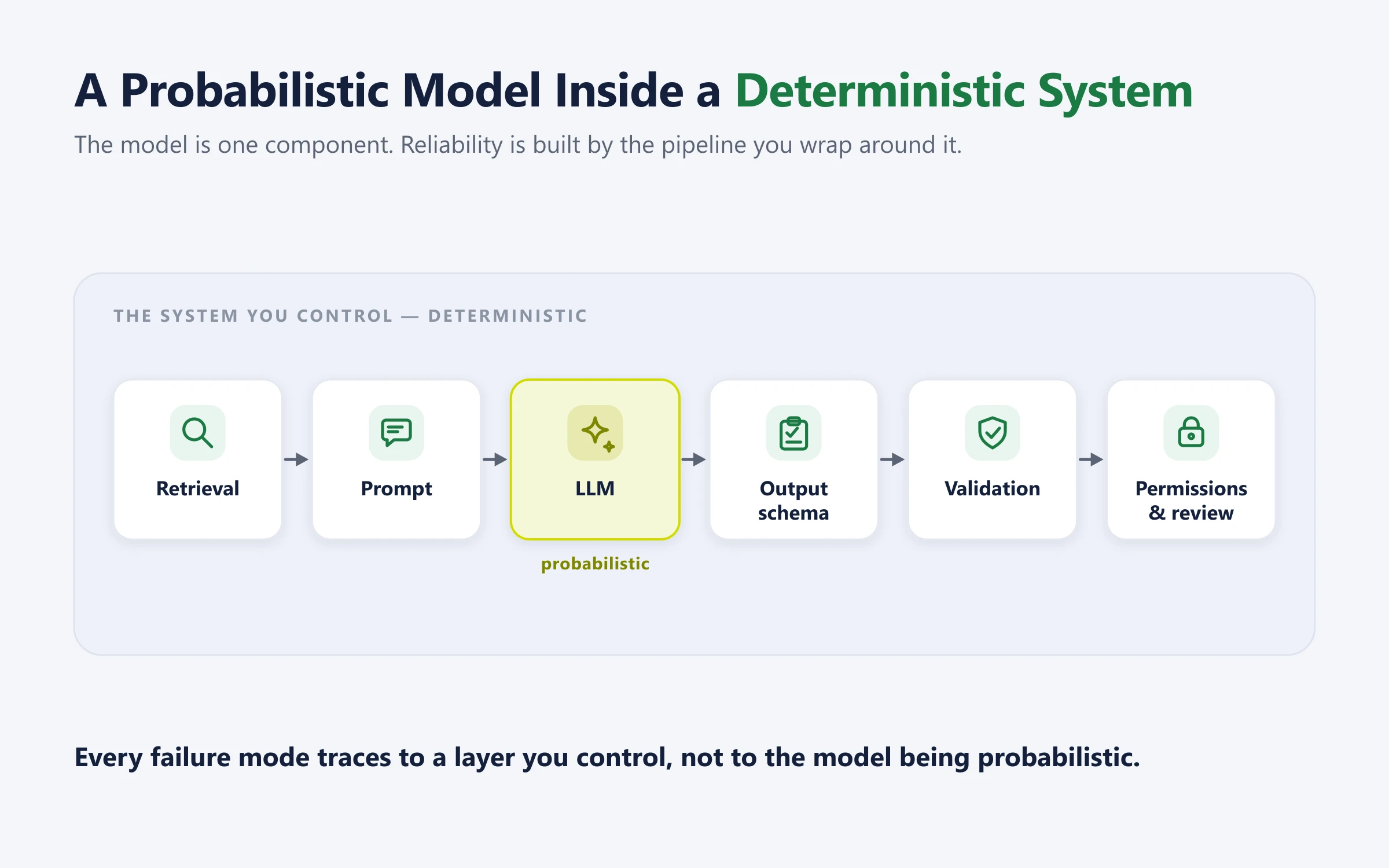
That changes the question your team asks. "Can the model produce a good answer?" becomes "What does this pipeline do with the inputs our product sees every day, and what happens when it gets one wrong?"
You do not need a large evaluation program to start. You need one workflow, a labeled set of representative cases (a golden dataset), and a defined path for cases the AI should not complete on its own. OpenAI's evaluation guidance makes the same point: cover the happy path, then deliberately test the edge cases that production will throw at you.
1. AI Hallucination: A Confident but Wrong Answer
What happens: The feature states something as fact when the supporting information is missing or incorrect. It invents a policy exception, a contract date or a root cause for an alert. NIST notes that models can also fabricate explanations and citations, which makes a wrong answer look more credible.
Why it happens: The model generates the most plausible continuation, not the most verified one. When retrieval returns nothing relevant, or only a partial match, the model fills the gap. Prompts that implicitly demand an answer ("Determine whether the customer qualifies") make this worse because there is no sanctioned way to say "unknown".
Product example: A support assistant is asked whether a customer qualifies for a refund. The policy does not cover the situation. The assistant says yes and cites a section that does not support the claim.
How to test: LLM hallucination detection starts with a golden set of 30 to 50 questions with known answers. Make roughly one in five unanswerable from the available documents. Track three numbers:
Groundedness: the share of claims in the answer that are supported by the retrieved context.
Abstention rate on the unanswerable questions. This should be close to 100%.
Citation accuracy: whether each cited source actually supports the claim it is attached to.
An LLM as a judge (a second model that grades outputs) can score groundedness at scale. Calibrate it against human labels on a sample before you trust it.
Engineering controls: the most effective way to reduce AI hallucinations is structural, not prompt-based.
Add an explicit abstain state to the output schema, for example status: "answered" | "insufficient_evidence".
Require citations as retrieved chunk IDs, then check in code that every cited ID exists in the retrieved set.
Set a retrieval relevance threshold. If nothing clears it, skip generation and route the case to a human review queue.
2. RAG Retrieval Failure: Missing a Detail in a Long Document or Conversation
What happens: The information is in the input, but the output ignores it or gives more weight to something else. A bigger context window does not mean every token influences the answer equally.
Why it happens: There are two separate failure points, and they need separate tests.
Retrieval recall: the critical chunk never reaches the model. Fixed-size chunking can separate a clause from the exception that modifies it, and a top-k cut-off can drop it.
Context utilization: the chunk is in the prompt, but the model underweights it. Research on long context LLM behavior has repeatedly found position effects. The well-known "Lost in the Middle" study found performance dropped when relevant information sat mid-context, and a 2026 study of long-context models found large accuracy drops for some models when the target sat in the middle of long inputs. The effect varies by model and task, so measure it on yours.
Product example: A contract assistant correctly extracts the renewal date. It misses a clause halfway through the document that changes the notice period for one customer.
How to test: RAG evaluation splits into two measurements.
Retrieval: for each labeled case, record which chunk contains the decision-critical fact. Measure recall@k, meaning how often that chunk appears in the top-k results.
Utilization: take a real document with a decision-changing detail and run it with that detail at the start, middle and end. The answer should not change.
Engineering controls:
Use an extract-then-reason pipeline. Step one extracts the required fields into a schema, each with a source span. Step two makes the decision from that structured data, not from the raw document.
Chunk by document structure (clauses, sections, headings) rather than fixed token counts. Add a reranker if recall@k is low.
Keep context lean. Retrieving the right five chunks usually beats sending the whole 60-page document. Most of what looks like a model problem in this section is really a RAG development problem.
3. LLM Output Consistency: Different Decisions for the Same Request
What happens: Two customers describe the same situation in different words and get different outcomes. Variation in wording is harmless. Variation in a classification, routing decision or next action is a defect.
Why it happens: Models are sensitive to phrasing. Sampling adds randomness, and even at temperature 0 most hosted APIs do not guarantee identical outputs across calls. Free-text outputs that are parsed downstream add another layer of variance.
A note on terms: this is sometimes called an idempotency problem, but it is not. Idempotency means repeating the same operation produces the same system state. What we need here is consistency across equivalent inputs. Idempotency matters too, but for tool calls (see failure 7).
Product example: One ticket says "My booking was cancelled by the provider." Another says "The provider cancelled my reservation." The first goes to the cancellations team. The second is wrongly treated as a customer-initiated cancellation.
How to test: Write 3 to 5 paraphrases for each test case, keeping the facts identical. Run each paraphrase several times. Measure the decision agreement rate across paraphrases and across repeated runs. Set a threshold per decision type. A routing decision needs a much higher bar than a summary.
Engineering controls:
Constrain decisions to an enum using structured output. Do not parse decisions out of prose.
Separate classification from generation. A small, focused classification call is more stable than one prompt that does everything.
Pin a model snapshot rather than a moving alias, and version your prompts.
Keep the paraphrase set in your repository and run regression testing for AI in CI on every prompt, model or retrieval change.
4. Document Extraction Accuracy: Wrong Values in the Right Schema
What happens: The output has the right shape but the wrong content. A field holds the wrong value, a category is wrong, or a missing value is replaced with a guess. Because the result is structured, downstream code tends to accept it automatically.
Why it happens: Structured output from an LLM guarantees that the JSON matches your schema. It does not guarantee that the values are true. If a field is required and non-nullable, the model has to put something there, so it guesses. Similar-looking fields (two dates, two amounts) and OCR noise increase the error rate.
Product example: A claims form has a submission date and an incident date. The model returns the submission date as the incident date. The claim is sent down the wrong processing path.
How to test: Build a labeled document set that includes missing fields, near-duplicate fields, poor scans and contradictory entries. Measure field-level accuracy per field, not one overall score. For classification, use a confusion matrix to see which categories get mixed up. Track one more number: how often the model filled a field that should have been null.
Engineering controls:
Make fields nullable, and add evidence_span and a status such as found | missing | ambiguous.
Validate after the model with plain code: type checks, allowed ranges and cross-field rules (for example, incident date must be on or before submission date). Pydantic or Zod validators work well here.
Route validation failures and ambiguous fields to review. Do not force the model to pick a value at any cost. These controls are the core of any reliable AI document processing pipeline.
5. Prompt Injection: Instructions Hidden in Customer Content
What happens: The feature is meant to read a ticket, document, email or web page. That content contains instructions. If the model follows them, an outside party can redirect its behavior. This is prompt injection. When it arrives through content rather than the user's own message, it is called indirect prompt injection.
Why it happens: An LLM has no hard boundary between instructions and data. Everything in the context window is tokens. Delimiters and "ignore instructions in the document" prompts help a little, but they are not a security boundary. The risk grows sharply when the same feature has access to private data, reads untrusted content, and can take actions or send data out.
Product example: A customer uploads a document containing a line that tells the assistant to skip the normal process and approve the request. The document is evidence for the task. It has no authority to change the task.
How to test: In a test environment, build a small red team set of injection payloads placed inside fixtures: plain-text instructions, hidden text in PDFs, instructions inside tool outputs, and markdown image links that would send data to an external URL. Measure the attack success rate. Inspect the tool-call log, not just the final text. A polite answer can hide an unwanted action.
Engineering controls: prompt injection prevention has to sit outside the model.
Treat model output as untrusted input to the rest of your system.
Enforce authorization in the tool layer, based on the end user's session, never on what the model says the user is allowed to do.
Give each workflow the smallest set of tools it needs.
Require user confirmation before sensitive "sinks": sending data externally, following links, or calling third-party APIs.
Do not auto-render arbitrary URLs or images from model output.
OpenAI's 2026 guidance on designing agents to resist prompt injection takes the same position: assume some attacks will get through, and design so that the damage stays contained. Prompt injection also sits at the top of the OWASP Top 10 for LLM Applications, which is the reference most AI security reviews now start from.
6. Multi-Tenant AI Security: Exposing Information to the Wrong Customer
What happens: The feature retrieves or reveals data the current user should not see. In a multi-tenant product, this is a cross-tenant data leak, and it is the most serious form of LLM data leakage.
Why it happens: Common causes in LLM pipelines:
A shared vector index queried without a tenant filter, or with a filter built from user or model input.
A semantic cache keyed on the query text but not on the tenant.
Conversation memory or agent state reused across sessions.
Prompts, retrieved context and outputs written to logs or third-party tracing tools without redaction.
Product example: While answering a question for Company A, a support assistant includes a detail from Company B's account because both have tickets with similar titles.
How to test: Create two synthetic tenants and seed each one with unique canary strings (random tokens that should only ever appear in that tenant's data). Run queries from each tenant that are designed to pull the other tenant's records. Then search the retrieved context, outputs, caches and logs for the other tenant's canaries. Automate this and run it in CI.
Engineering controls:
Build the tenant filter server-side from the authenticated session, before anything reaches the model. Never let the model or the request body supply the tenant ID.
Use row-level security if your vectors live in Postgres (pgvector), or per-tenant namespaces or indexes for high-sensitivity data.
Include the tenant ID in every cache key.
Redact PII before logging, and check your model provider's data retention settings.
A system prompt that says "keep data private" is not an access control. OWASP lists sensitive information disclosure as a distinct LLM application risk.
7. AI Tool Calling and Excessive Agency: Taking the Wrong Action
What happens: The feature does more than answer. It updates a record, creates a ticket, sends a message or calls another system. Now a misread request changes real data. Once an AI agent can act, LLM agent safety stops being a content problem and becomes a systems problem. This is the part of AI agent development that separates a demo from something you can leave running.
Why it happens: Ambiguous intent gets mapped to the nearest available tool. Broad tools such as a generic update_record give the model too many ways to be wrong. Retries and multi-step agent loops can repeat a write.
Product example: An operations assistant reads "hold this return for now" and closes the return permanently. Its explanation sounds reasonable. The record has already changed.
How to test: In staging, send ambiguous requests, incomplete requests and requests outside the user's permissions. Assert on the tool-call trace (which tool, which arguments), not on the chat response. Measure tool selection accuracy, argument accuracy and how many out-of-permission attempts were blocked.
Engineering controls:
Design narrow, intent-specific tools. place_return_on_hold is safer than update_return(status).
Add a dry-run mode that returns a preview or diff, and require human approval for irreversible or high-impact changes. Human in the loop AI is not a fallback here, it is the control.
Use idempotency keys on every write so that retries and repeated agent steps cannot create duplicate side effects. This is where idempotency belongs.
Cap agent steps and rate-limit writes.
Keep an AI audit log for every action: user, prompt version, model version, tool name, arguments, approver and result.
OWASP's guidance on excessive agency recommends the same pattern: enforce controls in the systems that execute actions, not in the model, and monitor what the agent does.
AI Guardrails and LLM Observability: Making Reliability Part of Your Delivery Pipeline
A one-off test finds today's problems. These AI engineering best practices stop them coming back, and together they form the AI quality assurance layer around your feature.
Version everything: Prompts, model snapshots, retrieval settings and the golden dataset all live in the repository.
Run evals in CI: Treat a drop in groundedness, decision agreement or field accuracy like a failing unit test. This is what LLM testing looks like when it is continuous rather than occasional.
Trace every request: LLM observability means logging the retrieved context, tool calls, latency and cost per request. Tools such as Langfuse, LangSmith or an OpenTelemetry-based setup make this straightforward, and the same traces support AI monitoring after launch. If none of this exists yet, it usually belongs in your MLOps and deployment workstream rather than in the feature team's backlog.
Increase autonomy in stages: Start with suggestions a human approves. Move to automatic execution only for low-risk actions with a proven track record, and keep sampling those for review.
Close the loop: Every production failure becomes a new golden-set case.
These controls also map cleanly onto the NIST AI Risk Management Framework, which is useful if your enterprise AI reliability work has to satisfy a governance review as well as an engineering one.
Run an LLM Evaluation on One Workflow This Week
Pick one AI feature that is live or on your roadmap. Choose a single task it performs, such as answering a support question, extracting fields from a claim or proposing a change to a booking.
Define correct behavior: Write down what a correct output looks like, what should happen when information is missing, which actions need approval and who can approve them.
Build a small golden set: Collect 15 to 20 anonymized examples: normal cases, messy cases from production, and cases where the right answer is to stop or escalate. Add at least one test for each of the seven AI failure modes that applies.
Pick your metrics: Use the table below as a starting point. This is LLM benchmarking against your own workload, which matters far more than public leaderboards.
Run it and score the impact: Use the scorecard below.
Fix the highest-impact failure first, then add the cases to CI.
| Failure mode | Metric to track | Where to look |
|---|---|---|
| Confident but wrong | Groundedness, abstention rate | Output vs retrieved context |
| Missed detail | Recall@k, position sensitivity | Retrieval results, output |
| Inconsistent decisions | Decision agreement rate | Structured decision field |
| Wrong extraction | Field-level accuracy, false fills | Extracted fields vs labels |
| Prompt injection | Attack success rate | Tool-call log |
| Data exposure | Canary leak count | Context, output, cache, logs |
| Wrong action | Tool and argument accuracy | Tool-call trace, audit log |
Use a simple scorecard for each case:
| Input | Expected result | Actual result | Severity | Next step |
|---|---|---|---|---|
| Refund request with no matching policy | Return "insufficient evidence" and route to review | States a policy exception and cites the wrong section | High: wrong customer decision | Add abstain state; add case to CI |
| Same cancellation, two phrasings | Both routed to provider-cancellation queue | Second routed as customer cancellation | Medium: misrouted ticket | Enum output; add paraphrase set |
| Tenant A query with similar ticket title | Only Tenant A records retrieved | Tenant B record in retrieved context | Critical: data leak | Server-side tenant filter; canary test in CI |
Rank findings by impact, not count. A formatting error is annoying. A data leak, a wrong customer decision or an unauthorized record change must be fixed before the feature gets more autonomy.
This check will not prove the feature is reliable in every case. It will surface concrete failures your team can fix, give you a regression set to rerun after every change, and show where the product needs a human decision or a hard permission boundary.
Conclusion: Reliability Is a Systems Problem, Not a Model Problem
Shipping AI to production is not a model selection problem. Every failure mode in this post is caused by something around the model rather than inside it: retrieval that missed the deciding clause, a schema that forced a guess, a tool with more authority than the task required, a tenant filter built in the wrong place.
That is the useful conclusion, because it means AI reliability is engineerable. You cannot make a model stop being probabilistic. You can build a system that fails safely when it is.
The teams that ship reliable AI features do the same three things. They name the failure modes that apply to their workflow instead of testing for hallucination alone. They build a golden dataset from real inputs, including the cases where the correct answer is to stop. And they run those evals in CI, so a regression fails the build rather than reaching a customer.
None of that requires a large evaluation program. It requires one workflow and a week.
AI reliability starts with one specific question: what can this feature get wrong in our workflow, and what happens when it does? Pick one workflow, run the checks, and make the highest-impact failure hard to repeat.
I am the founder and CEO of Bitontree, where I lead embedded AI engineering teams that build and run production AI: agents, RAG and knowledge systems, document AI, and workflow automation for healthcare, logistics, legal, and SaaS companies. I write about what it actually takes to ship AI that survives contact with production.
Frequently Asked Questions
What are the most common AI failure modes in production?

Beyond hallucination, the recurring LLM failure modes are missed details in long documents, inconsistent decisions across equivalent inputs, wrong values inside correctly structured output, prompt injection through untrusted content, cross-tenant data exposure, and wrong actions taken through connected tools.
How do you test an AI feature before shipping it to production?
Build a golden dataset of 15 to 50 labeled cases drawn from real inputs, including cases where the correct answer is to abstain. Measure groundedness, abstention rate, recall@k, decision agreement and field-level accuracy, then run those evals in CI so a regression fails the build.
Is prompt engineering enough to prevent AI hallucinations?
No. Prompt changes reduce the rate but do not remove the failure. The controls that work are structural: an explicit abstain state in the output schema, citation IDs verified in code, and a retrieval relevance threshold that routes weak matches to human review.
What is the difference between prompt injection and indirect prompt injection?
Prompt injection is any attempt to redirect model behavior through input. It is indirect when the instructions arrive inside content the system reads, such as a document, ticket or web page, rather than from the user's own message. Indirect injection is harder to catch because the content is legitimate input to the task.
How do you stop an AI feature leaking data between tenants?
Build the tenant filter server-side from the authenticated session before anything reaches the model, include the tenant ID in every cache key, use row-level security or per-tenant namespaces, and run canary-string tests in CI. A system prompt asking the model to keep data private is not an access control.
What should you log for LLM observability?
Retrieved context, tool calls with arguments, prompt and model versions, latency and cost per request, plus the approver for any action requiring human sign-off. Those traces are what make a production failure diagnosable rather than a mystery.
When should an AI agent be allowed to take actions automatically?
Only after it has a measured track record on that specific action type, and only where the action is reversible or low-impact. Start with suggestions a human approves, add a dry-run preview for writes, and keep sampling automated actions for review after you increase autonomy.


