August 14, 2026
Is DeepSeek Harness Production Ready? Everything Is a Plugin, and What That Costs You

Yash Vibhandik
CEO


DeepSeek released something in August 2026 that is easy to misread. DeepSeek Harness looks like a coding agent, installs like a coding agent, and behaves like one on first contact. It is not one. It is the chassis you build a coding agent out of.
Most of the coverage stops there, at the architecture. I want to go one step further, because the architecture is not the interesting question for anyone with a system in production. The interesting question is what it costs to depend on this thing today.
The short answer is that DeepSeek has not shipped a stable release. Every build published to npm so far is a release candidate. That single fact should shape how you use it, and it changes the recommendation more than any amount of plugin elegance.
This guide covers what DeepSeek Harness is, whether it belongs near production, how the Cordis kernel works, what the four modes are for, how to install it without hitting the two traps that catch most people, and who should skip it entirely.
Key Takeaways
- DeepSeek Harness (dsh) is an open-source, MIT-licensed agent runtime from DeepSeek AI, released as a developer preview on 13 August 2026.
- There is no stable release. Every published version is a
0.1.0-rc.xrelease candidate, and the repository warns in capitals that there will be compatibility-breaking changes. - Its organizing principle is that every capability is a plugin. Models, tools, skills, sessions, sandboxes, storage, the agent loop, the scheduler and even the interface can all be swapped.
- It is model-agnostic. DeepSeek's own models work out of the box, but so do other providers and self-hosted endpoints.
- Cordis, the kernel underneath, is not new and not DeepSeek's. It is an independent project with four years of production history behind it. That is the most reassuring fact in the whole stack, and almost nobody mentions it.
- It ships four modes: Standard, Code, Minimal and Creator. They are not difficulty levels. They are different trust and capability surfaces.
- The append-only session log is the most operationally valuable feature, because it makes an agent run auditable rather than mysterious.
What Is DeepSeek Harness?
DeepSeek Harness, package name dsh, is an open-source agent harness published by the deepseek-ai GitHub organization under the MIT license. DeepSeek open-sourced it on 13 August 2026, the same day the V4-Pro 0813 build landed on the DeepSeek API.
The framework's stated principle is short: model plus harness equals agent. The model supplies the reasoning. The harness supplies everything else, and "everything else" turns out to be most of what determines whether an agent works.
It runs locally. There is a browser-based Web UI, a headless CLI for scripting, and a Python SDK. There is no hosted service and no official desktop application, because the Web UI is the desktop application. Every "DeepSeek Harness Desktop" project you will find is an unofficial community wrapper around the same local server.
Adoption has been fast even by AI-tooling standards. The repository stands at roughly 182,000 GitHub stars and 19,900 forks. (Checked 24 August 2026. This number moves weekly and is not evidence of anything except attention.)
What matters more than the star count is what has not happened yet: a stable release. The latest tag on npm still points at a release candidate. Read that as the project telling you something honest about its own maturity.
What Is an Agent Harness, and Why Does It Matter?
If you have only ever used a finished AI coding assistant, the word "harness" needs unpacking, because it names the layer most people never think about.
A harness is the runtime that sits between a language model and your machine. It decides:
- How the model sees your repository, and how much of it
- Which tools the model can reach for, and in what form
- How work gets planned and broken into steps
- What happens when a command fails
- What is remembered between turns, and what is discarded
- What the model is permitted to do without asking
The model does none of that. The model produces tokens. Everything above is the harness's job.
Here is why this matters more than it sounds. Two teams running the identical model on the identical task can get materially different results if their harness configuration differs. Tool access, permission scope, how context is assembled, how the agent loop terminates: all of it changes the path the model takes.
That has a direct consequence for anyone comparing agent performance. Recording only the model name is insufficient. The harness configuration is part of the result. Any benchmark that omits it is telling you less than it appears to.
This is the same lesson I keep running into when we put AI agents into production for clients. The model is rarely the variable that decides whether a deployment works.
Is DeepSeek Harness Production Ready?
No, and DeepSeek says so plainly. The README carries the warning in capital letters. But "not production ready" is a lazy verdict on its own, so here is what the preview status actually costs you, item by item.
There is no stable version to pin to
Every release published to npm is a release candidate in the 0.1.0-rc.x line, shipping at roughly weekly cadence. You are not choosing between a stable channel and a bleeding-edge channel. There is only one channel and it is bleeding-edge.
Pin anyway. A bare npx @deepseek-ai/dsh web resolves to whatever latest points at today, which is not what it pointed at last week:
npm install -g @deepseek-ai/dsh@0.1.0-rc.7
Then check what you actually got, every time, and keep your configuration in version control alongside it.
The version resolution behaves differently depending on your Node
This is the trap that produces the most confusing bug reports, and it is worth understanding before it costs you a day.
The entire Node 22 line ships an npm older than 11.2.0. On Node 22, a bare npx @deepseek-ai/dsh web will happily keep running the release candidate it cached weeks ago. The same command on Node 24 re-resolves on every run. One command, two behaviors, and neither one warns you.
If you are debugging a failure that a colleague cannot reproduce, check both Node versions before you check anything else. On a project shipping weekly release candidates, this is a reproducibility problem, not a nuisance.
Architecture is not reliability
A well-composed harness does not make your agent dependable. Reliability comes from measuring it against your own repositories, your own tasks and your own models. That work is yours regardless of how good the framework is, and no plugin system does it for you.
Local does not mean private
The default configuration is not automatically airtight. If you attach a model API, a web search plugin or an MCP server, review what each one has access to: model routes, data provenance, workspace scope, and the shell command policy. Protect session logs the same way you protect anything else containing customer data, because everything the model saw is in them by design.
Task completion is not task correctness
A run that finishes, and finishes fast, has proved that it finished. Whether the output is right, whether the tool calls were sensible, whether latency and cost were acceptable, and whether a rollback is possible are separate questions. Every one of them needs its own check.
Creator mode deserves special care
Model-written code executing against a live runtime is a capability with obvious upside and obvious risk. It does not belong anywhere near a shared or production environment. More on this below.
The read I would give a client
Use DSH now to learn, to prototype, and to understand what your agent runtime is actually doing. It is the best available window into that layer and the transparency alone is worth the setup cost.
Do not put it under a customer-facing workflow this quarter. For that you want pinned dependencies on a stable release that does not yet exist, an evaluation harness measuring your accuracy over time, defined guardrails on irreversible actions, and someone on call. That is not a criticism of DSH. It is what moving any AI system from pilot to production requires, and a framework in preview makes it harder, not easier.
How DeepSeek Harness Works: The Cordis Plugin Kernel
Underneath DSH sits Cordis, described as a meta-framework for spatiotemporal composability. The name is heavier than the idea.
The idea is that a system should let you add and remove components at runtime without breaking everything else, and those components should be able to declare what they depend on and discover each other. Cordis handles mounting and unmounting plugins, resolving their dependencies, and providing the shared services and event stream through which they talk. Its design is set out in a paper by Shi, Zhang and Cui of DeepSeek-AI and Peking University, which formalizes revertible effects, where every context transformation carries an inverse the runtime tracks, and reactive coeffects, where each change of context notifies components against their declared specification.
Here is the part most coverage misses, and it is the most reassuring fact in this entire post.
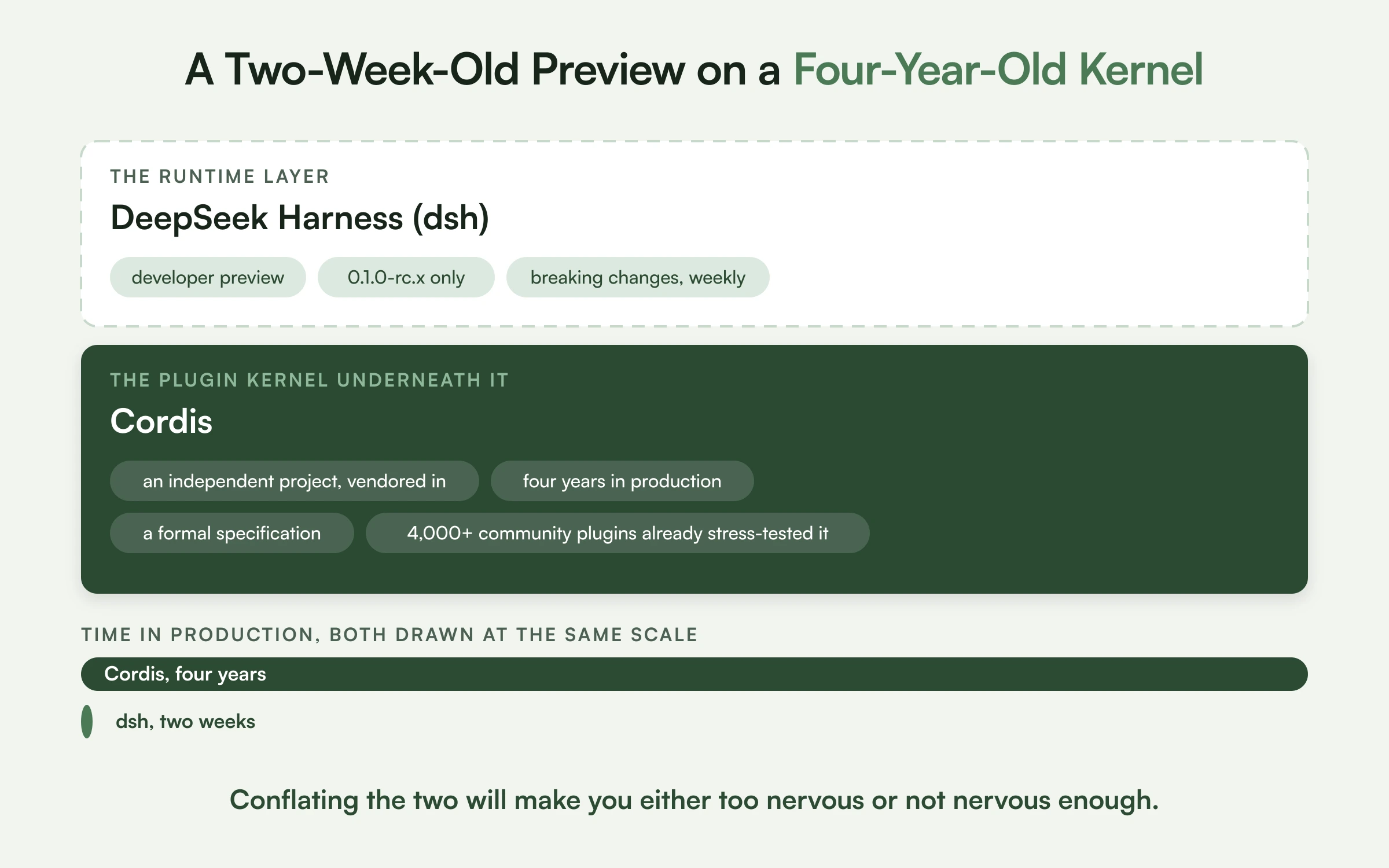
Cordis is not DeepSeek's, and it is not new. It is an independent open-source project that DeepSeek vendored into the harness. Before DSH existed, Cordis spent four years underneath a chatbot framework that accumulated over four thousand community plugins, which is the deployment the paper uses as its own validation case.
That distinction matters when you are assessing risk. The runtime layer is a two-week-old developer preview and you should treat it accordingly. The plugin kernel holding it together is a four-year-old system with a formal specification and a large plugin ecosystem that already stress-tested its cleanup guarantees. Those are two very different maturity profiles stacked on top of each other, and conflating them will make you either too nervous or not nervous enough.
Practically, Cordis is the kernel and every agent capability lives in a plugin:
| Layer | Examples of what is pluggable |
|---|---|
| Models | Model adapters for any provider |
| Tools | File editing, shell, web search, custom tools |
| Skills | Packaged reusable capabilities |
| Sessions | How state persists and resumes |
| Sandboxes | Where and how code executes |
| Storage | Where artifacts and history live |
| Loops | How the agent decides to continue or stop |
| Scheduling | How subagents get orchestrated |
| Interface | The Web UI itself |
There is no fixed core you configure around the edges. The agent loop is a plugin. The UI is a plugin.
The most interesting consequence is that other coding agents become components. DSH ships hook bridges for Claude Code and Codex that run your existing hooks.json, reads both AGENTS.md and CLAUDE.md, and can delegate work to Claude Code or Codex binaries already installed on your machine. Both delegations are off by default, which is the right default. That reframes DSH as something that sits above other coding agents rather than beside them.
On the plugin ecosystem: community indexes now track around eleven thousand repositories carrying the dsh-plugin topic, of which roughly six thousand actually declare a Cordis dependency and will load. That gap is worth internalizing before you go shopping. The topic tag is how discovery works, so it is also how noise gets in.
If you have worked with MCP servers, the instinct is familiar: standardize the interface, then compose. DSH pushes it further by applying the same logic to the runtime itself rather than just to tools.
DeepSeek Harness Modes: Standard vs Code vs Minimal vs Creator
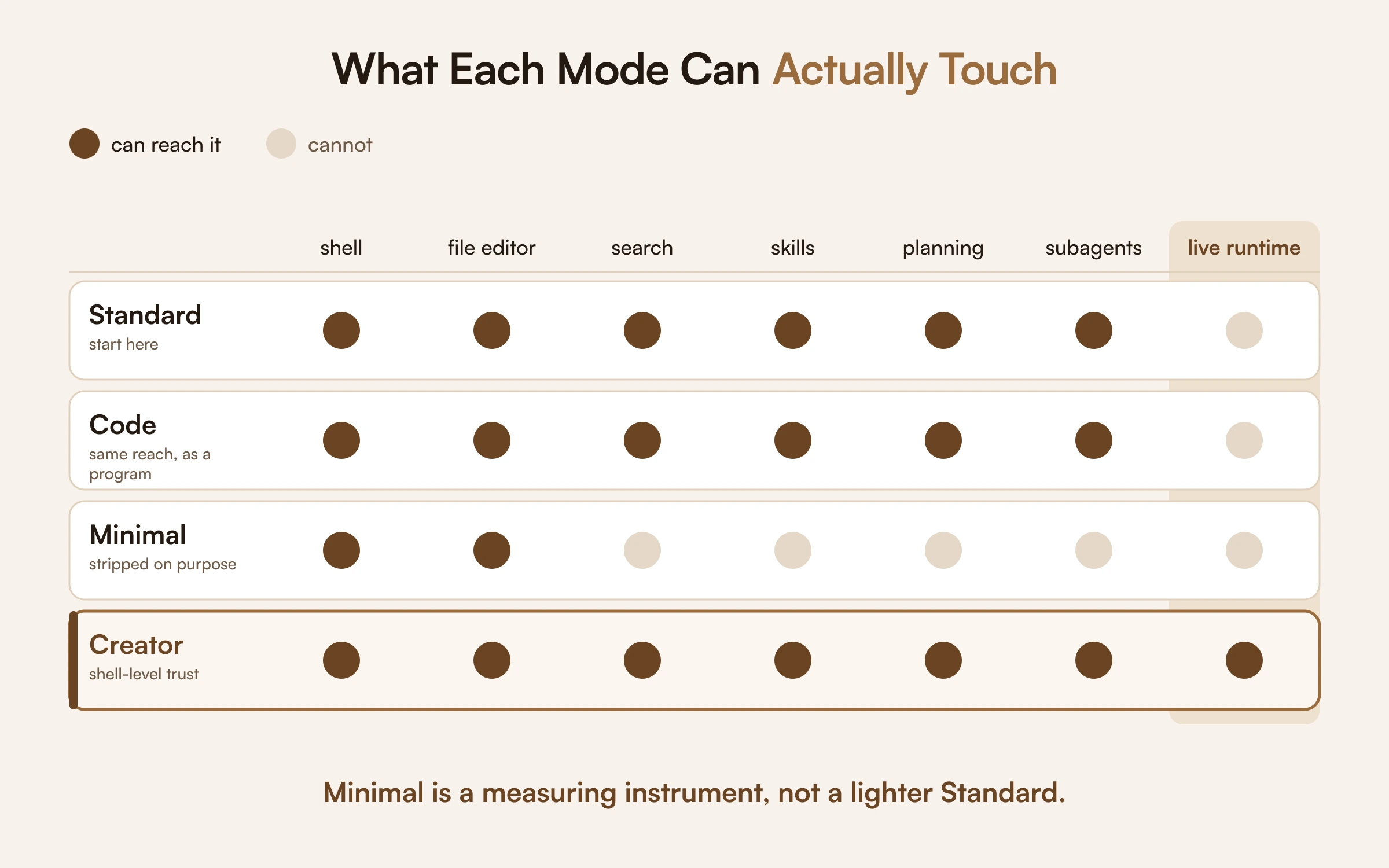
DSH ships four modes, surfaced in the UI as agent presets. Same Cordis kernel underneath, different plugin stacks on top. The common mistake is treating them as a scale from light to heavy. They are not. They are different trust boundaries.
Standard mode
The full coding agent: file operations, shell access, file and web search, skills, planning, goals, subagents and workflows. This is the mode most people should start with.
Starting in Minimal because it sounds lighter is a mistake that strips out exactly the capabilities that make an agent useful. Begin in Standard, then find out whether you actually need something narrower.
Code mode
Standard's capabilities, exposed differently. Rather than issuing tool calls one at a time, the model writes a TypeScript program against a generated SDK, and a dispatcher executes the nested calls.
The payoff is collapsing many round trips into a single program. That is genuinely valuable when the tool workflow itself is the complex part: repeated searches, loops over many files, filtering results, conditional branching. Note the distinction. The reason to reach for Code mode is workflow complexity, not simply that your task involves code.
Minimal mode
Two tools. A persistent bash shell and the str_replace_editor file editor. No search, no skills, no subagents, no planning.
This is the thin harness DeepSeek uses for benchmarking models in a bare environment, and that is exactly what it is good for. When you want to compare model behavior against a stable, minimal tool surface, Minimal removes the harness as a confounding variable. It is a measurement instrument, not a lightweight daily driver.
Creator mode
Creator adds self-referential Cordis tooling to the standard agent, so you can inspect the live runtime, test plugin combinations in memory, and author new presets. You can duplicate any built-in preset and modify it, or have the agent draft one for you.
Treat this one carefully. Model-written code can execute against the live runtime, and a composition the model generates can affect later sessions. Creator mode is shell-level trust, not an ordinary chat mode. Plugins created dynamically in memory also do not survive a restart.
Quick reference
| Mode | Use it when | Watch out for |
|---|---|---|
| Standard | Default for real work | None. Start here |
| Code | The tool workflow is complex, not just the code | Adds an indirection layer to debug |
| Minimal | Benchmarking a model on a stable surface | Not meant for daily use |
| Creator | Building plugins and presets | Shell-level trust. In-memory plugins die on restart |
How to Install DeepSeek Harness (dsh)
The fastest route is a single command.
npx @deepseek-ai/dsh web
That starts the local Web UI at http://127.0.0.1:3080 and opens your browser. An SSH launch prints the host URL instead, because the SSH client owns the forwarded address. Pass --no-open to skip the browser.
For a source build:
git clone https://github.com/deepseek-ai/deepseek-harness.git
cd deepseek-harness
pnpm install
pnpm run build
pnpm dsh web
Source builds additionally need Corepack-enabled pnpm, since the repository pins its own version.
The install trap nobody warns you about
Node.js is strict: ^22.19.0 || >=24.0.0. No release of the 23.x line qualifies at any patch level.
Here is the part that wastes time. That engines range lives in the private root manifest and never reaches npm. So npm install prints no engine warning and installs happily on an unsupported runtime. The failure arrives later, at first launch, in an error message that never mentions Node versions and looks like a bug in the harness.
If you hit an inexplicable first-run failure, run node --version before you do anything else. On Windows specifically, prefer Node 24 LTS: newer Node versions include native zstd decompression, which dsh uses to read its compressed session logs.
Other things worth knowing before you start
- Use an isolated workspace. The agent can modify files and run shell commands. Point it at a disposable directory for your first session, not at anything you care about.
- Add a model key in the UI under Settings, then Models. Changes apply to the next request without a server restart. Environment variables work too if you prefer configuration outside the UI.
- Keys are stored by reference. After saving, the interface shows only a redacted descriptor. The credential lands in a file under your DSH home directory, and settings retain a reference rather than the secret.
- Verify the package scope. Similarly named packages and repositories exist that are not DeepSeek's release. Install from
@deepseek-ai/dshand nothing else.
Platform support
The Web UI and CLI run on macOS, Linux and Windows, because it is a plain npm package. The sandbox backend that confines shell commands is where the platforms diverge, and Windows has known sandbox bugs that macOS and Linux do not. Read the Windows guidance before you let dsh write to your filesystem there.
The Python SDK is narrower: Python 3.10 or newer on Linux x64, Linux arm64, or macOS 14 and later on Apple Silicon. There is no Windows agent in the SDK.
The Session Log: Why Auditability Is the Real Feature
Most coverage of DSH leads with the plugin architecture. Having built and run production agents, I would argue the append-only session log is the more consequential feature.
Every run records the system prompts, the reasoning, the tool calls and their results, subagent scheduling, and every context injection, as a single ordered event stream. DeepSeek enforces this as a hard rule: model-visible means logged. The Trajectory view inspects those records by source, and resume, fork, search and replay all operate on the same stream. The interface also surfaces live operational stats that most agent products hide: tokens per second, cache hit rate, turn count and elapsed time.
Why this matters more than it sounds. When an agent does something wrong in production, the question is never "was the model bad." It is "which tool call, working from which context, produced that output." Without a trace, that question is unanswerable and you are guessing. With one, a wrong action becomes a fixable input problem.
There is an honest caveat, and DeepSeek states it: a trace improves reproducibility but does not guarantee it. Non-determinism does not disappear because you logged it.
This is the same reason every production agent we ship carries an audit trail. Not for compliance theater. Because a system nobody can interrogate is a system nobody keeps trusting.
DeepSeek Harness vs Claude Code and Codex
This comparison gets framed as a contest. It is closer to a category difference.
| Claude Code and Codex | DeepSeek Harness | |
|---|---|---|
| What you get | A working product with an extension surface | A kernel and modes you assemble into a product |
| Model choice | Tied to the vendor's models | Any provider, including self-hosted |
| Runtime control | Configure within the vendor's boundaries | Replace any layer, including the agent loop |
| Setup effort | Install and go | Configuration and tuning required |
| Stability | Production products | Developer preview, release candidates only |
| Best for | Getting work done today | Building or studying agent runtimes |
An opinionated product draws a boundary and optimizes inside it. DSH refuses to draw the boundary and hands you the parts. Both are legitimate. They answer different questions.
And since DSH can delegate to those products as sub-agents, and ships hook bridges for both, the interesting configuration is not one or the other. It is DSH orchestrating, with a mature agent handling the subtasks it is already good at.
This is a positioning comparison based on public documentation, not a performance benchmark.
Who Should Use DeepSeek Harness, and Who Should Not
Use it if you:
- Want to inspect or replace how your agent runtime works
- Are running controlled comparisons across models and need a stable tool surface
- Are building reusable plugins, skills or presets your team will reuse
- Have failing agent runs and need traces to work out why
- Want to avoid being locked to one model vendor
Skip it if you:
- Want a coding assistant that works out of the box today
- Have nobody who can maintain a dependency that ships breaking changes weekly
- Are shipping to customers this quarter and cannot absorb them
- Need a version-guaranteed enterprise SLA, which no release candidate can offer
- Depend on the Python SDK and run Windows
- Are looking for a hosted service rather than something you run
What DeepSeek Harness Signals About Where Agents Are Going
Step back from the tooling and there is a broader point worth noticing.
The runtime is becoming the product: For two years the interesting question in this space was which model. DSH is a bet that the interesting question is now which harness, and the fact that the same model performs differently under different harnesses supports that bet.
Composability is beating integration: The MCP ecosystem standardized how agents reach tools. DSH applies the same logic to the runtime itself. The direction of travel is clearly toward parts you can recombine rather than monoliths you configure.
Observability is arriving late but arriving: Agents have been unusually opaque compared with the rest of modern software. First-class traces and live run statistics are the beginning of the correction, and it is overdue.
For teams already running agents in production, none of this changes what makes a deployment succeed. Integration depth, guardrails and measurement still decide it. What changes is that the runtime layer is now something you can inspect and choose deliberately rather than inherit from whichever product you happened to adopt.
The Bottom Line
DeepSeek Harness is the clearest statement yet that the runtime around a model matters as much as the model. Every layer is a plugin, other agents are components, and every run leaves a trace you can actually read.
That makes it the best available tool for understanding what your agent is doing and why. It also makes it a preview with no stable release and moving contracts, which is a different thing from a foundation you build a customer workflow on this quarter.
Use it to learn. Pin it if you experiment. And whatever runtime you eventually standardize on, the things that decide whether an agent survives contact with production are unchanged: how deeply it integrates, what it is allowed to do alone, and whether anything is measuring its accuracy after launch.
I am the founder and CEO of Bitontree, where I lead embedded AI engineering teams that build and run production AI: agents, RAG and knowledge systems, document AI, and workflow automation for healthcare, logistics, legal, and SaaS companies. I write about what it actually takes to ship AI that survives contact with production.
Frequently Asked Questions
What is DeepSeek Harness?

DeepSeek Harness, or dsh, is an open-source agent harness from DeepSeek AI, released as a developer preview on 13 August 2026 under the MIT license. It is the runtime layer between a language model and your machine, built so that every capability, including models, tools, sessions and the agent loop itself, is a swappable plugin.
Is DeepSeek Harness production ready?
No. Every version published so far is a 0.1.0-rc.x release candidate, and the repository warns that there will be compatibility-breaking changes. It is useful for prototyping, benchmarking and understanding your agent runtime, but customer-facing workloads need stable releases, evals, guardrails and ownership after launch.
Is DeepSeek Harness free and open source?
Yes, under the MIT license, so you can install, inspect, modify and self-host it at no cost. Model usage is billed separately by whichever provider you connect.
Does DeepSeek Harness only work with DeepSeek models?
No. It is model-agnostic. DeepSeek models work immediately, and the interface includes other major providers plus OpenAI-compatible endpoints and local models through plugins.
How do I install DeepSeek Harness?
Run npx @deepseek-ai/dsh web with Node.js ^22.19.0 or >=24.0.0, then open the local Web UI on port 3080 and add a model key under Settings. Use an isolated workspace, because the agent can edit files and run shell commands.
What are the four DeepSeek Harness modes?
Standard is the full coding agent. Code exposes capabilities through a generated TypeScript SDK. Minimal reduces the runtime to a bash shell and file editor for controlled benchmarking. Creator lets you inspect the live runtime and author plugin compositions, and it carries shell-level trust.
Can DeepSeek Harness use Claude Code or Codex?
Yes. It ships hook bridges, reads AGENTS.md and CLAUDE.md, and can delegate to Claude Code or Codex binaries installed on your machine, though both delegations are off by default.
Does DeepSeek Harness run on Windows?
Yes, the Web UI and CLI run as a plain npm package. Node 24 LTS is safer on Windows, but the sandbox backend has known Windows bugs. The Python SDK does not have a Windows agent.
Related Blogs
Read more guides on agent runtimes, MCP, and production AI systems.