August 27, 2026
AI Agents for Business Process Automation: Where They Actually Pay Off

Yash Vibhandik
CEO


Most businesses do not have an automation problem. They have a "which part should we automate first" problem.
Every operations leader can list twenty things that eat time: invoices typed in by hand, support tickets that get searched before they get answered, quotes that take three days, onboarding questions asked for the hundredth time. What is much harder is knowing which of those are worth automating with AI, which will quietly waste six months and a budget, and how you would even tell the difference before you spend the money.
This guide answers that. It is written for business owners and operations leaders, not engineers. No jargon, no hype. Just where AI agents for business process automation genuinely pay back, where they do not, what the money looks like, and how to pick your first process.
Key takeaways
- AI business process automation means software that understands your work in plain language and acts on it, not just software that follows a fixed rule.
- The processes that pay back fastest are high volume, judgment light, and already documented somewhere.
- The processes that lose money are low volume, undocumented, or dependent on knowledge that only lives in someone's head.
- Real deployments produce measurable results. Bitontree's document AI pipeline eliminated 90% of manual work for a logistics operator, and an AI workflow automation build made sales response 60% faster.
- Your return comes from labor hours recovered and errors avoided, not from software cost. Calculate it that way.
- Start with one process, one team, and one number you can measure. Expand after that number moves.
What Are AI Agents for Business Process Automation?
A business process is any repeatable sequence of work your team performs. Taking an order. Approving an invoice. Answering a support ticket. Onboarding a new client. Booking a patient.
Business process automation is handing part of that sequence to software so nobody has to do it by hand.
An AI agent is what makes automation possible for work that used to need a person's judgment. Unlike older automation, which could only follow instructions you wrote in advance, an AI agent can read a message in ordinary English, understand what is being asked, pull the relevant information from your own systems, decide what to do next, and act on it.
Put simply: older automation could move data between two boxes. An AI agent can read the form, work out which box it belongs in, notice when something looks wrong, and ask a human before it does anything it should not do alone.
That last part matters more than anything else on this page. The value is not in the AI answering. It is in the AI completing the work and knowing when to stop.
A concrete example
A supplier emails an invoice as a scanned PDF.
Without automation: Someone opens it, reads it, types the numbers into your accounting system, checks it against the purchase order, spots a mismatch, emails the supplier, waits.
With an AI agent: The agent reads the scan, extracts the line items, matches them against the purchase order automatically, posts the ones that agree, and flags the one that does not into a Slack message with a single Approve or Deny button. A human spends fifteen seconds on the exception instead of six minutes on every invoice.
That is document AI doing the reading and AI workflow automation doing the routing. In production for a logistics operator in Singapore, this exact pattern removed 90% of the manual work from their invoice process.
AI Agents vs RPA and Traditional Automation
If you have looked at automation before, you have probably met RPA, or robotic process automation. It is worth understanding the difference, because it explains why some earlier automation projects disappointed.
| Traditional automation and RPA | AI agents | |
|---|---|---|
| How it decides | Follows rules you write in advance | Understands intent and context |
| Unstructured input | Breaks. Needs clean, predictable data | Reads emails, scans, PDFs, chat messages |
| When something is unexpected | Stops or does the wrong thing silently | Recognizes it and escalates |
| Building it | You map every branch of every rule | You define the goal and the guardrails |
| When your process changes | Rebuild the rules | Update the instructions and the knowledge |
| Best suited to | Identical, structured, repetitive steps | Messy, varied, judgment-adjacent work |
Neither one is better in the abstract. If your process is genuinely identical every single time and your data is already clean, rule-based automation is cheaper and more predictable, and you should use it.
AI agents earn their place where the work is messy: Where the input arrives as an email rather than a form. Where the answer depends on which of your policies applies. Where a person currently has to look something up before they can act. That is the majority of operational work in most businesses, and it is exactly the work rule-based automation could never touch.
Where AI Agents Actually Pay Off
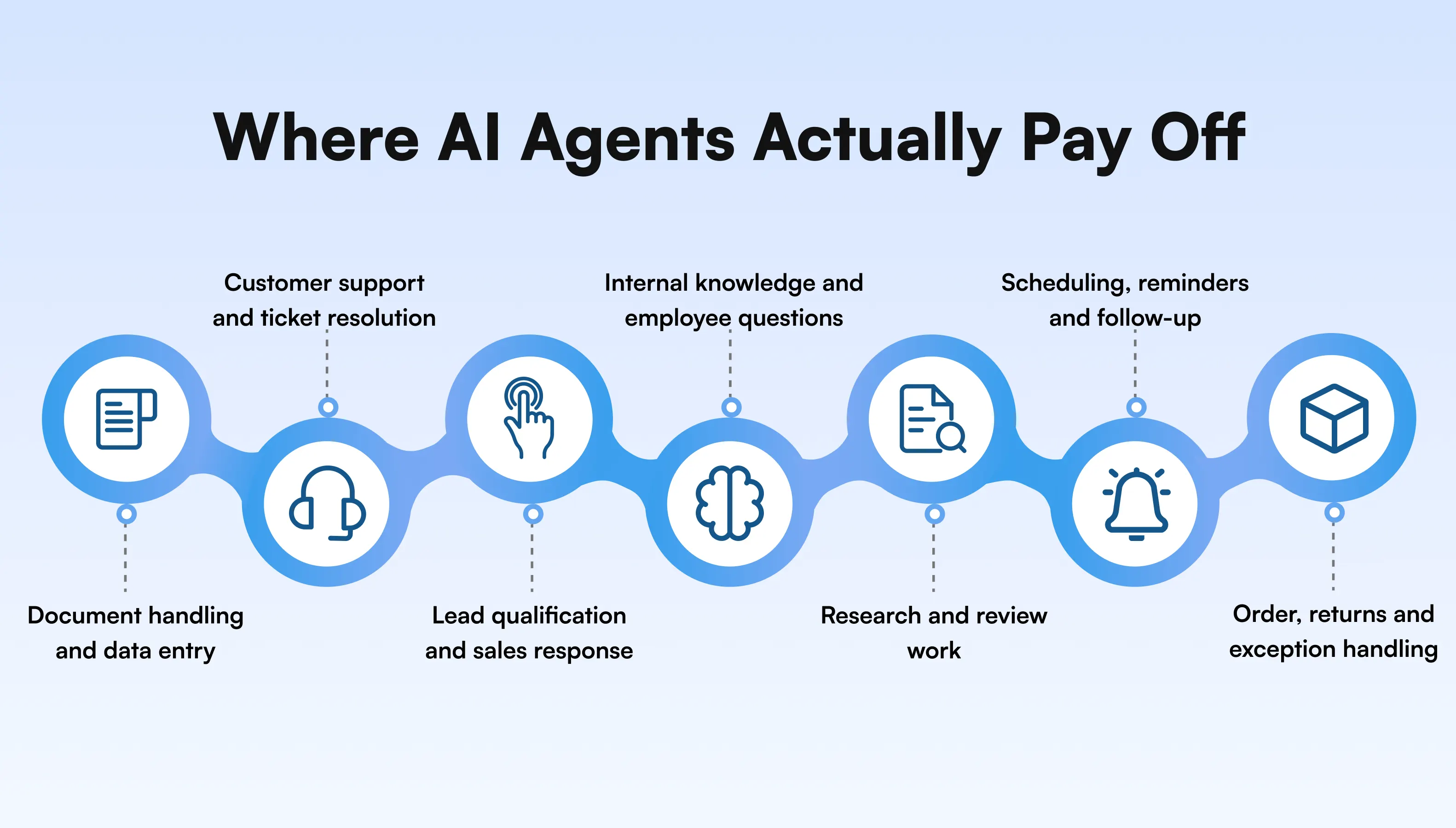
These are the process categories where AI agents return value quickly and where the result is easy to measure. Not a list of everything AI can do. A list of what is worth doing first.
1. Document handling and data entry
The process: Invoices, purchase orders, contracts, claims, shipping paperwork, forms, clinical notes. Anything that arrives as a document and ends up as fields in a system.
Why it pays: The work is high volume, purely mechanical, and expensive in human hours. It is also where errors are costly and boring to catch. An AI document processing pipeline extracts the fields, validates them against your own records, and flags only the exceptions.
How you measure it: Minutes per document before and after, and error rate.
In production: 90% of manual work eliminated for a logistics enterprise handling invoices across multiple formats and currencies.
2. Customer support and ticket resolution
The process: Answering the same questions repeatedly. Order status, shipping, returns, policy questions, how-to queries.
Why it pays: A large share of support volume is questions your documentation already answers. The cost is not the difficulty, it is the repetition. An AI chatbot grounded in your own content resolves those instantly and escalates the rest with full context attached.
How you measure it: Percentage of total inbound tickets resolved without a human, and first response time. Insist on the total-volume denominator when any vendor quotes you a deflection rate, including us. A rate quoted against "routine tickets" is unfalsifiable, because routine means the ones the system handled.
3. Lead qualification and sales response
The process: An inquiry arrives, someone reads it, works out whether it is serious, and either responds or lets it sit.
Why it pays: Speed of response is one of the strongest predictors of whether an inquiry becomes a sale, and most businesses lose deals to delay rather than to price. An AI agent responds instantly, asks the qualifying questions, scores the lead, writes it into your CRM, and routes the good ones to a person.
How you measure it: Average response time and the share of inquiries that convert to a booked call.
In production: A HubSpot-integrated AI workflow automation build delivered 60% faster sales response for a US sales team.
4. Internal knowledge and employee questions
The process: Staff asking each other where the policy is, which version of the contract is current, how the pricing exceptions work.
Why it pays: This cost is invisible because it never appears on an invoice. It shows up as senior people being interrupted. An internal knowledge assistant built on a RAG knowledge system lets anyone ask in plain English and get an answer with the source document cited, so they can verify it themselves.
How you measure it: Hours per week your senior staff spend answering internal questions. Measure this before you build. It is the one category where nobody has a baseline, because the cost is distributed across people who never log it.
5. Research and review work
The process: Reading a large volume of material to find the relevant part. Legal research, case files, compliance checks, competitor analysis, claims review.
Why it pays: The reading is the cost, not the thinking. An agent narrows hundreds of documents to the handful that matter, with citations, and the expert does the judgment.
How you measure it: Hours per matter or per case.
In production: 50% research time saved at a US legal advisory firm.
6. Scheduling, reminders and follow-up
The process: Booking appointments, confirming them, chasing no-shows, following up on quotes that went quiet.
Why it pays: It is pure administrative overhead that directly affects revenue. Every no-show and every unfollowed quote is money already earned and then dropped. A voice AI agent or messaging agent handles it without occupying a person.
How you measure it: No-show rate and follow-up completion rate.
In production: An outbound medication adherence voice system making 200+ nightly calls to confirm patient medication intake and flag misses to clinical staff.
7. Order, returns and exception handling
The process: Processing orders, handling returns and exchanges, resolving the cases that do not follow the standard path.
Why it pays: The standard cases are volume, and the exceptions are where the cost sits. An agent clears the standard ones automatically and gives your team a queue of only the genuine exceptions, with the context already gathered.
How you measure it: Percentage of cases requiring human touch, and average handling time on the ones that do. Watch the second number: a well-built system raises average handling time on the remaining cases, because the easy ones are gone. That is success, and it looks like failure on a dashboard nobody warned you about.
How to Identify Which Processes to Automate
Before you pick, run each candidate process through five questions. This is the same prioritization we do in a discovery workshop, and you can do a rough version yourself in an afternoon.
1. How many times does this happen?
Multiply frequency by the minutes it takes. Below roughly 500 instances a month, the fixed cost of building is hard to justify no matter how irritating the work is. A process that happens 500 times a month at 6 minutes each is 50 hours, and that is worth a conversation.
2. Is the knowledge written down anywhere?
An AI agent answers from your documentation. If the rules exist only in one person's head, that is the problem to fix first. No system can retrieve knowledge that was never recorded.
3. Is the judgment involved routine or genuinely expert?
"Does this invoice match this purchase order" is routine. "Should we extend credit to this customer" is expert. Automate the first, escalate the second.
4. Can you tell whether the output was right?
If you cannot verify correctness, you cannot trust the automation and you will not adopt it. Pick processes with a checkable answer.
5. Who on your side owns it?
Every deployment that works has one person internally who can answer "is this correct?" during testing. Without that person, accuracy is never validated and the team never trusts the system.
Score each process 1 to 5 on all five and start with the highest total: In practice, document handling and support volume usually come out on top, which is why they appear first in the previous section.
The scoring tells you what is automatable. It does not tell you what to build first.
Those are different questions. A process can score well on all five and still be the wrong place to start, because sequencing depends on which systems you already have access to, where your compliance exposure sits, and which team will actually adopt it.
Our AI discovery and PoC track settles that on your real data. Cross-functional workshops, a prioritized opportunity map, a working proof of concept, and a production plan with success metrics attached. Fixed scope, no build commitment.
Where AI Agents Do Not Pay Off
This section will save you more money than the rest of the page. These are the situations where an AI agent is the wrong answer and we tell businesses not to build.
Low volume work: Below roughly 500 instances a month, a person doing it manually is cheaper, faster and more flexible than anything worth building. Automation has a fixed cost that volume has to justify.
Undocumented processes: If nobody has written down how the work is actually done, automating it means encoding one person's guess. Document the process first. You will often find the documentation exercise alone recovers time.
Processes that change every month: If the rules genuinely shift constantly, you will spend more on maintenance than you save. Stabilize the process first.
High-stakes decisions with no verification step: Anything irreversible and unverifiable should stay with a human. Automation belongs on the work that leads up to the decision, not on the decision itself.
Work where the bottleneck is not the work: Sometimes the slow part is waiting for a customer, a supplier or a regulator. Automating your side changes nothing. Find the real constraint before you automate around it.
Situations where nobody wants it: If the team using it did not ask for it and does not believe in it, they will work around it. Adoption is not a technical problem and no build fixes it.
How to Calculate ROI on AI Business Process Automation
Most automation ROI calculations are wrong because they compare software cost to software cost. The return does not come from replacing software. It comes from recovering hours and avoiding errors.
Use this instead.
The four inputs
- Hours recovered: Instances per month, times minutes saved per instance, divided by 60.
- Cost of those hours: Fully loaded hourly cost of the people doing the work today, not their salary divided by 2,080.
- Errors avoided: Current error rate, times the cost of an error, times monthly volume.
- Revenue protected or gained: Faster response, fewer no-shows, fewer abandoned inquiries. Only count this if you can actually measure it.
A worked example
A business processing 2,500 documents a month, currently taking 8 minutes each, at a fully loaded cost of $18 per hour:
| Line | Calculation | Monthly value |
|---|---|---|
| Current cost | 2,500 x 8 min = 333 hrs x $18 | $6,000 |
| After automation (1 min each on exceptions) | 2,500 x 1 min = 42 hrs x $18 | $750 |
| Hours recovered | 291 hours | $5,250 |
| Errors avoided | 2% error rate x 2,500 x $40 to fix | $2,000 |
| Total monthly return | $7,250 |
That is $87,000 a year, against a one-time build cost and a modest running cost. Do the payback calculation explicitly rather than trusting a vendor's adjective: divide your build cost by the monthly return. At a realistic build range, this example can pay back in months, not years, and the return continues while the build cost does not repeat.
Run the same arithmetic at your own volume before you talk to anyone: At 600 documents a month the same process returns roughly $1,700 monthly, which pushes payback past a year and makes it a much harder case to justify internally. Volume is the variable that decides this, not the technology.
The mistake to avoid
Do not count "hours recovered" as money saved unless you actually redeploy or reduce those hours. If the same people simply do the same job with more slack in it, the saving is real but it is capacity, not cash. Both are valuable. They are not the same thing, and confusing them is how automation projects lose credibility with a finance team.
What Does AI Business Process Automation Cost?
There are three cost layers, and only one is the software.
1. Build cost: A one-time cost to design, build and integrate the system. It scales with how many of your systems it has to connect to, not with how clever the AI is. Integration depth is almost always the biggest driver.
2. Running cost: Model usage and infrastructure, which scales with volume. For most mid-market processes this is a modest monthly line rather than the main expense.
3. The cost people forget: keeping it working: AI systems drift. Your documents change, your policies change, and accuracy quietly degrades if nobody is measuring it. Budget for monitoring, evaluation and tuning, or budget for the system to stop being trusted in eight months.
That third layer is where most automation projects fail. Not at build. At month nine, when nobody owns it. It is why Bitontree runs systems past launch with monitoring dashboards, drift-detection evaluations and on-call response rather than handing over at delivery.
Timeline: Discovery and design typically run weeks 1 to 4. A first production build lands between weeks 4 and 16, depending on integration depth and compliance scope. Most clients see working software on real data within the first month.
For a scope and number on your specific process, the fastest route is a free AI fit assessment.
Where your data goes
This is the objection that stops most mid-market deals, and it belongs here rather than buried in an FAQ.
Ask any provider, including us, three questions before anything technical: where the data is stored and under whose control, whether your data is used to train shared models, and what is signed before anyone accesses your systems. If a vendor cannot answer all three in a sentence each, that tells you something.
Bitontree defaults to PHI-safe pipelines, audit logging and least-privilege access, with BAAs for US healthcare and SOC 2-aware practices for enterprise clients. Your data is not used to train shared models.
AI Business Process Automation Examples by Industry
The same underlying capabilities apply differently depending on what your documents and workflows look like.
Healthcare: Patient intake, clinical documentation, appointment reminders and medication adherence. Compliance is the constraint here, so PHI-safe pipelines and audit trails matter more than model choice. Live today: a nightly voice system making 200+ patient calls.
Logistics: Invoice and customs paperwork, exception handling, shipment queries. Document load is the bottleneck in freight, and it is the clearest automation case in any industry we work with.
Legal: Matter intake, legal research, contract review and case-brief drafting with citations and audit trails. The value is narrowing the reading, not replacing the judgment.
SaaS: In-app copilots, support deflection, and agentic workflows over customer data with proper tenant isolation.
E-commerce: Product discovery, support automation, returns and exchange handling, and post-purchase flows.
Professional services and finance: Quote generation, proposal drafting, month-end reconciliation and client onboarding.
How to Start
Three of these steps are yours to do before anyone writes code. Everything after that is where automation projects either work or quietly stall, and it is worth knowing which is which before you commit budget.
The part you do first
Step 1: Pick one process: Use the five questions above. Resist the urge to automate three things at once. One process, one team, one measurable number.
Step 2: Measure the baseline before anything is built: Instances per month, minutes each, error rate, cost per instance. If you skip this you will never be able to prove the return, and you will not get budget for the second project.
Step 3: Write down the process, including the exceptions: Who handles what today, and what happens when the standard path does not apply. This step alone often reveals that the process is not what anyone thought it was, and it is genuinely useful whether or not you automate anything.
Do those three and you will know whether you have a candidate worth building. You can do all of it yourself in a week.
Where projects stall
The three decisions below are the ones that separate an automation that gets adopted from one that gets switched off in month nine. None of them are about the AI model.
Guardrails: What is the agent allowed to do on its own, and what always needs a human sign-off? What happens when it is not confident? Getting this wrong in one direction produces a system nobody trusts. Getting it wrong in the other produces a system that quietly does something irreversible. These rules are specific to your business and they have to be set before the build, not patched on after the demo.
Integration: The cost and the difficulty live here, not in the AI. Reaching into your ERP, your DMS, your CRM and your ticketing system, respecting the permissions you already set, and handling the cases where those systems disagree with each other. This is ordinary engineering, and it is most of the work.
Evaluation: How will you know it is still accurate in six months? Your documents change, your policies change, and accuracy degrades silently unless something is measuring it. A build with no evaluation harness is a build you will stop trusting without ever being able to say exactly when it went wrong.
That is why we sequence engagements through discovery, design, build and scale rather than handing over at launch, and why an embedded AI team stays on the system after it goes live. AI systems decay if nobody runs them.
The Bottom Line
AI agents for business process automation pay off where three things are true at once: the work happens often, the knowledge behind it is written down somewhere, and the judgment involved is routine rather than expert.
Where those three hold, the returns are large and quick to measure. Where they do not, no amount of technology fixes it, and the honest answer is to fix the process before automating it.
The businesses that get the most out of this are not the ones that automate the most. They are the ones that pick the right first process, measure the baseline before they build, keep a human on the decisions that matter, and expand only after the first number moves.
At Bitontree, we build and run production AI for healthcare, logistics, legal, SaaS and e-commerce teams, and we keep systems running past launch rather than handing over at delivery. If a process is not worth automating, we will tell you that too. See what we have built and still run.
I am the founder and CEO of Bitontree, where I lead embedded AI engineering teams that build and run production AI: agents, RAG and knowledge systems, document AI, and workflow automation for healthcare, logistics, legal, and SaaS companies. I write about what it actually takes to ship AI that survives contact with production.
Frequently Asked Questions
What is AI business process automation?

AI business process automation is the use of AI agents to carry out repeatable business workflows end to end, including the steps that used to require human judgment. Unlike rule-based automation, it can read unstructured input like emails and scanned documents, decide what to do, act across your systems, and escalate when it is not confident.
Will AI automation replace my employees?
In the deployments we run, it removes the repetitive portion of a role rather than the role. The realistic outcome is that the same team handles more volume, and the expensive people spend their time on the work that actually needs them. If your plan depends on headcount reduction to justify the spend, be explicit about that in your ROI calculation rather than assuming it.
What is the difference between AI agents and RPA?
RPA follows rules written in advance and breaks when the input varies. AI agents understand intent and context, handle messy input like emails and PDFs, and recognize when a case is unusual. RPA suits identical, structured, repetitive steps. AI agents suit varied work that currently needs a person to interpret it.
Which business processes should I automate with AI first?
Start with processes that are high volume, judgment light, and already documented. Document handling and data entry, repetitive customer support, and lead response are usually the top three. Score your candidates on volume, documentation, judgment level, verifiability and internal ownership, then take the highest scorer.
How much does AI business process automation cost?
Cost has three layers: a one-time build cost driven mainly by integration depth, a running cost that scales with volume, and an ongoing cost to monitor and maintain accuracy. The third is the one most businesses forget and the most common reason automation projects quietly fail after a year.
How long does it take to automate a business process with AI?
Discovery and design typically take weeks 1 to 4. A first production build usually lands between weeks 4 and 16 depending on how many systems it has to integrate with and what compliance requirements apply. Most teams see working software on real data within the first month.
What happens when the AI gets something wrong?
A well-built agent shows its sources so a wrong answer is traceable to the input that caused it, usually an outdated or ambiguous document. Confidence thresholds and escalation rules are set during the build. An agent that guesses to appear capable is a build failure, not a limitation of the technology.
Is my business data safe with AI automation?
That depends on how it is deployed, and the three questions to ask any provider are covered in the cost section above. Bitontree defaults to PHI-safe pipelines, audit logging and least-privilege access, with BAAs for US healthcare and SOC 2-aware practices for enterprise clients.
Do I need a technical team to run AI automation?
No. Most businesses run these systems with an existing operations or IT owner. What you do need is one person who can confirm whether outputs are correct during testing and occasionally afterwards. The engineering can be handed over with documentation or run for you.
Can I start small and expand later?
Yes, and you should. One process, one team, one measurable number. Expand once that number has moved and the team trusts the system. Businesses that automate six processes at once usually end up with six half-adopted systems.
Bring Us the Process, Not the Brief
You do not need a specification, a budget or a technical plan. Bring the workflow that is eating your team's week and we will pressure-test it in 30 minutes with a senior AI engineer, not a sales rep. You leave knowing whether it is buildable, roughly what it would cost, and the shortest path to production.
Related Blogs
Read more guides on AI agents, automation ROI, and production workflows.