November 1, 2026
OCR vs LLM Document Extraction: Which One Should Your Business Use?

Yash Vibhandik
CEO


The question is usually asked as if one approach has to win. It does not. OCR and LLM document extraction solve different halves of the same problem, and the businesses getting good results from automated document processing are almost always running both.
The useful question is narrower: for each document type you handle, which approach should do which job, and where does a human still need to look?
This article answers that. It covers what each approach actually does, where each one fails, how to match them to document types, the hybrid pipeline that production systems converge on, and how to measure document extraction accuracy in a way that predicts what will happen at volume rather than what happened in a demo.
What OCR Actually Does in Document Data Extraction
Optical character recognition converts pixels into characters. That is the whole job.
An OCR engine such as Tesseract, the long-standing open-source engine, takes an image and returns text, usually with bounding box coordinates showing where on the page each piece of text was found. Modern engines are good at this. Clean printed text on a flat scan is close to solved.
What OCR does not do is understand what the text means. "Total: 1,240.00" is returned as the characters T, o, t, a, l, and so on, plus a position on the page. Deciding that this is the invoice total rather than a subtotal, a line item or a shipping charge is a separate problem.
How Template-Based OCR Extraction Works
Traditional document data extraction closes that gap with templates. You tell the system where to look.
- Zonal extraction: Define a rectangle on the page. Whatever text falls inside it is the invoice number
- Anchor-based extraction: Find the word "Total", then take the number to its right
- Regular expressions: Match a pattern, such as a date format or a tax registration number
- Table detection: Identify ruled lines or aligned columns and read the grid
This works extremely well under one condition: the documents look the same every time. For a high-volume form your own organization issues, template-based OCR is fast, cheap, deterministic and auditable. It is still the right answer for that case, and replacing it with a language model would be a downgrade.
Where OCR Accuracy Breaks Down
The condition above is the problem, because most business documents come from other businesses.
- Layout variation: Fifty suppliers means fifty invoice layouts, and each one needs its own template
- Layout drift: A supplier redesigns their invoice and your template silently starts returning the wrong field rather than failing loudly
- Scan quality: Skew, shadow, low resolution, phone photographs taken at an angle
- Handwriting: Still materially harder than print, and highly variable
- Semantic ambiguity: Three numbers on a page labelled "Total", "Amount Due" and "Balance". Position does not tell you which one your finance system needs
- Multi-page context: A value on page four that modifies a term on page one
The research community has measured how hard this is. The FUNSD dataset was built specifically for form understanding in scanned documents. Its authors describe those documents as noisy and highly varied in appearance, and they name that variation as the reason form understanding is hard. That variability is the exact thing templates cannot absorb.
What LLM Document Extraction Actually Does
LLM document extraction asks a model to read the document and return the fields you asked for, as structured data. Instead of telling the system where the invoice number is, you tell it what an invoice number is.
The practical differences:
- No templates: A new supplier layout needs no setup
- Semantic understanding: The model can distinguish "Amount Due" from "Total" because it understands the words, not the coordinates
- Reasoning across the page: A discount on page two can be applied to a figure on page one
- Flexible output: You define the schema you want and the model fills it
- Handles the unexpected: A handwritten note in the margin saying "pay 50% now" is at least visible to the system
How LLM Document Extraction Differs From OCR in Practice
Two architectures exist, and the distinction matters for accuracy and cost:
- OCR then LLM: An OCR engine produces text, and the model reads that text. Cheaper, but the model inherits every OCR error and loses all layout information
- Vision model directly on the page image: The model sees the document as an image. It keeps layout, tables and visual structure, at higher cost per page
For documents where layout carries meaning, which is most structured business documents, the second approach is usually more accurate and usually more expensive.
Where LLM Document Extraction Breaks Down
- It can invent values: This is the critical difference from OCR. A failed OCR read returns garbled characters or nothing. A failed LLM read can return a plausible, well-formatted, entirely fabricated number
- It is non-deterministic: The same document can produce different output on different runs
- It is slower and costs more per page: Particularly with vision models on multi-page documents
- Long documents degrade: Accuracy falls as page count rises, and a value buried in the middle of a sixty-page contract is less reliably found than one on page one
- It sends your document somewhere: Unless self-hosted, the content leaves your infrastructure
Reading documents accurately remains a measured, unsolved problem. The DocVQA benchmark by Mathew, Karatzas and Jawahar, built to test question answering over document images, puts human performance at 94.36% accuracy. Model scores have improved substantially since that 2020 paper, but the benchmark exists precisely because reading a document and answering correctly is harder than it looks.
OCR vs LLM Document Extraction: A Direct Comparison
| OCR with templates | LLM document extraction | |
|---|---|---|
| Setup per new layout | New template required | None |
| Cost per page | Very low | Materially higher, highest with vision models |
| Speed | Milliseconds | Seconds |
| Determinism | Identical output every run | Can vary between runs |
| Failure mode | Returns nothing or visible garbage | Can return a confident, wrong value |
| Handles new layouts | No | Yes |
| Understands meaning | No | Yes |
| Handwriting | Weak | Better, still imperfect |
| Auditability | High, the rule is inspectable | Lower, needs explicit evidence capture |
| Data residency | Stays in your infrastructure | Leaves it, unless self-hosted |
The row that should drive your decision is failure mode. OCR fails loudly. LLM extraction can fail silently. In a finance or compliance workflow, a silent failure that enters your system of record is far more expensive than a loud one that stops the pipeline.
Which Document Types Suit OCR and Which Suit LLM Extraction
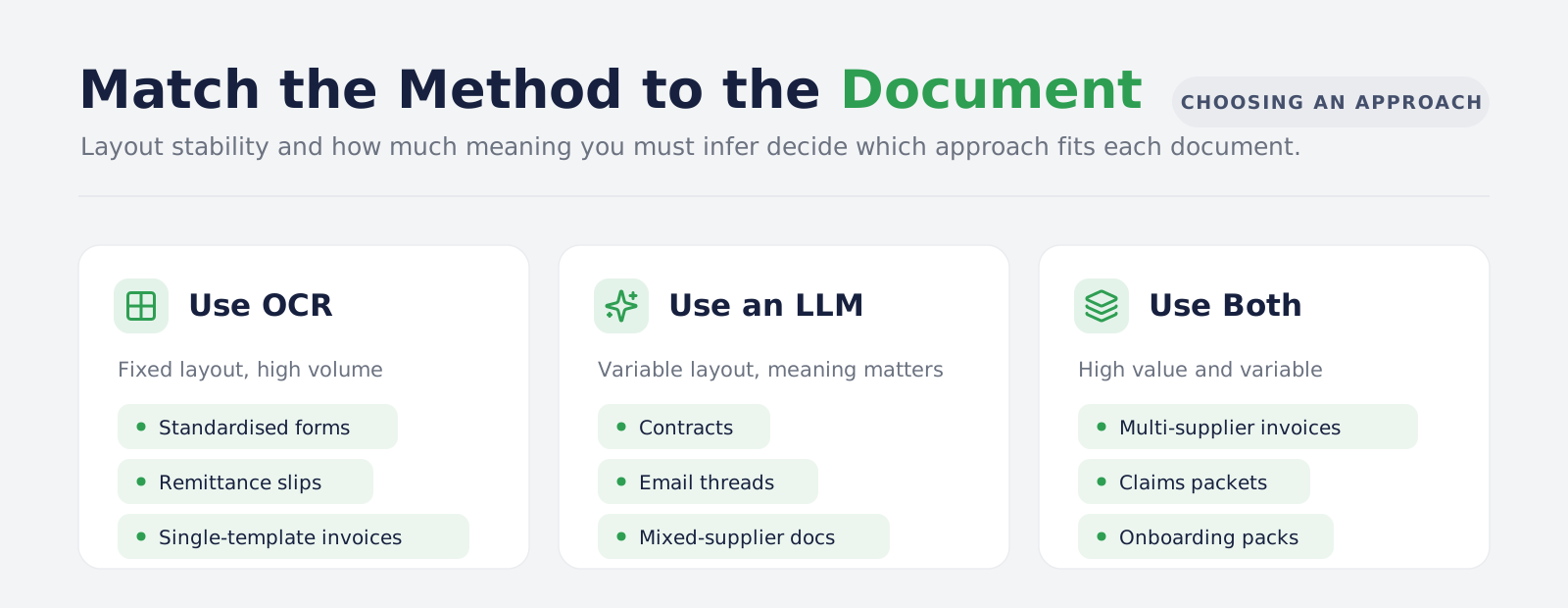
| Document type | Better fit | Why |
|---|---|---|
| Your own standard forms | OCR | Fixed layout, high volume, cost matters most |
| Supplier invoices from many vendors | LLM, or hybrid | Layout varies per supplier and changes without notice |
| Identity documents | OCR | Standardized formats, strong existing tooling, data sensitivity |
| Contracts and agreements | LLM | Meaning lives in clauses, not positions |
| Purchase orders | Hybrid | Structured header, variable line items |
| Bank statements | OCR for tables, LLM for anomalies | Tabular and repetitive, with occasional narrative entries |
| Handwritten forms | LLM with human review | Neither is reliable enough alone |
| Shipping and customs paperwork | Hybrid | Fixed fields, many issuing authorities, many formats |
| Medical records | LLM with strict controls | Unstructured narrative, high sensitivity, high consequence |
| Email attachments of mixed type | Classification first, then either | You do not know what you are holding until you look |
That last row is more common than it looks. Most business documents arrive as email attachments rather than through a portal, which means your extraction pipeline usually starts with mail rather than with files. Our work on the AI email assistant covers the classification layer that decides which attachments are worth opening at all.
Contracts deserve a specific note. The value is almost never in reading the characters, it is in locating an obligation, a notice period or a liability cap and understanding what it means. That is work a template cannot do, and it is why AI work for legal teams is built on comprehension rather than coordinates.
Extraction is also rarely the end of the workflow. Once documents are structured, the usual next step is making them answerable, which is where an internal knowledge assistant or a wider RAG development build takes over, and where an AI agent can start acting on what was extracted rather than just storing it.
Why Most Production Systems Use Both: The Hybrid Document Extraction Pipeline
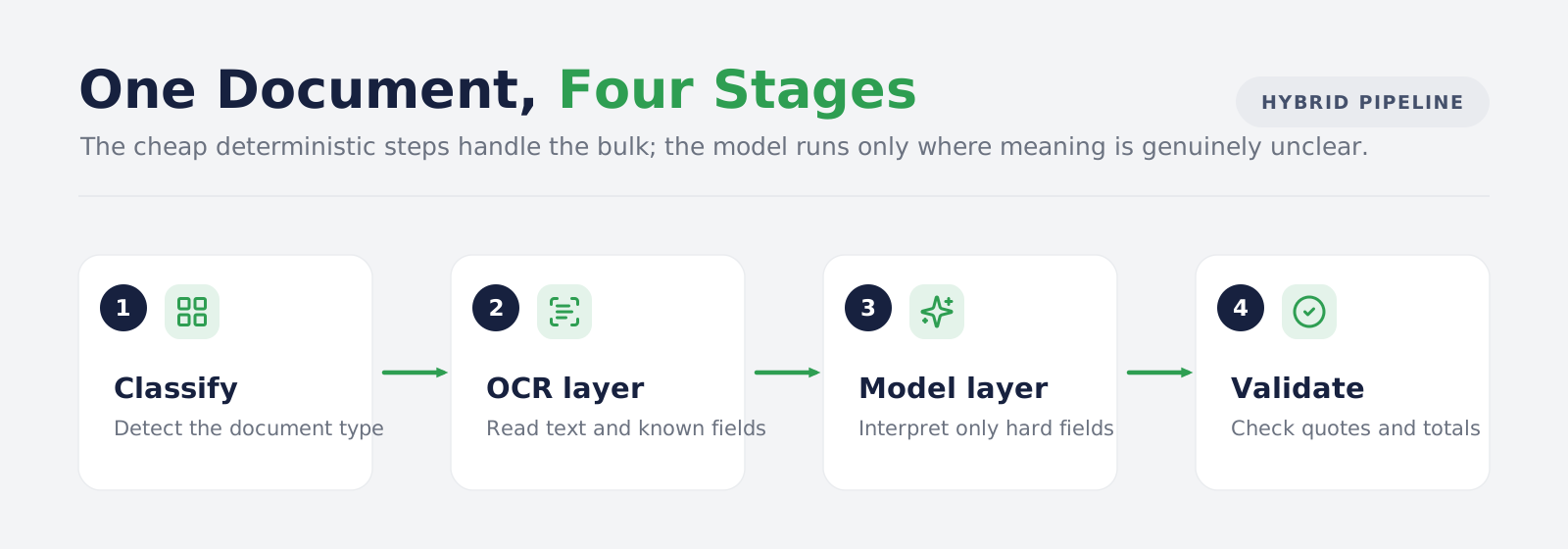
In practice, the OCR vs LLM document extraction question resolves into a pipeline where each stage does what it is good at. This is the architecture we use for most intelligent document processing builds.
One example is the AI invoice processing system we built for a Singapore logistics company. It receives invoices from vendors, freight forwarders and customs agents in many languages and layouts. The pipeline cleans the image, runs OCR, extracts fields with a confidence score, checks them against purchase orders and vendor records, and routes exceptions to reviewers by amount and vendor. The stages below follow the same order.
Stage 1: Document Classification Before Extraction
Before you extract anything, decide what the document is.
- Why it comes first: Routing an invoice through a contract extractor wastes money and produces nonsense
- How it works: A cheap classifier on the first page, using layout signals, keywords and sender metadata
- What it saves: Each document type goes to the cheapest method that can handle it
Stage 2: OCR for Text Layer Recovery
- What it does: Produces the text and its coordinates, including for scanned pages with no embedded text layer
- Why keep it: It is fast, cheap and deterministic, and it gives you a verifiable record of what was physically on the page
- Where it matters most: Known layouts, where OCR alone completes the job and no model is needed
Stage 3: LLM for Field Interpretation
- What it does: Takes the fields OCR could not confidently resolve and interprets them against your schema
- What to require: Every extracted value must come back with the source text it was derived from
- Why that matters: A value with no traceable source is a value you cannot audit, and it is also how you catch invention
This is the same grounding discipline that makes retrieval augmented generation trustworthy. In both cases the rule is identical: the model may only tell you something it can point at.
Stage 4: Validating Extracted Document Data Before It Lands
This is the stage that separates a working system from a demo.
- Type and format checks: Dates parse, currencies are valid, tax numbers match the expected pattern
- Arithmetic checks: Line items sum to the subtotal, subtotal plus tax equals the total. On financial documents this catches more errors than any model improvement
- Cross-reference checks: The supplier exists in your system, the purchase order number is real, the amount is within tolerance of the order
- System of record integration: Validated data has to land somewhere, and the write path into your ERP or finance system needs idempotency so a retry does not create a duplicate record. Our MCP server development work covers that integration layer
- Confidence thresholds: Route low-confidence extractions to a human rather than into your database
The arithmetic check deserves emphasis. On an invoice, the document validates itself. If the extracted line items do not sum to the extracted total, something was read wrong, and you know it without a human looking. No amount of model capability replaces that.
How to Measure Document Extraction Accuracy
Most accuracy claims in this space are measured per field. Your business experiences accuracy per document. These are very different numbers.
The table below shows the share of documents with zero errors, for a given per-field accuracy and number of fields, assuming each field is read independently:
| Field accuracy | 10 fields | 20 fields | 30 fields |
|---|---|---|---|
| 90% | 34.9% | 12.2% | 4.2% |
| 95% | 59.9% | 35.9% | 21.5% |
| 98% | 81.7% | 66.8% | 54.6% |
| 99% | 90.4% | 81.8% | 74.0% |
At 95% per field across 20 fields, roughly 36% of your documents arrive completely correct. The other 64% contain at least one error. A vendor quoting "95% accuracy" is describing the first number while you will experience the second.
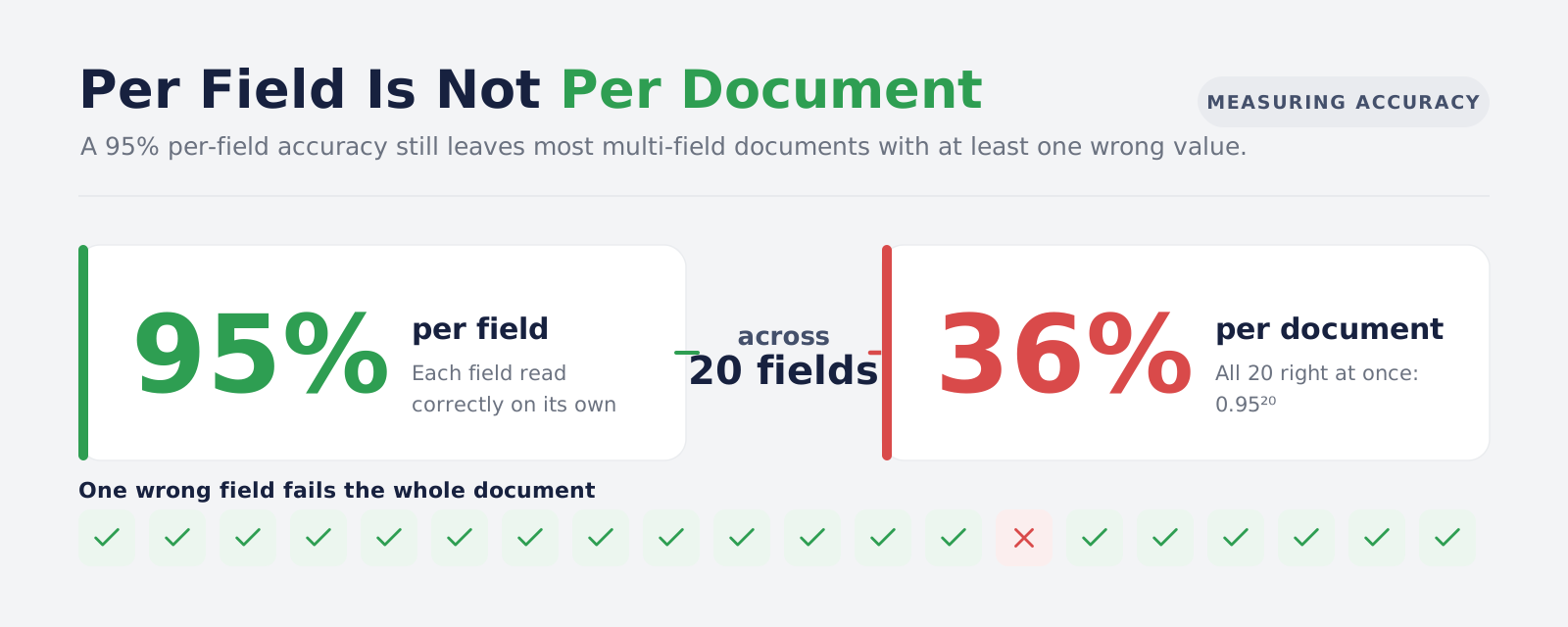
One caveat on the table. Real errors are not independent. They cluster: one bad scan breaks many fields at once, while a clean document is often read perfectly. So treat the table as the shape of the problem rather than a forecast, and measure the document-level rate on your own sample.
What to measure instead:
- Document-level accuracy: The share of documents with zero errors, which is the number that determines your review workload
- Field-level accuracy by field: Some fields matter more than others. A wrong invoice number is recoverable, a wrong bank account number is not
- Error type, not just error rate: Separate "returned nothing" from "returned the wrong thing". The second is far more dangerous
- Straight-through processing rate: The share of documents that need no human touch at all, which is the only figure that maps to cost saving
Define acceptance criteria before you build. "Better than what we do now" is not a specification.
What OCR and LLM Document Extraction Cost at Volume
Cost comparisons usually ignore the parts that dominate.
- OCR licensing or compute: Low per page, and effectively fixed
- Template building and maintenance: The real cost of the OCR route. Every new supplier layout is engineering work, and every supplier redesign is a silent failure waiting to be found
- LLM tokens per page: Significant, and much higher for vision models on multi-page documents
- Human review time: Driven by your straight-through processing rate, and usually the largest line of all
- Error cost: What one wrong value costs you downstream, which varies enormously between a mailing address and a payment amount
The hybrid pipeline wins on cost for a reason that is easy to miss. Classification plus OCR resolves a large share of documents for almost nothing, so the expensive model only runs on what actually needs it. That is the same principle we apply across business process automation: put the cheap deterministic layer first and reserve the expensive layer for genuine ambiguity.
Compliance and Data Residency in Document Extraction
Business documents contain personal data, commercial terms and bank details. Where they go matters.
- OCR can run entirely inside your infrastructure: Nothing leaves. For regulated workloads this is frequently the deciding factor
- Hosted LLM extraction sends document content to a third party: You need to know where, under what retention terms, and whether it is used for training
- Self-hosted models remove the transfer but add cost: You are now running inference infrastructure
- Send the minimum: Under GDPR Article 5, personal data must be adequate, relevant and limited to what is necessary. Sending a full medical record to a model to extract a date of service does not meet that test
A practical pattern: run OCR locally, redact or mask what the extraction task does not need, and send only the reduced text to the model. It lowers cost and narrows exposure at the same time.
How to Choose Between OCR and LLM Document Extraction: Five Questions
- How many distinct layouts do you handle, and how often do they change? Under ten stable layouts favors OCR. Fifty supplier formats that change without warning favors LLM extraction
- What does one wrong value cost you? High consequence pushes you toward OCR with validation, or LLM extraction with mandatory human review on low confidence
- Does your document validate itself? Invoices and financial documents contain internal arithmetic you can check. Contracts do not, which raises the review requirement
- Can the content leave your infrastructure? If not, hosted LLM extraction is out before any accuracy discussion
- What is your current straight-through processing rate? If you cannot answer, measure it before you build, or you will have no way to prove the system worked
Conclusion
OCR vs LLM document extraction is a false choice presented as a product decision. OCR turns pixels into characters cheaply and predictably. Language models turn characters into meaning. Any system handling real business documents needs both, plus a classification step to decide which path a document takes and a validation step to catch what both get wrong.
If you take one thing from this article, make it the failure modes. OCR fails loudly and you find out. LLM extraction can fail silently with a confident, well-formatted, incorrect value, and you find out when a supplier calls about a payment. Every architectural decision in this space should be made with that asymmetry in mind.
And measure per document, not per field. The gap between those two numbers is where most document automation projects quietly disappoint.
Bitontree builds intelligent document processing pipelines on exactly this structure: classify first, use the cheapest method that works, require source evidence for every extracted field, and validate before anything reaches your system of record. We will tell you which of your document types are worth automating and which should stay manual, before you commit to either approach.
I am the founder and CEO of Bitontree, where I lead embedded AI engineering teams that build and run production AI: agents, RAG and knowledge systems, document AI, and workflow automation for healthcare, logistics, legal, and SaaS companies. I write about what it actually takes to ship AI that survives contact with production.
Frequently Asked Questions
Is LLM document extraction more accurate than OCR?
For understanding what a value means, yes. For converting clean printed characters into text, a good OCR engine is at least as accurate, faster and far cheaper. They are measuring different things, which is why most production systems use both.
Can an LLM replace OCR entirely?
Vision models can read document images directly, so technically yes. Whether you should is a cost and determinism question. For high-volume fixed-layout documents, replacing OCR with a model means paying substantially more for a less predictable result.
Why does LLM extraction sometimes return wrong values that look correct?
Because the model generates plausible output rather than reading mechanically. This is the main risk in AI document extraction, and the mitigation is structural — require a source quote for every extracted field, verify it appears in the document, and validate the result arithmetically before it is accepted.
How accurate is AI document extraction in practice?
It depends on document type, layout variability and scan quality, so treat any single headline number with suspicion. Ask whether a quoted figure is per field or per document, because the difference is large. At 95% per field across 20 fields, only about 36% of documents are fully correct.
Which is better for invoice data extraction?
Hybrid, in most cases. Invoices vary by supplier, which hurts templates, but they also contain arithmetic that validates the extraction, which makes errors catchable. Classification, then OCR, then model interpretation of the fields OCR could not resolve, then validation.
What about handwritten documents?
Both approaches struggle, models somewhat less than traditional OCR. Treat handwriting as a human-review workflow with machine assistance, not as automation, and set confidence thresholds accordingly.
Do we need to send our documents to an external AI service?
No. OCR runs locally, and models can be self-hosted. The usual compromise is to extract text locally, reduce it to what the task needs, and send only that.
How long does it take to build a document extraction pipeline?
The extraction step is rarely the long pole. Classification, validation rules, the human review interface and integration with your system of record take the most time. Expect a scoped first deployment on one document type rather than full coverage.
Do we need in-house engineers to run document extraction?
You need an owner, not necessarily a team. New suppliers and new document types arrive, so the validation rules and confidence thresholds need regular review. If nobody internal has that time, a small dedicated team can build the pipeline and hand over a short monthly tuning routine your operations staff can run.
Ready to Automate Your Document Processing?
We design and build document extraction pipelines that combine OCR, model-based interpretation and validation, with confidence thresholds matched to what an error would cost you. Send us a sample of your real documents, including the messy ones, and we will tell you what straight-through processing rate is realistic.