

The chatbot works. It answers questions, captures leads, and does the qualification your reps used to do by hand. Then someone opens the CRM three months later and finds the same customer four times, two of them with the wrong owner, one with a phone number that was never theirs.
Nobody noticed, because nothing errored. The bot was writing successfully the whole time. It was just writing to the wrong places.
That is what makes AI chatbot CRM integration different from most integrations. A broken connection announces itself. A connection that writes plausible-looking records into your system of record does not, and by the time it surfaces the damage has spread into your reporting, your routing and your email sends.
Any chatbot that writes to a system of record carries this risk. The CRM carries the most of it, because it is where every other system gets its truth.
This guide covers what actually breaks, the matching and write rules that prevent it, and how to test the integration before it touches live data.
Why AI Chatbot CRM Integrations Damage Data
Four reasons, none of them about the chatbot giving wrong answers. (If wrong answers are your problem, see why your RAG chatbot gives wrong answers.)
The bot writes far more often than a human would: A sales rep creates a contact occasionally. A chatbot handling a thousand conversations a month attempts a write on every one. Any flaw in the write logic is multiplied by volume before anyone reviews a single record.
Visitors give partial and inconsistent information: The same person is "Raj" in one chat and "Rajesh Patel" in another, with a personal email the first time and a work email the second. A human recognizes them. A matching rule keyed only on email does not.
Downstream systems trust the CRM: A duplicate contact becomes a duplicate in your email tool, a double-counted lead in your pipeline report, and two reps calling the same person. The chatbot creates one bad record; the stack turns it into five problems.
Nothing fails loudly: The API call returns 200. The record exists. There is no error to investigate, which is why these problems are usually found by the sales team rather than by engineering.
There is also a compliance dimension. Under GDPR, personal data must be "accurate and, where necessary, kept up to date", with reasonable steps taken to erase or rectify inaccurate data without delay. A chatbot writing unverified values into contact records is working against that obligation, and data quality stops being an internal housekeeping question once personal data is involved.
The Six Ways Chatbot CRM Data Goes Wrong
| Failure | What it looks like | Why it happens |
|---|---|---|
| Duplicate contacts | Same person, several records | Bot creates without searching, or searches on one identifier only |
| Overwritten fields | Rep's data replaced with blanks | Bot updates every field it has a slot for |
| Wrong ownership | Lead sits in nobody's queue | Record created with the integration's service account as owner |
| Lost conversation history | Rep calls with no context | Chat happened, nothing recorded against the contact |
| Wrong lifecycle stage | Customer moved back to "lead" | Bot treated a support question as a new inquiry |
| Duplicate companies | Several records, same organization | Company created per conversation with no domain matching |
Duplicates are the failure people notice first, but overwritten fields is the one worth dwelling on. A duplicate can be merged. A field a rep filled in by hand, replaced with an empty value because the visitor did not mention a job title, is gone.
Know Your CRM's Deduplication Rules Before You Write Anything
Every CRM handles duplicates differently, and the differences decide your write logic. Before you build, answer these five questions from your platform's own documentation.
1. Does it deduplicate contacts automatically, and on which field? Most match on email. If your business identifies people by phone number more reliably, the default may not fit.
2. Do those rules apply to records created through the API? This is the question that catches people out. Some platforms apply automatic matching to records created through forms and imports but treat API-created records differently, and a chatbot writes through the API. Confirm this explicitly rather than assuming the behavior carries over.
3. What about companies and organizations? Company matching is often weaker than contact matching, and duplicate companies are harder to clean up because child records attach to them.
4. What about tickets, cases and deals? These frequently have no automatic deduplication at all. If your bot creates them, every conversation produces a new one unless you build the matching yourself.
5. What controls does the API expose? Some platforms let you specify which fields are checked and in what order, or send a header controlling what happens when a duplicate is detected. Those controls exist because the defaults do not suit every integration.
Write the five answers down before designing the write path. They determine how much matching logic you need to build yourself, and that is the bulk of the work.
How to Connect an AI Chatbot to Your CRM: Six Steps
Step 1: Define exactly what the chatbot may write
Before any code, list the operations. Not "update the CRM" but specific writes with specific limits.
| Operation | Create new? | Update existing? | Which fields |
|---|---|---|---|
| Capture a new lead | Yes | Yes, if matched | Name, email, phone, source |
| Log the conversation | Yes | n/a | Note or activity only |
| Update inquiry status | No | Yes | Status field only |
| Create a company record | No | n/a | Rep creates manually |
That last row is a real decision, not a placeholder. Given how badly duplicate companies clean up, many teams are better off never letting the bot create them.
The narrower this table, the safer the integration. An operation you never define cannot go wrong.
Step 2: Match the record before you write
Identity resolution (working out whether this visitor is already in your CRM) is the single most important step, and it prevents the most common failure. Get it right here and most duplicate problems never occur.
Before creating anything, search the CRM for an existing match on every identifier you have, not just the email the visitor typed:
- Email as given
- Email normalized: Lowercased, and with plus-addressing handled according to your policy. Subaddressing means
raj+newsletter@example.comandraj@example.comoften reach the same mailbox, so decide deliberately whether your business treats them as one person. - Phone number normalized to a single consistent format, including country code
- Any identifier the visitor arrived with, such as a logged-in user ID or an account reference
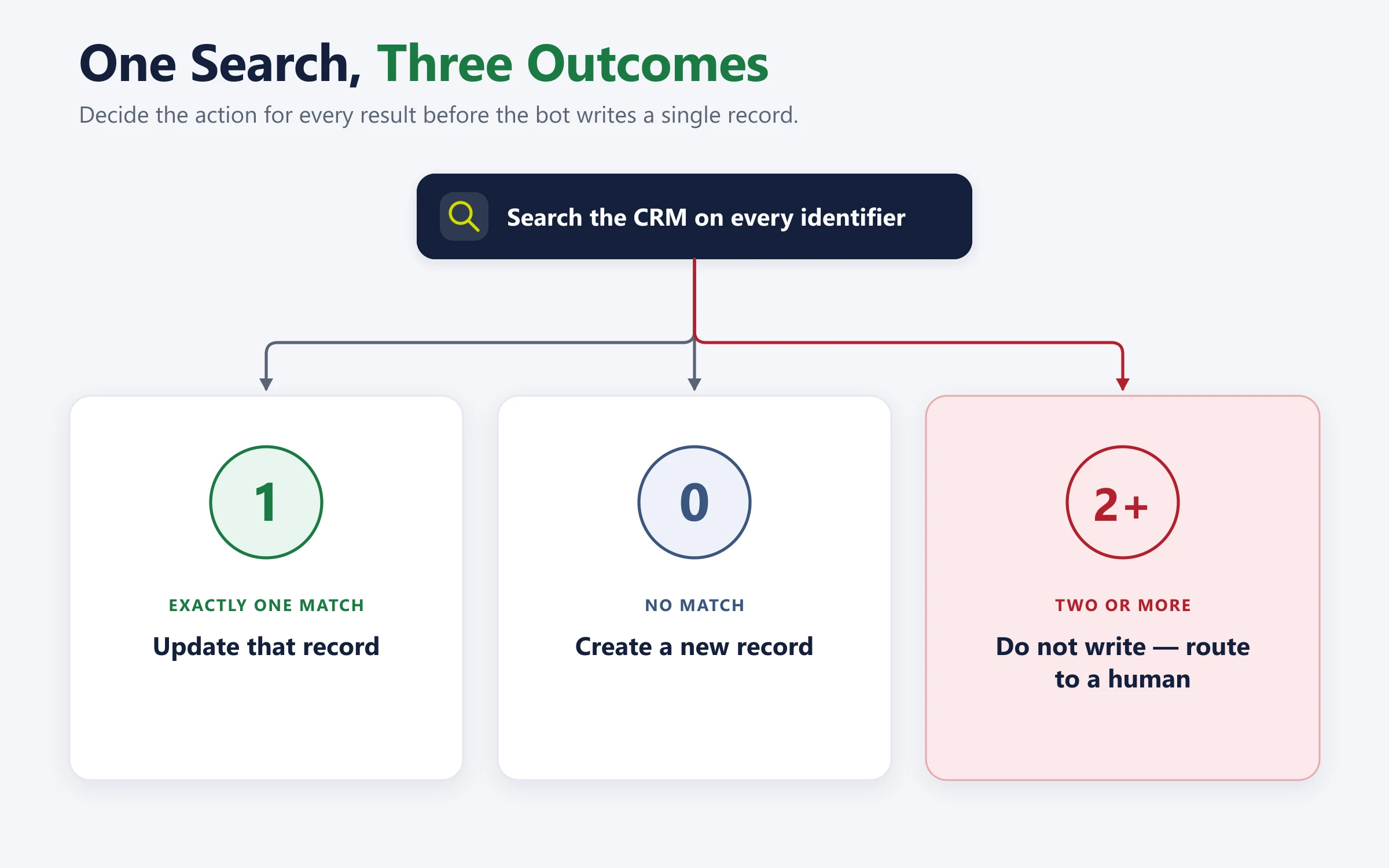
Then decide in advance what your identity resolution logic does on each outcome. Contact matching has exactly three results, and all three need a defined action:
| Search result | Action |
|---|---|
| Exactly one match | Update that record |
| No match | Create a new record |
| Two or more matches | Do not write. Log it and route to a human |
That third row is the one teams skip, and skipping it is how the wrong person ends up receiving someone else's information. An ambiguous match is not a reason to guess.
Step 3: Use upsert and make writes idempotent
Where your CRM provides an upsert operation (update the record if it exists, create it if it does not), use it for the final write. An upsert makes the match-or-create decision in one call rather than two calls with a race condition between them.
One caution. An upsert usually matches on a single key, such as email or an external ID. It cannot do the multi-identifier search from Step 2. So search on every identifier first, decide the outcome, then use the upsert keyed on the record you matched. Upsert makes the write safe. It does not replace the matching.
Where it does not, search then write, and attach an idempotency key so a retry cannot create a second record. The pattern is well established outside CRM work: an idempotency key lets you safely repeat a request without performing the same operation twice, because the server recognizes the retry and returns the original result instead of creating a new object.
This matters more for chatbots than for most integrations. Chat sessions drop mid-capture, mobile connections fail, and users double-submit. Without idempotency, each of those becomes a duplicate contact, and your integration quietly produces the exact problem it was meant to avoid.
Idempotency handles retries of the same request. It does not handle the same person in two chats at once, because the two conversations send two different requests with two different keys. For that, take a short lock on the normalized email or phone number before the search-and-write, or send all writes for one identifier through a single queue. The second write then sees the record the first one created.
The same discipline applies anywhere an AI system writes to a system of record. Our guide to connecting AI agents to your ERP with MCP makes an idempotency key a required field on every write tool for the same reason.
Step 4: Write fields conservatively
The governing rule: never overwrite a non-empty field with a value the bot inferred.
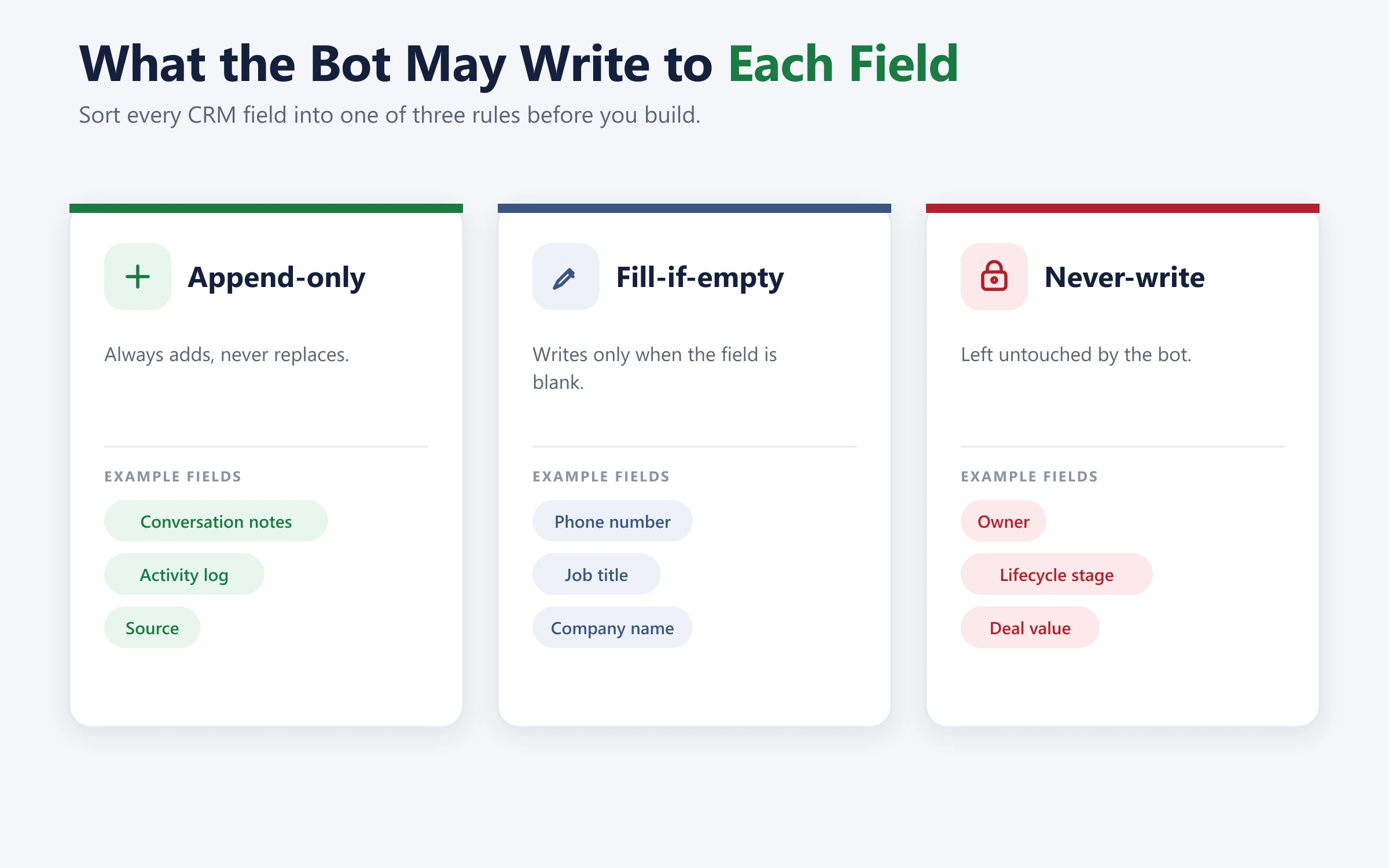
Sort every field into one of three categories before you build.
Append-only: Conversation notes, activity log, source attribution. The bot always adds, never replaces.
Fill-if-empty: Phone number, job title, company name. The bot writes only when the field is currently blank. If a rep already put something there, it stays.
Never-write: Owner, lifecycle stage, deal value, lead score, and anything that drives routing or reporting. These change through defined business processes, not through a chat conversation.
Lifecycle stage deserves specific mention. A bot that moves an existing customer back to "lead" because they asked a support question has broken your segmentation, and the correction is usually manual.
This is also where data minimization applies. GDPR requires personal data to be "adequate, relevant and limited to what is necessary" for the purpose. A chatbot that writes every detail a visitor happens to mention is collecting beyond that limit, and each extra field is another thing that can be wrong.
Step 5: Decide where conversation history goes
The transcript needs a home, and the choice has consequences.
As a note or activity on the contact record: Searchable, visible in the timeline where a rep expects it. The right default for most deployments.
As a linked ticket or case: Correct when the conversation is a support interaction with its own lifecycle.
As a summary rather than a raw transcript: A twelve-turn chat compressed into three lines a rep will actually read, with the full transcript kept in the chat platform and linked.
What not to do: write the transcript into a custom text field on the contact. It will hit length limits, overwrite on the next conversation, and make the record unreadable.
Carrying this context when the same customer arrives through different channels is a related problem, covered in our work on omnichannel AI chatbot CRM integration, where web, WhatsApp and in-app conversations all need to resolve to one record.
Step 6: Make the human handoff a clean write
Handing a conversation to a human is a CRM write too, and it is the one reps notice immediately when it goes wrong.
Three things to get right:
Context travels: The receiving person gets the conversation, what the bot established and what it could not resolve. A customer who has to repeat themselves to a human after talking to a bot is the fastest way to make an AI deployment unpopular.
The record is correct before the human arrives: Matched or created, fields written, conversation logged. The rep should not be fixing data before they can start working.
Ownership is assigned: Not to the integration, not left blank. To a person or a queue with a defined owner.
The same discipline applies when the conversation arrives by phone instead of chat, which we cover in AI voice agent development.
Testing Your Chatbot CRM Integration Before Launch
Test these six cases in a sandbox. The happy path already works; it is not what you are checking.
| Test case | Expected behavior |
|---|---|
| Returning visitor, different email address | Matched or flagged, not duplicated |
| Same person, two chats at once | One record, not two |
| Visitor gives no email | Created on phone, or held for review |
| Field already populated by a rep | Bot does not overwrite it |
| Conversation drops mid-capture | Partial data handled, no orphan record |
| Two possible matches found | No write, routed to a human |
Run these against a sandbox containing realistic messy data, not a clean test instance. Ten perfect test contacts prove nothing about a production CRM holding forty thousand imperfect ones.
Then audit after launch. CRM data quality is measured, not assumed, so sample the records your bot created in its first two weeks and check them by hand. The problems in that sample are the problems you would otherwise discover in six months at forty times the volume.
Common AI Chatbot CRM Integration Mistakes
Letting the integration own records: The service account becomes record owner and the lead enters nobody's queue. Captured and lost in the same motion.
Writing on every turn: The bot updates the CRM each time the visitor says something. Write once, when the conversation has produced something worth recording.
Trusting what the visitor typed: Mistyped email addresses, phone numbers missing a country code. Validate format before writing, and treat an invalid value as missing rather than writing it.
No rate limit handling: A busy day produces more writes than the CRM accepts, calls fail, and without retry-with-backoff those conversations never reach the CRM at all.
No audit trail: When a record looks wrong you need to know whether the bot wrote it, which conversation it came from, and what the value was before. Log every write with the conversation ID.
Assuming the CRM will sort out duplicates: Sometimes it does, sometimes it does not, and the exceptions tend to sit exactly where chatbots operate. CRM data quality is your responsibility, not the platform's.
When the CRM Is Not the Right Destination
Two cases where writing to the CRM is the wrong answer.
Anonymous conversations: Not every chat is a lead. A visitor who asks one question and leaves does not need a CRM record. Creating one for every anonymous chat fills your database with contacts that have no name, no email and no purpose, and distorts every count you report on.
High-volume routine support: If the bot handles thousands of support conversations, those belong in your helpdesk, not your CRM. Write to the CRM when the conversation changes the commercial relationship, not simply because it happened. Routing logic of this kind is covered in our work on AI automation.
Conclusion: The Write Rules Are the Integration
To connect an AI chatbot to your CRM is not technically difficult. Every major platform has a documented API, and a working connection is short work.
What decides whether the project succeeds is everything around the write. Whether the bot searches before it creates. What it does when the match is ambiguous. Which fields it will never touch. Whether anyone actually looks at the records it produced in the first two weeks.
Get those right and the CRM gets better, because every conversation becomes context a rep can use. Get them wrong and the chatbot quietly degrades the one system your sales team cannot work without, and nobody finds out until the data is already bad.
Start with the write table in step one. It is twenty minutes of work and it prevents most of what goes wrong.
If you want those rules designed alongside the build rather than bolted on afterwards, that is how we approach custom chatbot development. Our AI chatbot development services treat the CRM integration as part of the scope, not a cleanup task afterwards, and the same discipline runs through our wider AI development services.

I am the founder and CEO of Bitontree, where I lead embedded AI engineering teams that build and run production AI: agents, RAG and knowledge systems, document AI, and workflow automation for healthcare, logistics, legal, and SaaS companies. I write about what it actually takes to ship AI that survives contact with production.
Frequently Asked Questions
What is the first step to connect an AI chatbot to your CRM safely?

Define exactly which records and fields the bot may write, before any code. That table is the security boundary for the whole integration, and every other decision follows from it.
Why does my AI chatbot create duplicate contacts in the CRM?
Usually because it creates records without searching first, or because it searches only on the exact email the visitor typed. The same person using a personal email one time and a work email the next produces two records unless you match on multiple identifiers and escalate ambiguous matches instead of guessing.
Will my CRM automatically prevent duplicates from a chatbot?
Not reliably. Automatic deduplication often applies to contacts but not to companies, tickets or deals, and some platforms treat records created through the API differently from those created through forms or imports. Check your platform's documentation for API behavior specifically, since that is how a chatbot writes.
Should an AI chatbot be allowed to update existing CRM records?
Yes, but conservatively. Append to notes and activity, fill fields that are currently empty, and never overwrite a populated field or change owner, lifecycle stage or anything that drives routing and reporting.
What should happen when the chatbot finds two possible matching contacts?
Nothing should be written. Log the ambiguity and route it to a human. Guessing between two matches risks attaching one person's conversation to another person's record.
Where should chatbot conversation history be stored in the CRM?
As a note or activity on the contact record for most deployments, or as a linked ticket when the conversation has its own lifecycle. Store a readable summary rather than a raw transcript, and keep the full transcript in the chat platform with a link.
How do you stop a chatbot creating duplicates when a chat session drops?
Attach an idempotency key to every write. The CRM or your integration layer recognizes the retry and returns the original result instead of creating a second record.
How long does an AI chatbot CRM integration take to build?
The connection itself is days. Identity resolution, field write rules and testing against messy data are where the time goes, typically three to six weeks for a production integration depending on how many record types the bot touches.