September 30, 2026
How to Connect AI Agents to Your ERP Using MCP: A Practical Setup Guide

Yash Vibhandik
CEO


Most AI agent projects stall in the same place. The agent reasons well, retrieval works, and then someone asks it to check whether a purchase order was received. At that point it needs the ERP, and the ERP was not built to be spoken to by a language model.
Model Context Protocol (MCP) is the standard that closes that gap. Instead of writing a bespoke integration for every agent, you expose the ERP once and any MCP-compatible agent can use it.
This guide is the setup. What to decide before you connect AI agents to your ERP, how to handle authorization under the current specification, and how to put controls around operations that write to a system of record.
One note before starting. MCP has shipped five specification revisions, the most recent on July 28, 2026, and that revision changed the protocol foundations. Anything written before August 2026 describes a different protocol. We covered what changed in detail in our breakdown of MCP for enterprise agents and the 2026 spec.
What MCP Gives You for ERP Integration
When you connect AI agents to an ERP through MCP, you get three things specifically.
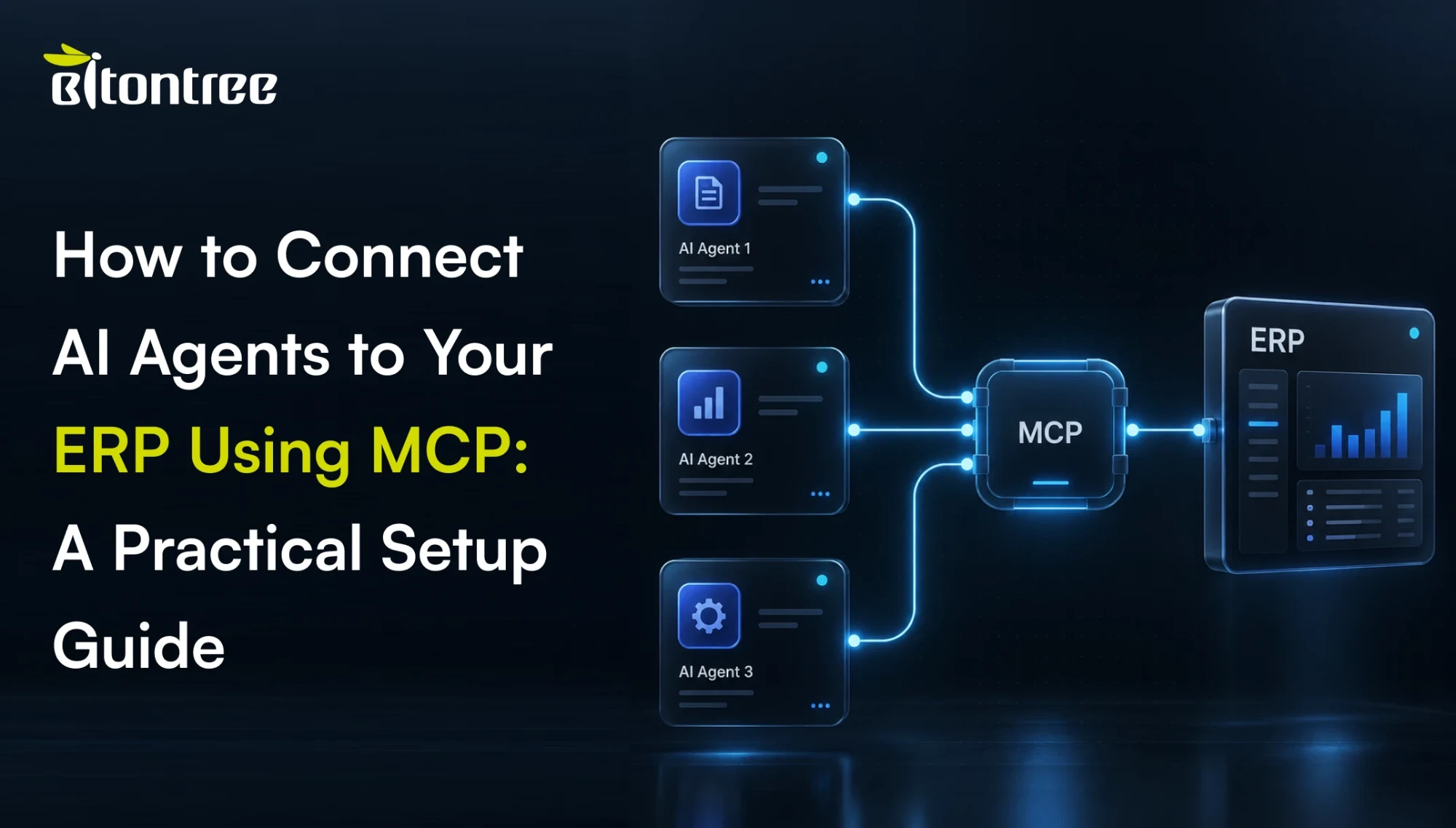
One interface instead of many: Expose the ERP through an MCP server once, and every agent that follows uses the same connection. Without it, three agents means three integrations and three sets of maintenance.
A place to put controls: ERP operations have consequences. Reading a stock level is harmless; posting a journal entry is not. MCP gives you a defined boundary where permissions, approvals and audit logging live, rather than scattering that logic across agent prompts.
Access to capability, not just data: An MCP server can expose business logic and actions, not only queries. That is what turns an agent from something that reports on your ERP into something that works in it.
What MCP is not: it is not an authorization system, and it does not make your ERP's business logic safe to call. It standardizes the connection. Governance is still yours, and most of this guide is about that half.
For a shorter introduction to the protocol itself, see our overview of MCP for startups and SMEs.
Before You Connect AI Agents to Your ERP: Three Decisions
Get these wrong and no amount of implementation quality rescues the project. They matter more than any technical choice that follows.
1. Which operations the agent may perform
Write the list. Not "access the ERP" but named operations: check stock for a SKU, retrieve purchase order status, create a draft requisition, place a return on hold.
For each, record three things:
| Question | Why it matters |
|---|---|
| Read or write? | Writes need approval design, reads usually do not |
| Reversible? | Irreversible operations need a human in the loop |
| Who approves it? | Named role, not "someone senior" |
This list becomes your tool surface. Start from the ERP's API surface instead and you will expose far more capability than the use case needs, which is the most common reason ERP MCP integrations get rolled back after launch.
2. Whose identity the agent acts under
The agent must act as a specific user, carrying that user's permissions, and the ERP must enforce them.
This is the most frequently skipped step. A shared service account with broad ERP permissions is convenient during development and means the ERP can no longer enforce anything meaningful. Every agent gets every permission the account holds.
Decide now: authenticated user identity passed through to the ERP, with the ERP making the authorization decision.
3. Whether your ERP already has an MCP server
This determines the shape and length of the project.
| Situation | What the project looks like |
|---|---|
| Vendor provides an official MCP server | Configure, then focus on permissions and guardrails |
| Vendor provides a gateway or sample code | Partial build on top of a supported foundation |
| No vendor support | Custom MCP server, designed around your operations list |
Microsoft provides a server for Dynamics 365 Finance and Operations, with tools for reading and changing data, working through application forms, and invoking business logic. SAP's MCP support varies by product and release and is still changing, so check SAP's own documentation for your system. Most other ERPs have no turnkey option.
Note what a vendor server like Microsoft's actually gives you. Its tools are general: create, read, update and delete on data entities, plus form navigation. You cannot narrow them to your operations list. With a vendor server, your main control is the security role of the identity the agent acts under, because the server only exposes what that role can access. That makes Decision 2 the most important decision in the project.
Check your vendor's current documentation rather than relying on any guide, including this one. This landscape moves every few months.
If you are building, the custom route has one real advantage worth weighing: you control exactly which operations exist. That is the single largest safety lever in the design. We cover that work on our MCP server development page.
How to Connect an AI Agent to Your ERP: Seven Setup Steps
Step 1: Configure the server
With a vendor server: check the prerequisites before you plan around it. For Dynamics 365 Finance and Operations that means a minimum product version, a Tier 2 or higher environment or a Unified Developer Environment (Cloud Hosted Environments are not supported), and adding your agent platform to the Allowed MCP Clients list. The server itself is enabled by default.
Also check the billing model. For agents built outside Copilot Studio, Microsoft charges 0.1 Copilot Credits per tool call to the server. A chatty agent design therefore has a direct cost, and that should shape the agent's design before you build, not after the first invoice.
Building your own: implement against the current specification revision. Design tools around business operations rather than endpoints.
Good:  place_purchase_order_on_hold(po_number, reason)
Bad:   update_record(table, record_id, field, value)
The narrow tool cannot be misused in ways you did not anticipate. The generic one gives the model hundreds of ways to be wrong, and you will discover them in production.
Step 2: Define the tools the agent will see
An MCP server advertises a list of tools. When an agent connects, it calls tools/list and receives that catalog, and from then on the agent can only do what the catalog describes. This is why your operations list from Decision 1 is the real security boundary: an operation you never define is an operation the agent cannot perform.
Each tool needs a name, a description the model will read to decide when to use it, and an input schema.
{
  "name": "get_purchase_order_status",
  "description": "Retrieve the current status, expected delivery date and receipt state of a purchase order. Read-only.",
  "annotations": { "readOnlyHint": true },
  "inputSchema": {
    "type": "object",
    "properties": {
      "po_number": {
        "type": "string",
        "description": "Purchase order number, e.g. PO-2026-00841"
      }
    },
    "required": ["po_number"]
  }
}
The description matters more than engineers expect. It is the main thing the model uses to decide whether this tool fits the request, so it should state what the tool does and what it does not. "Read-only" in that description is doing real work.
Back it up with tool annotations, which the specification provides for exactly this: readOnlyHint, destructiveHint and idempotentHint. The description tells the model. The annotations tell the client, which can use them to decide when to ask a human for approval. Annotations are hints, not enforcement, so the server must still enforce the rules itself.
A write tool carries more:
{
  "name": "place_purchase_order_on_hold",
  "description": "Place a purchase order on hold. Reversible. Requires approval before execution.",
  "annotations": {
    "readOnlyHint": false,
    "destructiveHint": false,
    "idempotentHint": true
  },
  "inputSchema": {
    "type": "object",
    "properties": {
      "po_number": { "type": "string" },
      "reason": { "type": "string" },
      "idempotency_key": {
        "type": "string",
        "description": "Unique key for this request. Prevents duplicate holds on retry."
      }
    },
    "required": ["po_number", "reason", "idempotency_key"]
  }
}
Four things to notice. The idempotency key is a required field, not an optional nicety. The description states reversibility, which is what lets you reason about approval policy. The annotations mark it as a write that is reversible and safe to retry. And the tool does one thing, so there is no argument combination that produces an operation you did not intend.
Inside the handler, the tool maps to your ERP's actual API call, with the authenticated user's identity attached. The agent never sees the ERP endpoint, the credentials or the table structure. It sees the tool.
Step 3: Connect the agent to the server
With the server running and tools defined, the agent needs to know the server exists. In most frameworks and agent platforms this is a configuration entry naming the server and how to reach it.
{
  "mcpServers": {
    "erp": {
      "url": "https://mcp.yourcompany.internal/erp",
      "transport": "http"
    }
  }
}
The exact format differs by client and platform, so treat this as an example and check your client's documentation.
On connection the agent calls tools/list, receives the catalog, and the tools become available to the model alongside whatever else it has.
Two things to get right at this point.
Scope the catalog per agent: A support agent and a procurement agent should not see the same tools. Either run separate server configurations, or return a filtered catalog based on the authenticated identity. An agent that can see a tool will eventually try it.
Under the 2026-07-28 revision, list results no longer vary by connection, and every list result carries a cache scope. If you filter the catalog by user, mark the result private so a shared cache never serves one user's tool list to another.
Verify what the agent actually received: Before testing behavior, inspect the tool list the agent holds. The most common surprise at this stage is an agent with more tools than anyone intended, because the server returned everything it could rather than everything it should.
A connected read-only agent is the right place to stop and confirm things work. Ask it a question that requires a lookup, and check the tool-call trace shows the expected tool with the expected arguments.
Step 4: Implement authorization
MCP authorization has been built on OAuth 2.1 since the 2025 revisions. The 2026-07-28 revision did not replace that foundation. It hardened it. Taken together, this is what a current implementation needs:
| Requirement | What it does |
|---|---|
| OAuth 2.1 with PKCE | Mandatory, protects against code interception |
| Protected Resource Metadata (RFC 9728) | Lets clients discover the correct authorization server |
| Resource Indicators (RFC 8707) | Binds a token to the resource it was issued for |
| Issuer validation (new in 2026) | Clients confirm the response came from the expected authorization server, preventing mix-up attacks |
| Issuer-bound credentials (new in 2026) | Client credentials are never reused with a different authorization server |
Resource Indicators are the one teams most often skip, and the failure they prevent is specific: a token minted for one resource being accepted by another. In an ERP context that is the difference between a scoped integration and an open door.
The 2026 revision also deprecated Dynamic Client Registration (DCR) in favor of Client ID Metadata Documents. DCR still works for backward compatibility, but new implementations should not depend on it. If your plan assumes DCR, check the current MCP authorization specification before building.
The bigger change in the 2026 revision is architectural: the protocol is now stateless. The initialization handshake and protocol-level sessions were removed, so any server instance can handle any request. You can put a plain load balancer in front of an MCP server with no shared session store, which makes scaling a non-issue rather than a design problem. If a workflow needs state across calls, the server issues an explicit handle and the agent passes it back as an ordinary tool argument.
Step 5: Add guardrails at the tool layer
A system prompt telling the agent not to post journal entries is not a control. It is a suggestion to a probabilistic system.
Four controls that work, in order of importance for ERP:
Idempotency keys on every write: Agents retry. Networks fail mid-call. Multi-step agent loops repeat steps. Without idempotency, each of those produces a duplicate transaction in a system of record. A duplicated purchase order is a real-world problem with a real-world cost. The same discipline applies to chatbots writing to a CRM, covered in how to connect an AI chatbot to your CRM without breaking your data.
Dry-run mode for writes: The tool returns a preview or diff of what would change, and a human approves before execution. For irreversible operations this is not optional.
Hard step limits on agent loops, with a defined fallback when the limit is hit. An unbounded loop against a metered ERP connection is an unbounded bill and an unbounded blast radius.
An audit log for every action: user, prompt version, model version, tool name, arguments, approver, result. When something goes wrong in an ERP, "the AI did it" is not an acceptable answer to an auditor.
OWASP's guidance on excessive agency reaches the same conclusion: enforce controls in the systems that execute actions, not in the model.
Step 6: Test the failure cases
Before any agent touches production ERP data, test these four. The happy path will already work; it is not what you are checking.
| Test | Expected behavior |
|---|---|
| Ambiguous request | Agent asks rather than guesses |
| Request outside user's permissions | Refused by the ERP, not by the prompt |
| Repeated or retried write | No duplicate transaction created |
| Injection payload inside ERP data | Instructions in a vendor name or item description are ignored |
That last one deserves emphasis. Vendor names, item descriptions and free-text notes in your ERP are user-supplied content. If an agent reads them, they are an injection surface, and an agent with write access makes that a live risk rather than a theoretical one.
Assert on the tool-call trace, not the chat response. A polite, reasonable-sounding answer can sit on top of an unwanted write.
Step 7: Roll out in stages
Three stages, in order, with no skipping:
- Read-only. The agent can query but not change anything. Run it long enough to see how it behaves on real requests.
- Writes with approval. Every write produces a preview a human signs off.
- Automatic execution, limited to reversible, low-impact operations that have a measured track record at stage two.
Most failed deployments started at stage three because the demo was convincing.
Where ERP MCP Integrations Go Wrong
Five patterns, all recoverable if caught early and expensive if not.
Exposing the API surface instead of business operations: A generic update tool gives the agent hundreds of ways to be wrong. Narrow tools give it one way to be right.
Service account permissions: The ERP stops being able to enforce anything, and you have moved authorization into a prompt.
No idempotency: Retries and agent loops produce duplicate transactions. This one is usually discovered by finance, not by engineering.
Treating ERP content as trusted input: Free-text fields are user-supplied. An agent that reads them is reading untrusted content.
Treating MCP as the security layer: It is a connection standard. Authorization, approval and audit remain your responsibility on both sides of it.
When Not to Use MCP for ERP Access
Two cases where a simpler answer is better.
A single fixed workflow: If one agent needs three operations and that will not change, a direct integration is simpler and easier to reason about. MCP earns its complexity when multiple consumers need evolving access.
Pure reporting: If the agent only answers questions from ERP data and never acts on it, export to a read-optimized store instead. Querying a production ERP through an agent is slower, costlier and riskier than querying a replica. In our AI automation work, analytics use cases land on this answer more often than not. If people need to ask questions over documents rather than tables, that is a retrieval problem instead, covered in why your RAG chatbot gives wrong answers.
A Realistic Timeline
| Phase | Vendor server | Custom server |
|---|---|---|
| Scoping and permission design | 1 to 2 weeks | 1 to 2 weeks |
| Server build | n/a | 4 to 8 weeks |
| Tool definition and agent connection | 3 to 5 days | 3 to 5 days |
| Guardrails and testing | 2 to 3 weeks | 2 to 3 weeks |
| Staged rollout | 4 weeks or more | 4 weeks or more |
The pattern worth noticing: the connection is the fastest part of the project. Deciding what the agent may do, and proving it behaves when inputs are messy, is where the time goes. That holds across AI agent development generally, and more so when the agent can write to a system of record.
Conclusion: Start With the Operations List
MCP solves a real problem. Before it, connecting agents to an ERP meant a bespoke integration per agent and a maintenance burden that scaled badly. The July 2026 revision made it much easier to run at enterprise scale, mainly by making the protocol stateless, and it tightened authorization further.
But the hard part of how to connect AI agents to your ERP was never the protocol. It is deciding which operations an agent may perform, enforcing that in the ERP rather than in a prompt, and proving the system behaves when input is ambiguous or hostile.
Get that right and the connection is straightforward. Get it wrong and MCP makes it straightforward to do damage quickly.
Start with the operations list. Everything else follows from it.
I am the founder and CEO of Bitontree, where I lead embedded AI engineering teams that build and run production AI: agents, RAG and knowledge systems, document AI, and workflow automation for healthcare, logistics, legal, and SaaS companies. I write about what it actually takes to ship AI that survives contact with production.
Frequently Asked Questions
What is MCP in the context of ERP systems?

Model Context Protocol is a standard interface between AI agents and external systems. For ERP it means exposing finance, supply chain or procurement operations once through an MCP server, so any compatible agent can use them without a separate integration each time.
Do I need to build an MCP server for my ERP?
It depends on your ERP. Some vendors provide one, some provide a gateway or sample code, and many have nothing. Check your vendor's current documentation first, since this changes every few months.
How does an AI agent actually connect to an MCP server?
The server is registered in the agent's configuration with its URL and transport. On connection the agent calls tools/list and receives the catalog of tools the server advertises, which is the complete set of operations it can perform. Scope that catalog per agent rather than returning everything the server can do.
How do you stop an AI agent making unauthorized changes in an ERP?
Through the ERP's own permission model applied to the authenticated user rather than a shared service account, plus dry-run previews with human approval for writes, idempotency keys to prevent duplicates, and tool definitions narrow enough that unintended operations do not exist. Prompt instructions are not a control.
Can an AI agent post financial transactions automatically?
Technically yes, and in most organizations it should not, at least not at first. Start read-only, move to writes with approval, and allow automatic execution only for reversible, low-impact operations with a measured track record.
What authorization does MCP require?
OAuth 2.1 with mandatory PKCE, Protected Resource Metadata so clients can discover the authorization server, and Resource Indicators so tokens are bound to the intended resource. The 2026-07-28 revision added issuer validation and issuer-bound client credentials, and deprecated Dynamic Client Registration in favor of Client ID Metadata Documents.
How long does an ERP MCP integration take?
Roughly two to three months from scoping to the end of staged rollout where a vendor server exists, plus four to eight weeks if you are building the server. Most of that time is permission design and testing, not the connection.
Is ERP data safe to feed into an AI agent?
Treat it as untrusted input. Vendor names, item descriptions and free-text notes are user-supplied content, and instructions hidden in them will reach your agent. Test for that explicitly before granting write access.