

Most businesses do not have an email problem. They have an email management problem, and AI email management is the first approach that treats it as one.
Start with the volume. The average worker receives 117 emails a day, and most of them are skimmed in under 60 seconds. That figure comes from Microsoft's own telemetry across Microsoft 365, published in its Work Trend Index special report Breaking down the infinite workday in June 2025. The same research found that 40% of people who are online at 6am are already reviewing email to work out the day's priorities.
Thirteen years earlier, the McKinsey Global Institute put a number on the time cost. Its report The social economy, published in July 2012, estimated that the average interaction worker spends 28% of the workweek managing email.
Those two findings, more than a decade apart, describe the same unsolved problem. People are not short of email tools. They are short of a way to turn email into work that someone is accountable for.
This article is about that gap. It covers why business emails get missed, what manual email management actually costs, and how AI email management converts an inbox into a list of tracked actions with owners and dates. It is written for the person who has to run the business, not the person who has to build the system. If you want the technical breakdown of how the classification and extraction works, that is covered separately in our guide to the AI email assistant.
Why Important Business Emails Get Overlooked
Nobody misses an email on purpose. They miss it because the inbox is structured in a way that makes missing things inevitable.
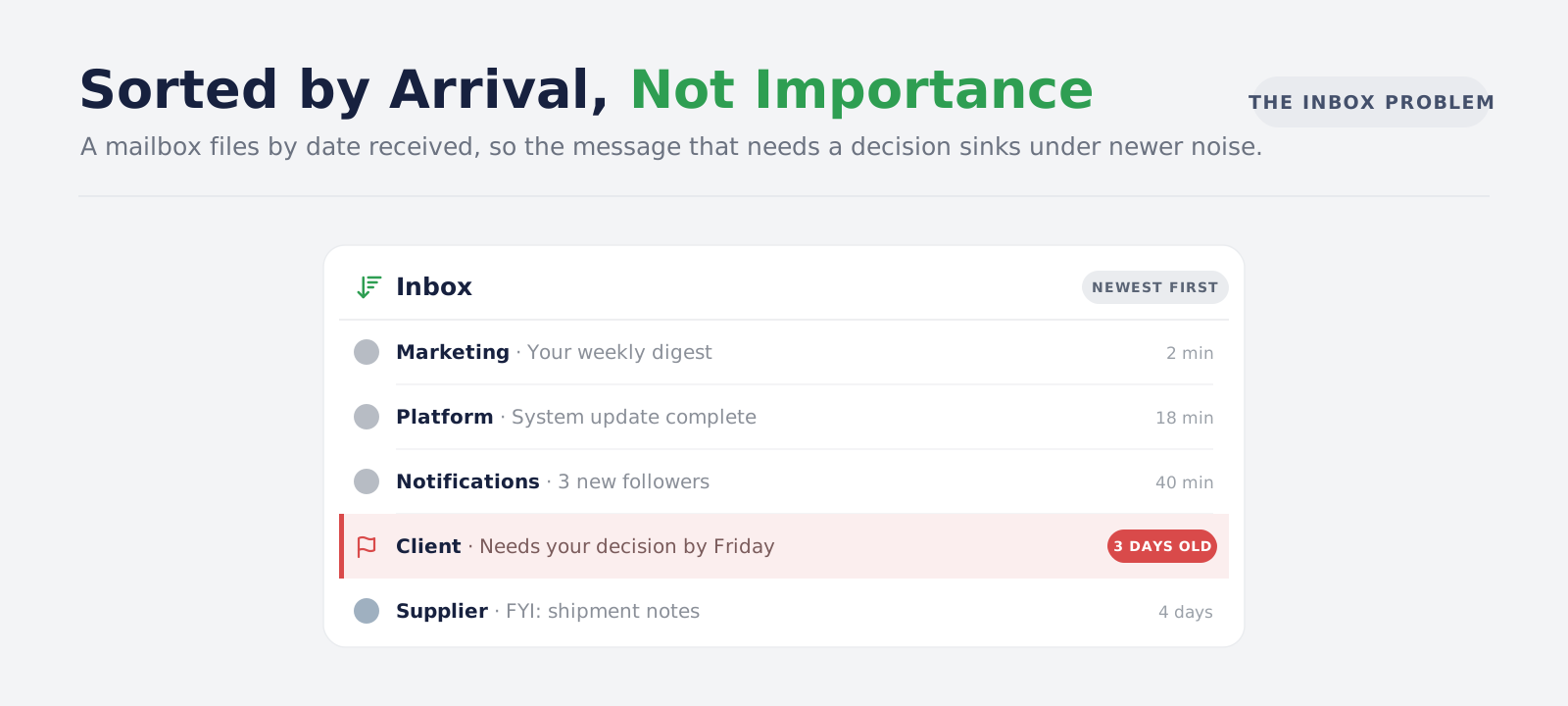
Your Inbox Is Ordered by Arrival Time, Not by What Matters
Every mailbox in common use sorts by date received. That is a filing decision, not a prioritisation decision, and it has three consequences:
- Urgency and recency get confused: the newest message sits at the top whether it is a contract signature request or a software update notice
- Important mail sinks: a message that needed a decision on Tuesday is on page three by Thursday, not because it was handled but because other mail arrived
- Re-reading becomes the only sorting method: to find out what still needs attention, you reopen threads you have already read
Folders and labels help with retrieval. They do not help with email prioritisation, because you have to have read a message before you can file it, and by then the judgement has already been made in your head and then lost.
This is why business email management rarely improves with a new client or a cleaner folder structure. The filing changes. The decision-making does not.
Email Commitments Hide Inside Threads, Not in Subject Lines
The subject line of a thread is written once, at the start, by whoever began it. Everything that matters is agreed later.
A thread titled "Re: Q3 pricing" might contain a supplier agreeing to a delivery date, a colleague promising to send revised figures, a client asking for a decision by month end and a quietly inserted change to payment terms. None of that is visible from the inbox list view. All of it is actionable.
This is the core reason email search does not solve the problem. Search finds messages. It does not find obligations.
The People With the Most Email Have the Least Time to Sort It
Email volume rises with seniority and with how many processes run through a person. The result is predictable:
- Founders and directors: receive the decisions, the escalations and every thread they were copied into for visibility
- Operations and account managers: hold the commitments that keep delivery on schedule
- Finance and admin: receive the invoices, renewals and compliance deadlines that have real dates attached
These are exactly the people who cannot spend an hour a day triaging, and exactly the people whose missed email costs the most.
What Manual Email Management Costs Your Business
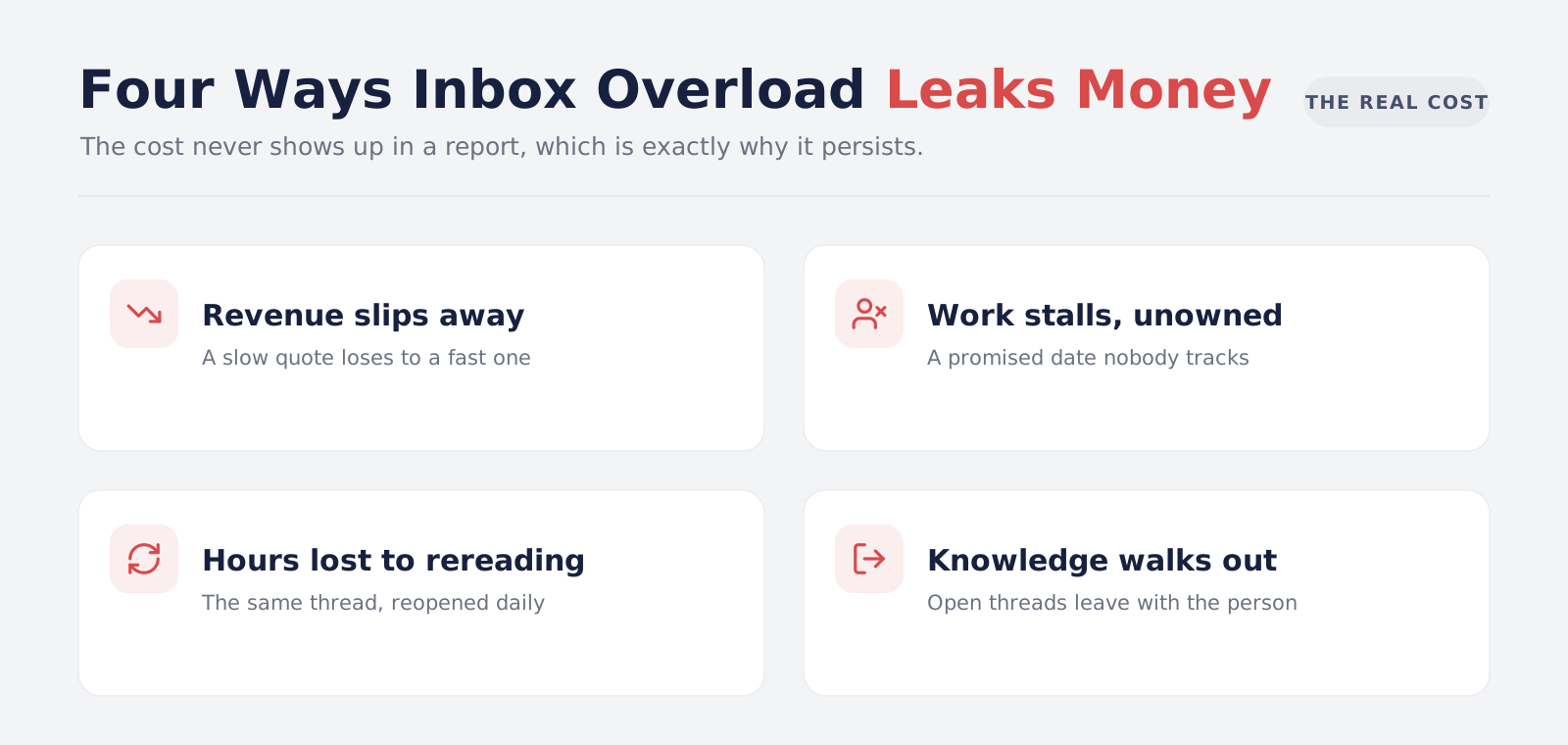
The cost of inbox overload is rarely recorded anywhere, which is why it persists. It shows up as four separate leaks.
Revenue Lost to Slow Email Replies
A quote that sits unanswered for three days competes against a quote answered in three hours. The lost deal is attributed to price or timing, because the slow reply never appears in any report.
The same applies to inbound enquiries that arrive outside business hours, to clients asking about an upsell, and to renewal conversations that nobody picked up.
Stalled Work When Nobody Owns Email Follow-Up Tracking
When a supplier says they will confirm by Friday, that is a commitment with a date and an owner. It almost never gets recorded anywhere. Friday passes, nobody notices, and the work stalls until someone downstream discovers the gap.
The pattern repeats across every function:
- Procurement: a vendor agreed to a revised delivery date in an email thread
- Sales: a prospect said they would come back after an internal review
- Legal and finance: a counterparty promised a signed document
- Delivery: a client owes you approval, content or access before the next phase can start
Each one is a dependency your business is carrying without a record of it.
The Hidden Cost of Manual Email Triage
Because nothing is extracted, every check requires rereading. A forty-message thread gets reopened each time someone needs to confirm what was agreed, and each reread risks a different interpretation.
This is pure waste. The information was read once already. It was simply never captured in a form that could be looked up. Manual email triage repeated daily by five people is a full working day a week spent re-deciding things that were already decided.
Business Email Knowledge That Leaves With the Person
When someone goes on leave, changes role or exits the company, the commitments they were carrying exist only in their mailbox and in their memory. Handover documents capture process. They rarely capture the twenty open threads where someone owes someone else something.
How AI Email Management Turns Messages Into Tracked Actions
AI email management is the practice of putting a layer between the mailbox and the person, so that mail arrives already sorted by what it needs rather than when it arrived. Unlike ordinary email automation, which moves and labels messages, it produces email task management output: a list of work rather than a tidier queue of mail.
In outcome terms, it does four things:
- Sorts by required attention: every message is labelled with the kind of response it needs, such as a decision, a reply, an action, or nothing at all
- Extracts commitments into records: obligations inside threads become tracked items with a title, an owner and a due date, each linked back to the message that created it
- Separates your work from other people's: things you owe go to one list, things others owe you go to another
- Produces a daily view: one page showing what is due, what is overdue, what is waiting and what is scheduled
The important shift is from reading to tracking. An inbox is a queue of messages. The output of AI email management is a queue of work, and work can be assigned, chased, measured and handed over. It is the same shift that AI agent development projects aim at generally: moving a business from systems that store information to systems that carry accountability.
The mechanics of how the classification and extraction happen are a separate subject, covered in our AI email assistant guide. What matters commercially is the change in what your team is looking at each morning.
Email Follow-Up Tracking for Pending Decisions
Most stalled work in a business is not blocked by difficulty. It is blocked by a decision nobody has made, sitting in a thread nobody has reopened.
Tracked decisions change three behaviours:
- A pending decision becomes visible to someone other than the recipient: it stops being invisible until it becomes urgent
- The age of a decision becomes measurable: "this has been open for nine days" is a fact you can act on, where "I think someone asked about that" is not
- The decision keeps its evidence: the exact message that raised it stays attached, so the context does not have to be reconstructed
For teams where decisions frequently cross departments, this is often the single highest-value outcome. The same pattern underpins how we build AI sales workflow automation, where the cost of an unanswered question is measurable in pipeline.
Managing Email Deadlines and Waiting-For Items
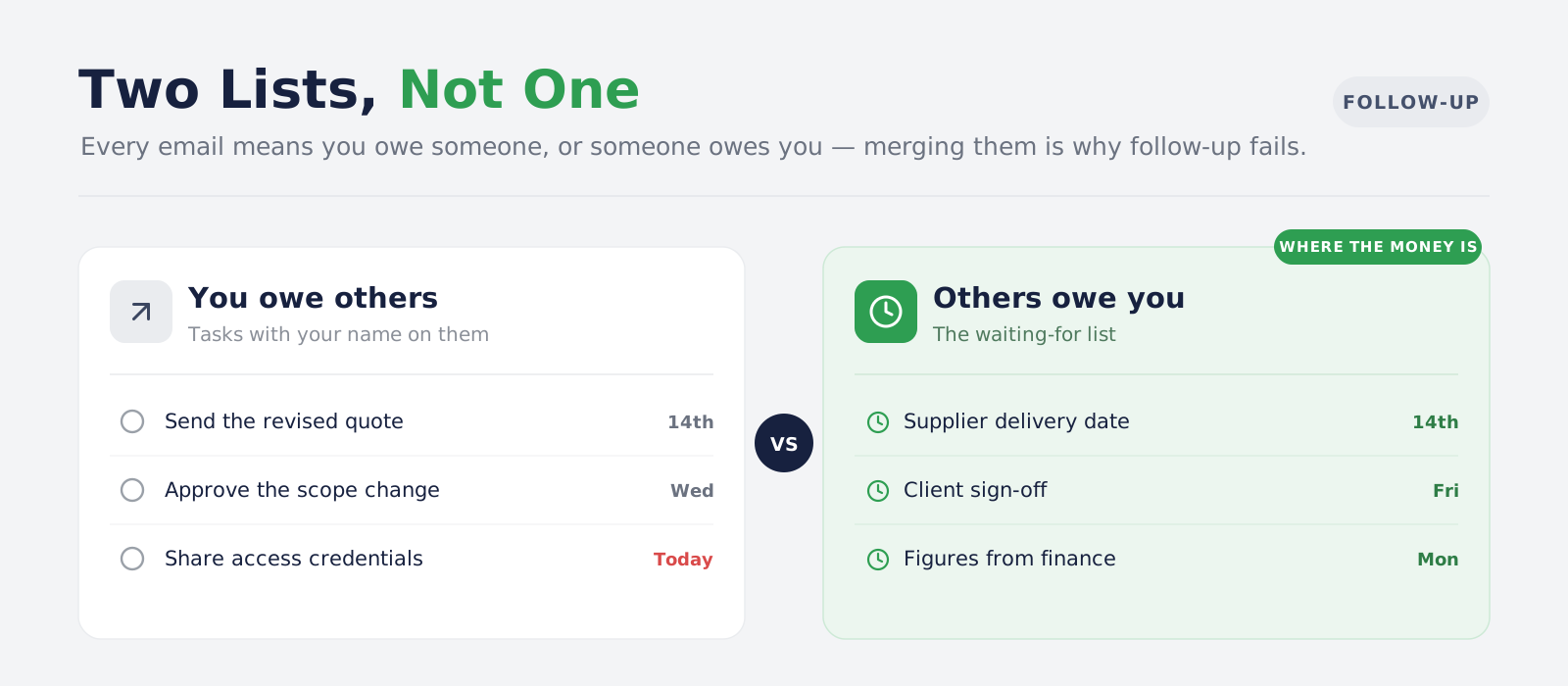
Every business email implies one of two things: you owe somebody something, or somebody owes you. Treating these as the same list is why follow-up fails.
Email Commitments You Owe Other People
These are straightforward once extracted. Each becomes an item with a due date, and the daily view surfaces them as the date approaches. Nothing exotic here, but the gain is real: the work is in a list rather than in your memory of an email you read on Tuesday.
Waiting-For Items: What Other People Owe You
This is the list almost nobody keeps, and it is where the money is.
- Supplier commitments: delivery dates, revised quotes, replacement parts
- Client obligations: approvals, content, access credentials, signed documents
- Internal dependencies: figures from finance, a sign-off from legal, a spec from engineering
- Third parties: a bank, an auditor, a regulator or a landlord who said they would revert
Where those obligations arrive as attachments rather than message text, intelligent document processing covers the extraction side, since a date inside a PDF is invisible to anything reading only the email body.
Each of these, left untracked, becomes a delay that gets discovered rather than prevented. Each one, tracked, becomes a chase email sent on the right day.
One honest limit: a waiting-for list built this way captures commitments that were actually stated in a thread. It is not a detector of every email you sent that nobody answered. Those are different problems, and any vendor who conflates them is overselling.
Setting Daily Email Priorities With an Executive Brief
A tracked list is better than an inbox. A daily brief is better than a list, because it answers the question people actually start the day with, which is not "what is outstanding" but "what matters today".
A useful daily brief contains:
- Due and overdue items: with the thread each came from
- Decisions awaiting you: oldest first, since age is the risk factor
- Waiting-for items that have passed their date: the chase list
- Today's meetings with their related threads: so preparation is not a separate exercise
- Flagged risks and deadlines: anything with a date attached that is approaching
The behavioural effect is what matters. A brief read at the start of the day replaces the hour of inbox triage that the Microsoft research found people doing at 6am. The decisions are the same decisions. They are simply made once, from a summary, instead of repeatedly while scrolling.
This is where the return is largest for founders, directors and senior managers, because their email volume is highest and their available time is lowest.
We know that because we have built it. Bitontree designed and delivered an executive assistant product that does exactly what this article describes: connected mailboxes and calendars, classified mail, commitments extracted into tracked actions with owners and dates, a separate waiting-for list, and a dated daily brief assembled from all of it. You can read how that was put together in our AI email assistant for executives case study.
A brief is also the artefact that makes delegation possible. A manager can see what their team is waiting on without asking each person, and a person covering for a colleague inherits a list rather than a mailbox. Teams that extend this into a searchable record of decisions usually pair it with an internal knowledge assistant, so last quarter's agreements remain answerable without reopening threads.
AI Email Management in Practice: Four Business Scenarios
Scenario 1: A Supplier Delivery Date Agreed Inside an Email Thread
-
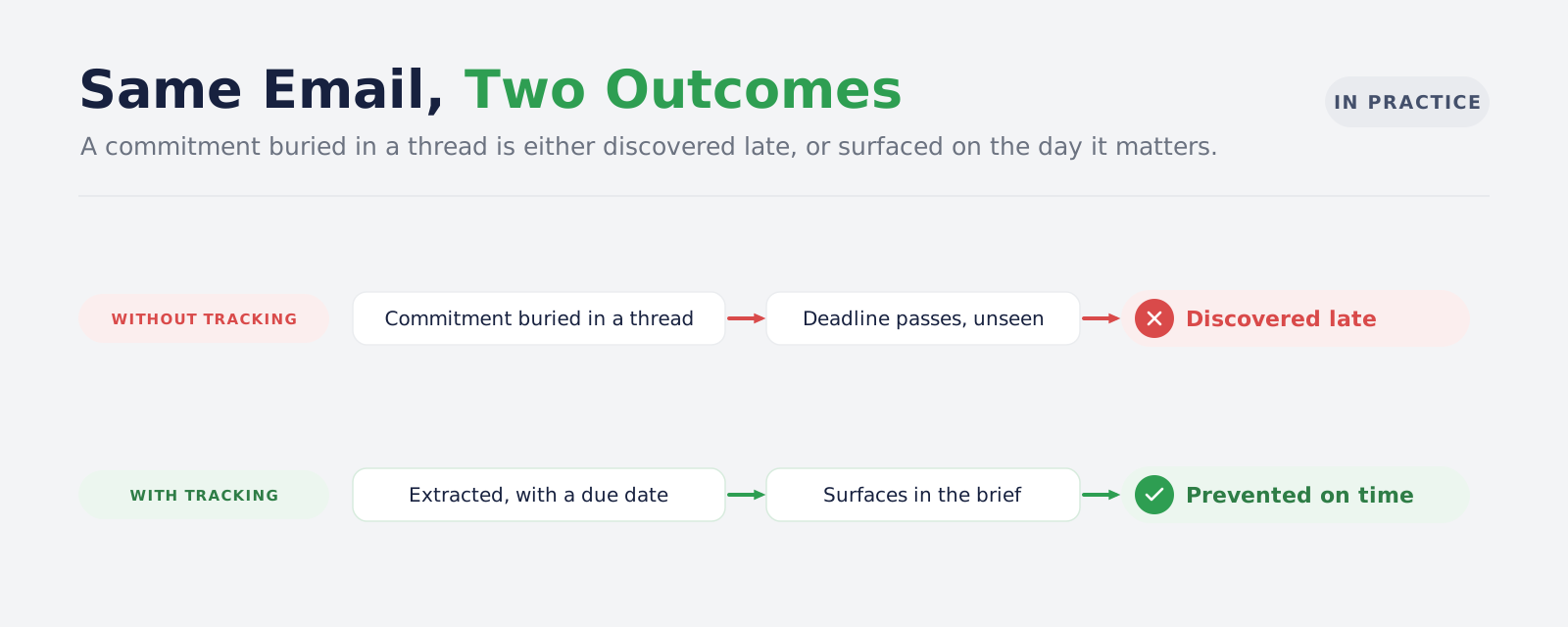
The situation: a procurement thread runs to thirty messages. On message nineteen, the supplier agrees to deliver by the 14th.
-
Without tracking: the date lives in one person's memory. The 14th passes. The gap is discovered by production on the 17th.
-
With AI email management: the commitment becomes a waiting-for item owned by the supplier, dated the 14th, linked to message nineteen. It appears in the daily brief on the 13th. One chase email prevents a three-day production delay.
Scenario 2: A Client Decision That Never Arrives
-
The situation: a client is asked to approve a scope change. They reply about something else. The approval is never given or refused.
-
Without tracking: the project team assumes it is handled. Work proceeds on the old scope. The discrepancy surfaces at delivery.
-
With AI email management: the request is classified as decision required and stays open. Its age is visible. After five days it is raised in the brief, and someone asks again before the work is built on an assumption.
Scenario 3: A Renewal Date Buried in an Attachment
-
The situation: a vendor agreement with a 60-day notice period arrives as a PDF attached to an email, eleven months before it matters.
-
Without tracking: the renewal auto-executes. You discover it on the invoice.
-
With AI email management: the deadline is extracted and tracked against its date. Combined with AI contract analysis, the notice window becomes a calendar item rather than a surprise.
Scenario 4: An Email Handover When Someone Goes on Leave
-
The situation: an account manager takes two weeks off. Fourteen clients have open threads with her.
-
Without tracking: she writes a handover note from memory. Three commitments are missed, discovered when a client follows up annoyed.
-
With AI email management: her open actions and waiting-for items are already a list. The cover person works from it. The handover takes ten minutes and nothing depends on what she remembered to write down.
Which Teams Get the Most From AI Email Management
Not every team benefits equally. The gain is largest where email is the system of record for commitments rather than a notification channel.
| Team | Why email overload hurts here | What tracking changes |
|---|---|---|
| Operations and logistics | Delivery dates and exceptions are agreed in threads | Waiting-for items become a daily chase list |
| Sales and account management | Follow-up timing decides win rates | Open decisions surface before they go cold |
| Finance and procurement | Invoices, renewals and approvals carry hard dates | Deadlines are extracted rather than remembered |
| Professional services | Client approvals block billable work | Stalled approvals become visible on day three, not day thirty |
| Leadership | Volume is highest, available time is lowest | A brief replaces an hour of triage |
Teams whose work lives mainly in a ticketing system, a CRM or a project tool get less from this, because their commitments are already captured somewhere. For them, the better starting point is usually a customer support AI assistant or broader business process automation.
What AI Email Management Will Not Fix
Being clear about this is part of making the business case honestly.
- It will not fix a communication culture problem: if decisions are deliberately avoided, tracking them makes the avoidance visible, which helps, but somebody still has to decide
- It will not read mail you never receive: commitments made on a call, in a corridor or in a chat tool are outside its scope unless those systems are connected too
- It will not be right every time: classification is a judgement, extraction is a proposal, and both need a review path that takes one click
- It will not replace your CRM or project tool: it feeds them. An extracted commitment that belongs in a deal record should end up in the deal record
- It will not reduce the volume of email arriving: it changes what happens to mail after it arrives, which is a different problem from the one your spam filter solves
How to Tell If Your Business Needs AI Email Management
Five questions. Answer them honestly rather than optimistically. If three or more come back yes, there is a case worth costing.
Has a commitment made in an email thread been missed in the last quarter, with a cost attached?
One concrete incident is usually enough to justify the investigation, and almost every business has one if they look. The useful version of this question is not "do we miss things" but "what did the last one cost". Put a number on it: the delayed shipment, the renewal that auto-executed, the client who escalated because nobody replied. If that number is larger than a month of the system's running cost, the argument is already made. If nobody can recall an incident, either your processes are working or your incidents are not being recorded, and it is worth knowing which.
Does anyone in your business spend more than an hour a day in their inbox deciding what to do?
Note the wording. This is not time spent reading or replying, which is productive work. It is time spent deciding what deserves attention, which produces nothing. Ask three people to estimate it, then multiply the total by their loaded cost and by roughly 220 working days. For a small leadership team the annual figure is usually large enough to surprise the person who asked. Compare that against a build cost rather than against zero, because the current approach is not free, it is simply unbilled.
When someone goes on leave or leaves the company, is the handover built from memory?
If the answer is a document someone writes the week before they go, you are carrying undocumented obligations. Test it directly. Take the last person who went on leave and ask what was outstanding in their mailbox on the day they left. If nobody can answer, those commitments were held by one person and nothing recorded them. That is a continuity risk as much as an efficiency one, and it gets worse as the business grows, because the number of people holding undocumented obligations grows with it.
Can you say today what your business is waiting on from suppliers and clients?
This is the sharpest of the five, because the answer is binary. Either there is a list or there is not. If producing one means asking three people to check their inboxes, you do not have a system, you have five people each holding part of the picture. Try it now with one department and time how long it takes. The exercise usually settles the question faster than any business case.
Do decisions stall without anyone noticing until they become urgent?
This is the clearest symptom of commitments living in an inbox rather than a list. The pattern to look for is work that was blocked for weeks and then resolved in a day once somebody finally chased it. The delay was never a difficulty problem. It was a visibility problem, and visibility is exactly what tracking provides.
If most of your answers are no, your processes are probably already capturing this somewhere else, in a CRM, a project tool or a disciplined operating rhythm. In that case your budget is better spent elsewhere, and we would rather tell you that at the first meeting than at the third invoice.
Conclusion
Inbox overload is usually described as a volume problem, and treated with filters, folders and discipline. It is not a volume problem. It is a translation problem.
Email arrives as messages. Business runs on commitments, decisions and dates. Nothing in a standard mailbox performs that translation, so it gets done manually, repeatedly, by the people who can least afford the time, and it gets done inconsistently because it depends on attention.
AI email management does that translation automatically and keeps the result in a list rather than in somebody's head. The measurable outcomes are fewer missed commitments, faster decisions, cleaner handovers, and an honest answer to the question of what your business is currently waiting on.
The starting point is not technology. It is one missed commitment from last quarter, with a cost attached. If you have one of those, the rest of the case writes itself.
Bitontree designs and builds AI email management systems for businesses that have reached that point. We connect to the mailboxes you already use, define the categories around how your team actually triages work, and deliver the tracked actions, waiting-for lists and daily briefs described above. If the assessment shows your commitments are already being captured elsewhere, we will say so.

I am the founder and CEO of Bitontree, where I lead embedded AI engineering teams that build and run production AI: agents, RAG and knowledge systems, document AI, and workflow automation for healthcare, logistics, legal, and SaaS companies. I write about what it actually takes to ship AI that survives contact with production.
Frequently Asked Questions
What is AI email management?
AI email management is the use of classification and extraction to turn incoming business email into prioritised, trackable work. Rather than sorting messages into folders, it identifies what each message requires and converts commitments inside threads into records with an owner and a due date.
How is this different from inbox rules and email automation?
Rules and ordinary email automation match structured conditions such as sender or subject and move messages. They cannot evaluate meaning, so they cannot tell a decision request from a status update, and they cannot extract a promised date from the body of a thread.
Does AI email management stop emails being missed?
It reduces missed emails by making required attention visible rather than relying on someone noticing. It does not guarantee nothing is missed, since classification is a judgement, which is why the review path matters as much as the accuracy.
Will it work with our existing email provider?
It connects to your existing mailboxes rather than replacing them. Your team keeps the email client they already use. The tracked actions and the daily brief live alongside it.
Do we have to give it access to all our email?
No, and you should not. A sensible deployment lets you choose which mailboxes and which folders are processed, and lets you exclude senders entirely. Under GDPR Article 5, the data you process should be limited to what the purpose actually requires.
How long before we see a return?
The waiting-for list usually produces the first visible win, because chasing a commitment on the right day prevents a delay that would otherwise be discovered late. Expect the first few weeks to involve tuning categories to how your business actually triages work.
Is this the same as an AI assistant that writes our emails?
No. Draft generation is one capability among several, and it should always produce a draft you approve rather than sending anything on your behalf. The value described here comes from tracking, not from writing.
Do we need in-house AI engineers to run this?
Not to run it day to day, but somebody needs to own how your categories are defined and review where the system and your team disagree. Companies without that capacity internally often engage AI and ML developers for the build and keep a lighter arrangement afterwards.