July 3, 2026
WhatsApp AI Agents for Business: How to Automate Sales and Bookings 24/7

Yash Vibhandik
CEO


Your customers are already on WhatsApp. The real question is whether your business answers them at 11 p.m. on a Sunday, or lets the enquiry, and the sale, go cold until Monday morning. This is exactly the gap WhatsApp AI agents for business are built to close. Instead of a human racing to reply to every message, an AI agent sits on your WhatsApp number and handles conversations around the clock: answering questions, recommending products, qualifying leads, and booking appointments automatically, in natural language, in your customer's own words.
In this guide, we break down what a WhatsApp AI agent actually is, how it works, what it can do, what it hands to your team and when, what it costs, and how it stacks up against Meta's built-in Business Agent, so you can decide whether it is the right move for your business.
Key Takeaways
- A WhatsApp AI agent is an AI-powered assistant on WhatsApp Business that understands messages and takes action. It sells, qualifies, and books, 24/7.
- Run as a WhatsApp AI sales agent, it handles the first response, qualifies the enquiry, and only involves your team when the lead is worth their time.
- It runs on the WhatsApp Business API, is trained on your own business data, and connects to your CRM, catalogue, and calendar.
- The biggest wins are automated sales and automated appointment bookings, with no missed messages and instant replies at any hour.
- The handoff matters as much as the automation. A good agent knows when to stop and pass the chat to a person, with the full history attached.
- Meta's free Business Agent covers the basics. A custom WhatsApp AI agent is for deeper integrations, complex workflows, and full control.
What Is a WhatsApp AI Agent?
A WhatsApp AI agent is an AI-powered assistant that operates on your WhatsApp Business account and uses a large language model (LLM) to understand customer messages in natural language and respond, or act, without human intervention. Unlike a basic auto-reply, a WhatsApp Business AI agent can answer product questions, recommend items, qualify a lead, take an order, and book an appointment, all inside the same chat, 24 hours a day.
The word "agent" matters here. Earlier WhatsApp bots followed rigid, pre-written scripts and broke the moment a customer phrased something unexpectedly. A modern AI agent for WhatsApp understands intent, holds context across a conversation, pulls answers from your real business data, and connects to your other systems to get things done, not just reply.
WhatsApp AI Agent vs WhatsApp Chatbot: What's the Difference?
People often use "WhatsApp AI agent" and "WhatsApp AI chatbot" interchangeably, but there is a meaningful gap between an old-style chatbot and a true AI agent.
| Traditional WhatsApp chatbot | WhatsApp AI agent | |
|---|---|---|
| How it responds | Fixed menus and scripted keyword rules | Understands natural language and intent |
| Handling the unexpected | Breaks or loops when the question is off-script | Adapts and answers in context |
| Knowledge | Only what was hard-coded | Trained on your catalogue, FAQs, and policies |
| Actions | Mostly replies with text or links | Books, orders, qualifies, updates your CRM |
| Human touch | Robotic | Conversational, in your brand tone |
If your current setup can only send a customer a link to a booking page, that is a chatbot. If it can read the customer's request, check open slots, and confirm the appointment inside the chat, that is an agent.
Why WhatsApp Is the Right Place for an AI Agent
WhatsApp is the most-used messaging app in the world, and it is especially dominant in markets like India, where it is the default way people talk to businesses. Messages on WhatsApp get opened and answered at rates email and phone calls cannot match, which makes it the single highest-intent channel most businesses have.
The platform itself is now leaning hard into automation. In mid-2026, Meta rolled out its Business Agent, an AI agent built directly into WhatsApp Business that can answer questions, recommend products, qualify leads, and book appointments. It is available globally after being tested first in markets like India and Mexico, with more than a million businesses already using it. When the platform owner is pushing AI agents this aggressively, it is a strong signal the channel is where customer conversations are heading.
How Do WhatsApp AI Agents Work?
A WhatsApp AI agent works by combining four things: a connection to WhatsApp, a language model, your business knowledge, and links to your other tools.
- WhatsApp Business API connection: The agent plugs into your number through the official WhatsApp Business Platform (API), which is what allows automated, two-way messaging at scale.
- A language model that understands intent: An LLM interprets what the customer actually wants, such as a price, a booking, or a complaint, even when it is phrased casually or with typos.
- Your business knowledge (RAG): Using retrieval-augmented generation, the agent answers from your real data, like your product catalogue, FAQs, policies, and pricing, instead of making things up, so responses stay accurate and on-brand.
- Integrations and actions: The agent connects to your CRM, e-commerce store, and calendar so it can take orders, log leads, and confirm bookings. When a query is too complex or sensitive, it hands off cleanly to a human with the full conversation context.
What Can a WhatsApp AI Agent Do for Your Business?
Here is where a WhatsApp AI agent for business earns its place. The strongest use cases cluster around sales and bookings, which is exactly why they belong in the same 24/7 workflow.
Automate Sales 24/7
A WhatsApp AI sales agent greets every enquiry instantly, answers product and pricing questions, recommends the right item, shares catalogues and media, and can take and confirm orders inside the chat. Because it never sleeps, the late-night "is this in stock?" message that used to go unanswered now becomes a completed sale.
Check Stock and Availability in Real Time
"Do you have this in size M?" is one of the most common WhatsApp messages any retailer receives, and it is the one most likely to go unanswered after hours. Connected to your inventory system, the agent checks live stock rather than guessing, tells the customer honestly when something is unavailable, and can register their interest so they are notified automatically the moment it comes back. That turns a dead-end conversation into a recovered sale.
Qualify and Capture Leads
Instead of a human manually chasing every enquiry, the agent asks the right qualifying questions, scores the lead, captures contact details, and pushes the record straight into your CRM, so your sales team only spends time on prospects who are ready.
Qualification is not a single question. A well-built WhatsApp agent works out budget range, timeline, requirement and decision authority across a natural conversation rather than an interrogation, and it flags the difference between someone browsing and someone ready to buy this week. Your team gets a short list instead of an inbox.
Generate Quotes and Estimates Inside the Chat
For service businesses, the gap between "how much would this cost?" and a sent quotation is usually days. An agent connected to your pricing logic can collect the details it needs, apply your own rules, and give an indicative estimate inside the conversation, while flagging anything non-standard for a human to price properly. The customer gets an answer while they are still interested. Your team stops writing the same quotation from scratch.
Automate Appointment Bookings 24/7
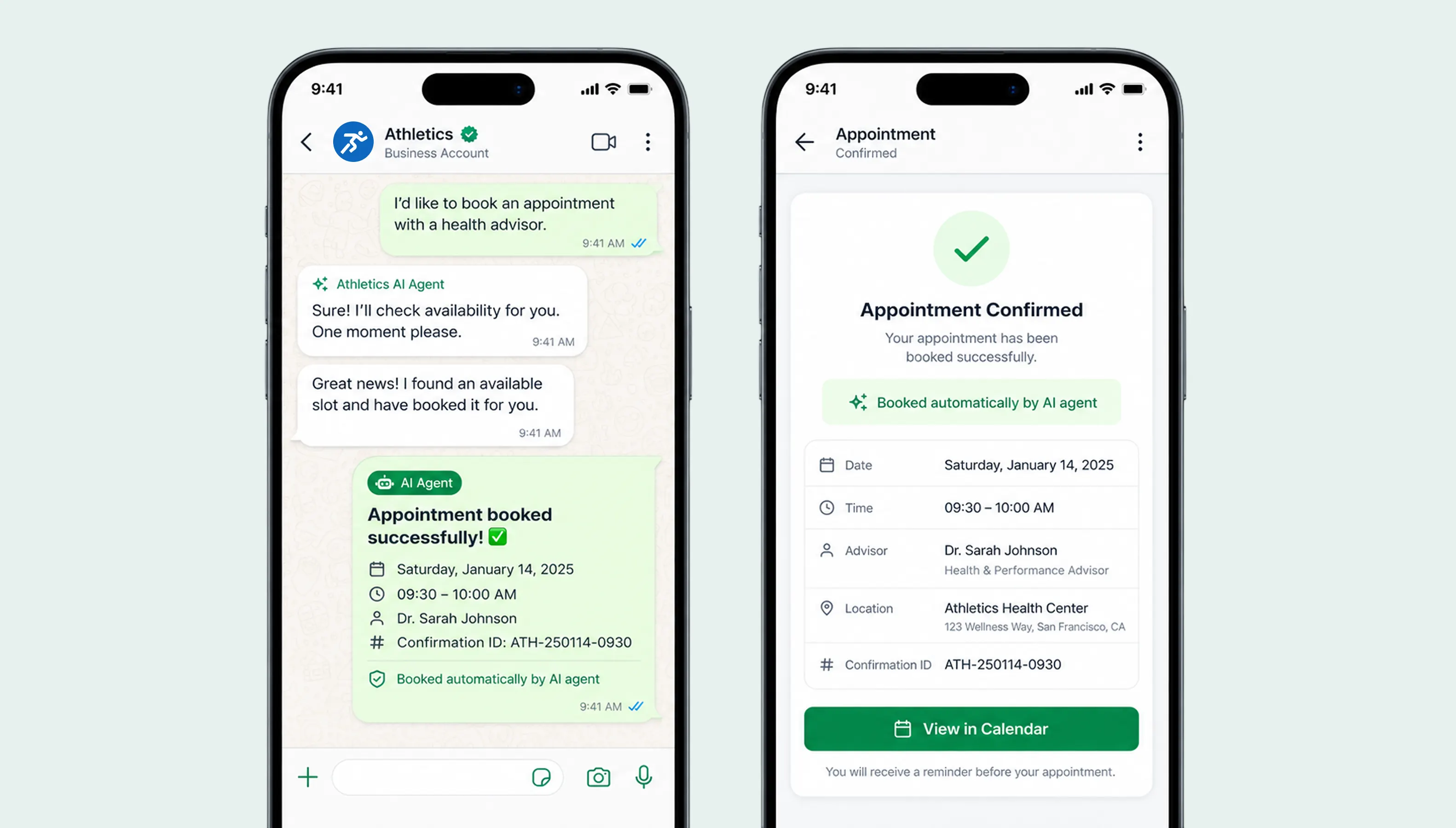
For clinics, salons, service businesses, and consultants, the agent checks live availability, offers open slots, books the appointment, and sends reminders, all in the chat, at any hour. No back-and-forth, no phone tag, and far fewer no-shows thanks to automated reminders.
Provide Instant Customer Support
The agent resolves common questions like order status, shipping, returns, and business hours the moment they are asked, and escalates only the genuinely complex cases to your team. (See our detailed guide on WhatsApp AI agents for customer support.)
Recover Sales and Follow Up
The agent can proactively follow up on abandoned carts, send reminders, and re-engage quiet leads with personalised offers, turning one-off conversations into repeat revenue.
Collect Feedback and Reviews Automatically
The moment after a job is completed or an order is delivered is when a customer is most likely to leave a review, and it is almost always the moment nobody has time to ask. The agent sends the request at the right point, collects a rating in the chat, routes happy customers to your public review page, and routes unhappy ones quietly to your team before the complaint becomes public.
Speak Your Customer's Language
Modern agents handle dozens of languages and switch automatically, which is a major advantage in multilingual markets. An agent that can serve a customer in Hindi, Gujarati, or English without missing a beat removes a real barrier to the sale.
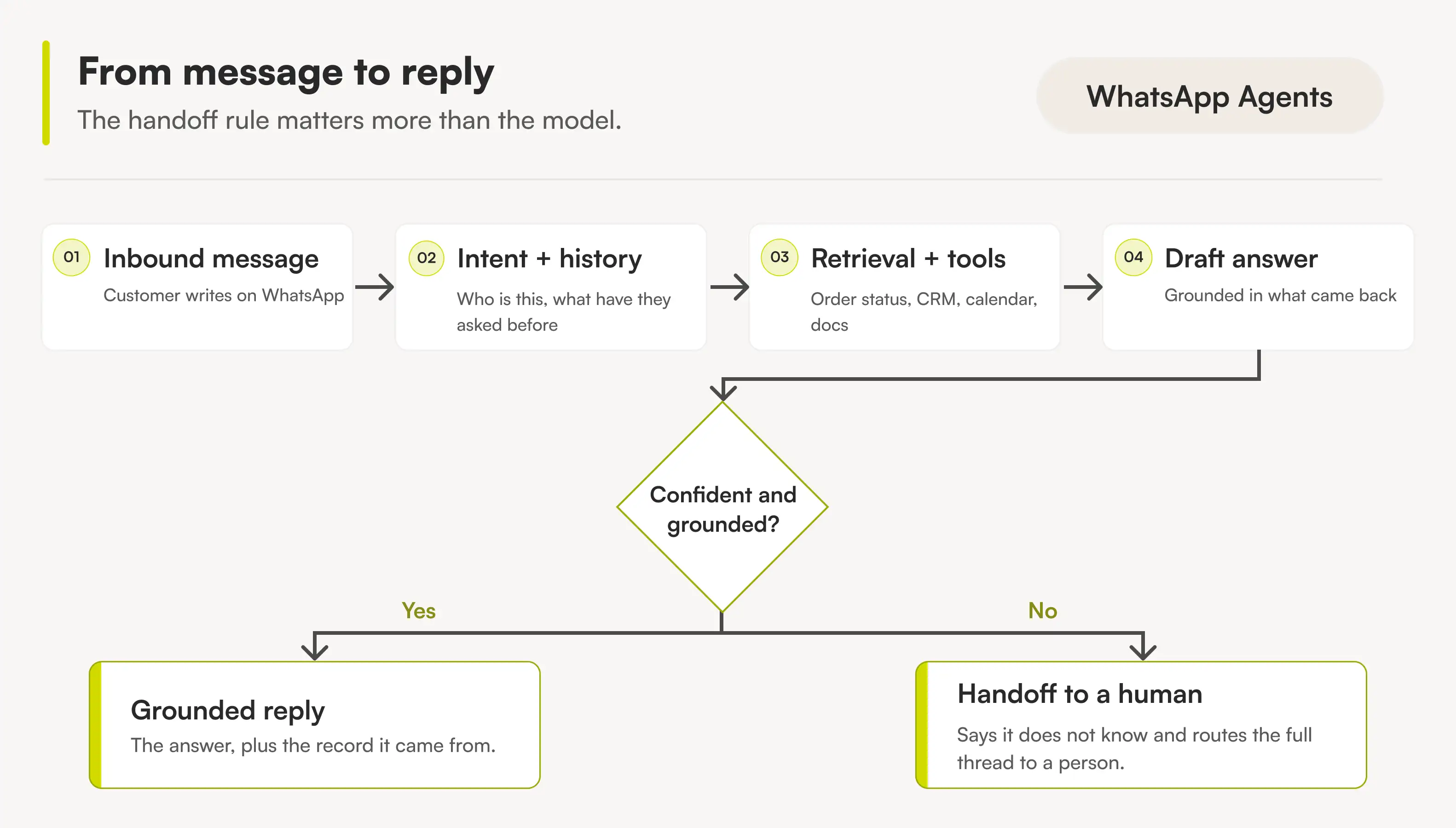
How the Handoff to a Human Actually Works
This is the question businesses ask us most often, and it is the part most articles skip. Automation is not the hard problem. Knowing when to stop automating is.
A well-built WhatsApp AI agent hands the conversation to a person in four situations:
1. The customer asks for a human: Directly or indirectly. "Can I speak to someone", "this isn't helping", or repeated frustration in the phrasing. The agent should not argue or loop. It should hand over.
2. The agent is not confident: Every answer the agent produces carries a confidence level. Below your threshold, it stops rather than guessing. A system that says "let me get someone who can answer that properly" costs you nothing. A system that invents an answer costs you a customer.
3. The conversation crosses a rule you set: Discount requests above a limit, refund and cancellation decisions, anything involving regulated or sensitive information, or a named account you always want handled personally. These are your rules, defined during the build, not the model's judgement.
4. The lead is worth a person: The inverse of escalation. When the agent identifies a high-value or ready-to-buy prospect, it should pull a human in rather than continue automating. Some conversations deserve your best salesperson.
What your team receives on handoff
A handoff that dumps a cold chat on an agent is worse than no automation. When the conversation transfers, the person picking it up should see:
- The full conversation so far, not a summary
- What the agent already established: requirement, budget, timeline, urgency
- Why it escalated
- What the agent has already promised the customer, so nobody contradicts anyone
- The customer's history if they have contacted you before
The customer should never have to repeat themselves. That single detail is what separates automation people tolerate from automation people do not notice.
After the handoff
Once a human takes over, the agent steps back and stays back until the conversation is closed or the team hands it forward again. It should not interject mid-conversation. When the human is done, the agent can resume for follow-ups, reminders and the next enquiry.
What Your Team Sees: The Other Side of the Chat
Almost every article about WhatsApp AI agents is written from the customer's side of the conversation. But you are not buying a customer experience. You are buying a way of working. Here is what changes for the people on your side.
One shared inbox instead of a phone on someone's desk: Every conversation, automated or human, lands in one place your whole team can see. No more "who replied to this?", no more conversations trapped on one person's device, and no more customer history walking out of the door when someone leaves.
Conversations routed to the right person: By product line, by language, by territory, or by the branch nearest to the customer. Whatever rule your business already follows informally, the system applies consistently.
Assignment and ownership: Each conversation has an owner, so nothing sits unanswered because two people each assumed the other had it.
Structured data, not chat transcripts: The detail that matters, budget, requirement, timeline, product interest, gets extracted from the conversation and written into your CRM as fields you can filter and report on. Chat logs are unusable at scale. Structured records are not.
Visibility for whoever runs the team: How many enquiries came in, how many the agent resolved alone, how many escalated and why, response times, and where leads dropped out of the funnel. Most businesses discover their real bottleneck the first week they can see this.
One thread per customer, not one per channel: If a customer messages you on WhatsApp today and email next week, your team should see one continuous history, not two disconnected conversations with the same person.
How to Automate Sales on WhatsApp (Step by Step)
Here is what an automated WhatsApp sale actually looks like in practice, once a WhatsApp sales agent is handling the first response:
- A customer messages your WhatsApp number asking about a product.
- The agent replies instantly, answers the question, and recommends a suitable option from your catalogue.
- It handles objections like price, availability, and delivery time using your real policies.
- It captures the customer's details and either takes the order or books a call.
- It logs everything to your CRM and, if needed, hands a hot lead to a human rep.
The entire flow runs without anyone on your team lifting a finger, at any time of day.
How to Automate Appointment Bookings on WhatsApp
The booking flow is just as clean, which is why it is a favourite for healthcare, beauty, and service businesses:
- The customer asks to book a demo, a consultation, or a service slot.
- The agent checks your connected calendar for real availability.
- It offers open times and confirms the customer's choice.
- It creates the booking and sends a confirmation plus reminders.
- It reschedules or cancels on request, with no human needed.
Benefits of WhatsApp AI Agents for Business
- Zero missed messages: Every enquiry gets an instant reply, 24/7, including nights, weekends, and holidays.
- Faster response, higher conversion: Speed-to-reply is one of the biggest drivers of whether an enquiry becomes a sale.
- Scale without headcount: One agent handles thousands of simultaneous conversations at a fraction of the cost of staffing for it.
- Consistent, on-brand answers: No off-days, no wrong information, in your tone every time.
- Better data: Every conversation is captured and structured in your CRM for follow-up and insight.
- Nothing lost when someone leaves: The knowledge lives in the system, not in one person's head.
Which Option Is Right for Your Business?
Before you talk to anyone about building something, understand that you have three genuinely different routes. They are not competitors of each other. They suit different businesses at different stages, and the wrong choice is expensive in both directions.
Option A: Meta's built-in Business Agent
Meta now gives every business a free AI agent inside WhatsApp Business. You switch it on, point it at your business information, and it starts answering.
Choose this if your questions are genuinely simple: opening hours, location, service list, basic pricing. It is free, it takes minutes, and for a large number of small businesses it is the correct answer.
It stops working when you need the agent to read from your own systems, follow logic specific to your business, or do anything Meta's tooling does not already support.
Option B: An off-the-shelf subscription platform
A category of no-code tools sits between Meta's free agent and a custom build. You pay a monthly subscription, build conversation flows in a visual editor, and connect a fixed set of common integrations.
Choose this if you need more than Meta's agent but your workflows fit inside a flow builder: broadcasts, standard e-commerce order updates, a shared team inbox, straightforward FAQ automation. It is fast to launch and cheap to start.
Be aware that the subscription is rarely the whole bill. These tools typically price on active contacts, agent seats, or AI features as add-ons, so the cost climbs as you grow, and many add a markup on top of Meta's own message charges. Budget for the shape of the bill, not the sticker price.
It stops working when your workflow cannot be drawn as a flowchart, when the integration you need is not on their list, or when your data cannot sit inside a third-party tool.
Option C: A custom-built WhatsApp AI agent
An agent designed around your actual process, connected to your actual systems, running on rules you define.
Choose this if the agent has to read from your ERP or internal database, apply pricing or eligibility logic unique to your business, follow a multi-step process that branches on real data, or handle information you cannot put through a subscription tool.
Be aware that it takes weeks rather than days, and it is not worth it for simple FAQ automation. We say so below, plainly.
A quick way to decide
| Your situation | The right option |
|---|---|
| You want auto-replies and basic FAQ handling | Meta's built-in Business Agent |
| Your flows are standard and you want to launch this week | An off-the-shelf platform |
| The agent must read from your own systems | A custom build |
| You have logic no flow builder can express | A custom build |
| Your data cannot leave your environment | A custom build |
| You are not sure yet | Start with the free option and find the wall |
Meta Business Agent vs a Custom WhatsApp AI Agent: Which Do You Need?
This is the question most businesses miss. Meta now gives every business a free, built-in Business Agent on WhatsApp, so why would you build a custom one? Because "free and basic" and "does exactly what your business needs" are two different things.
| Meta Business Agent (built-in) | Custom WhatsApp AI agent | |
|---|---|---|
| Best for | Small businesses wanting basic auto-replies | Businesses needing real workflows and integrations |
| Setup | Minutes, self-serve | Built and trained around your processes |
| Integrations | Limited to Meta's supported tools | Your CRM, ERP, booking system, custom databases |
| Workflows | Standard Q&A and simple actions | Complex, multi-step logic unique to your business |
| Control and data | Meta's rules and environment | Full control over behaviour, data, and hand-off |
| Cost | Free tier, then Meta subscription and usage | Build cost plus WhatsApp messaging fees |
Rule of thumb: if you just need to answer FAQs and capture the odd lead, Meta's built-in agent may be enough. The moment you need the agent to talk to your own systems, follow your own sales or booking logic, or handle regulated data, that is when a custom-built WhatsApp AI agent pays for itself. If you are weighing this up, our team can help you scope it. See our AI agent development services.
Not sure whether Meta's built-in agent is enough, or whether you need a custom one? That is exactly what we help businesses figure out. Bitontree designs and builds custom WhatsApp AI agents wired into your CRM, catalogue, and calendar, so yours does precisely what your sales and booking workflows need. Book a Free AI Fit Assessment
What Does a WhatsApp AI Agent Cost?
Most articles answer this with categories and no numbers. Here is the actual structure of the bill.
There are three cost layers, and only one of them is the software.
- The platform or build cost: A subscription platform is a monthly fee that scales with contacts, agent seats and AI features. A custom-built agent is a one-time build cost plus ongoing maintenance. The range depends on integration depth, workflow complexity, message volume, compliance requirements, and whether the system needs ongoing optimization after launch.
- Meta's messaging charges: From 1 January 2026, WhatsApp bills per template message rather than per 24-hour conversation. Indicative rates for India are around Rs. 1.09 for a marketing message and Rs. 0.145 for a utility or authentication message. Replies you send inside the 24-hour customer service window are free. Rates vary by country and Meta revises them periodically, so always check Meta's official WhatsApp pricing for current rates in your market.
- Markup on Meta's rates: Some providers pass Meta's message charges through at cost. Others add a percentage on top. At any real volume that difference is larger than the subscription itself, and it is the most common reason a WhatsApp bill arrives higher than expected. Ask about it before you sign anything, with anyone.
A worked example
A service business sending 10,000 utility messages and 2,000 marketing messages a month:
| Line item | Indicative monthly cost |
|---|---|
| Utility messages (10,000 x Rs. 0.145) | Rs. 1,450 |
| Marketing messages (2,000 x Rs. 1.09) | Rs. 2,180 |
| Messaging subtotal | Rs. 3,630 |
| Platform or maintenance cost | Varies by route |
| Markup, if your provider charges one | 0 to 25% of messaging |
Change your message mix and the answer changes, which is why nobody can quote a real number without knowing your volumes. But the shape holds: for most businesses, the messaging is the bill, not the software.
What a custom build changes: It does not change your Meta charges. It changes what the agent can do between messages, which is where the return comes from. If your team currently spends hours every week on WhatsApp replies that a system could handle, the build usually pays back on labour long before it pays back on software.
When You Should Not Build a Custom WhatsApp AI Agent
We turn this work down regularly. Here is when a custom build is the wrong answer, so you can rule yourself out before spending anything.
Your questions are genuinely simple: If most of your WhatsApp messages are opening hours, location and price list, Meta's free Business Agent handles that. Paying for a build is buying a lathe to sharpen a pencil.
Your answers are not written down anywhere: An AI agent answers from your documentation. If your pricing rules live in one person's head and nowhere else, that is the problem to fix first. No agent can retrieve knowledge that was never recorded.
Your volume is low: Below a few hundred messages a month, a person replying on their phone is cheaper, faster and warmer than anything we could build.
You need it live next week: A subscription platform gets you running in a day. A custom build with real integrations takes weeks. If speed matters more than fit, start simple and move later.
Nobody on your side owns it: Every deployment that worked had one person internally who could answer "is this reply correct?" during testing. Without that person, accuracy never gets validated and the team never trusts the system.
If none of these apply, and you have already hit a wall you can name, that is the case for a custom agent.
Which Businesses Should Use WhatsApp AI Agents?
Almost any business that talks to customers over chat can benefit from a WhatsApp AI agent, but a few industries see returns quickly because their customers already prefer messaging over calls and forms. Here is where the impact is clearest:
- E-commerce and retail: The agent handles product enquiries, shares catalogues, recommends items, takes and tracks orders, and recovers abandoned carts, turning casual chats into completed sales. (Related reading: our take on agentic commerce.)
- Healthcare and clinics: Patients can book, reschedule, and receive reminders for appointments 24/7, along with instant answers about timings, services, and pre-visit instructions. This cuts no-shows and lightens the load on your front desk.
- Real estate: Speed wins deals in property. The agent responds to every lead the instant it arrives, shares listings, answers questions, and schedules site visits before a competitor has even seen the enquiry.
- Education and coaching: From admissions queries and course details to fees and enrolment, the agent guides prospective students through the entire funnel and captures leads for your counselling team.
- Restaurants and hospitality: The agent takes reservations, answers menu and timing questions, handles takeaway or delivery orders, and confirms bookings, all without tying up staff during a rush.
- Salons, spas, and local services: Booking-driven businesses let customers check availability and book or reschedule at any time, with automated reminders that keep the calendar full and no-shows down.
- Travel and tourism: The agent answers questions about packages, availability, and pricing, captures booking intent, and sends itineraries and confirmations directly in the chat.
- Finance and insurance: The agent answers common policy and product questions, guides customers through applications, and routes qualified leads to an advisor, while handing sensitive cases to a human.
If your business answers the same questions repeatedly, books appointments, or takes orders over chat, a WhatsApp AI agent will usually pay for itself quickly.
The Bottom Line
Your customers have already chosen WhatsApp. A WhatsApp AI agent for business simply makes sure you are always there to answer them, turning every message into a chance to sell, qualify, or book, 24 hours a day.
The businesses that get this right are not the ones that automate the most. They are the ones that automate the routine work completely, hand over the rest cleanly, and give their team a clearer view of what is happening than they had before.
Whether you start with Meta's built-in agent, a subscription tool, or a custom build wired into your own systems, the direction is clear: the businesses that automate their WhatsApp conversations will capture the sales the rest are sleeping through.
At Bitontree, we help businesses design, build, and launch custom WhatsApp AI agents that fit their exact sales and booking workflows, from the first message to the closed sale. And if a simpler route is the right answer for you, we will tell you that instead.
I am the founder and CEO of Bitontree, where I lead embedded AI engineering teams that build and run production AI: agents, RAG and knowledge systems, document AI, and workflow automation for healthcare, logistics, legal, and SaaS companies. I write about what it actually takes to ship AI that survives contact with production.
Frequently Asked Questions
What is a WhatsApp AI agent?

A WhatsApp AI agent is an AI-powered assistant on your WhatsApp Business account that understands customer messages in natural language and takes action, such as answering questions, recommending products, qualifying leads, and booking appointments, automatically and 24/7.
Do I need a new phone number for a WhatsApp AI agent?
Not necessarily. You can register your existing business WhatsApp number on the WhatsApp Business Platform, though the number cannot be actively registered on a personal WhatsApp account at the same time. Many businesses do choose a separate number to keep personal and business conversations apart. Decide this before setup, because migrating a number afterwards is more disruptive than choosing correctly at the start.
Can my team still use WhatsApp on their phones?
Yes. Meta's Coexistence feature allows the WhatsApp Business app and the Business Platform to run on the same number, so your team can keep replying from their phones while automation runs alongside. Most owners assume this is impossible and stop investigating, which is why it is worth asking about specifically.
Will it sound like a robot to my customers?
That depends entirely on how it is built. Script-driven bots sound robotic because they are reading from a script. A modern agent generates its reply from your actual business information and your tone of voice, so it reads like a well-briefed member of staff. The two things that make an agent feel robotic are refusing to admit uncertainty and failing to hand over to a person when it should. Both are build decisions, not limitations of the technology.
What happens when the agent does not know the answer?
It should say so and pass the conversation to a person, with the full history attached. An agent that guesses in order to seem capable will eventually tell a customer something untrue in writing. Confidence thresholds and escalation rules are set during the build, and they matter more than anything else in the system.
Can I read the conversations the agent has had?
Yes, and you should be able to see every message, which conversations were fully automated, which escalated and why, and how long each took. If a provider cannot show you this, that is a reason to walk away.
Is my customer data safe?
The right answer depends on how the agent is deployed. Ask three questions of anyone you speak to: where the conversation data is stored and under whose control, whether your data is used to train any shared model, and what is signed before anyone accesses your information. At Bitontree we sign an NDA before any technical discussion, and deployment options include your own environment where required.
Who maintains it after launch? Do I need a developer on staff?
No. Most businesses run it with an existing operations or IT owner. What you do need is one person who can answer "is this reply correct?" during testing and occasionally afterwards. Ongoing maintenance, model updates and new integrations can either be handed over to your team with documentation, or managed for you.
Can I turn it off?
Yes, instantly, and you should confirm this before you commit. You should also be able to disable it for specific conversations, specific hours, or specific customers without disabling it everywhere.
What is the difference between a WhatsApp sales agent and a support agent?
The technology is the same. The job is not. A WhatsApp AI sales agent is built to qualify, quote and book, so it is measured on conversations that turn into revenue. A support agent is built to resolve, so it is measured on how many issues close without a human. Most businesses start with one and add the other once the first has earned trust, and both can run on the same WhatsApp Business AI agent setup.
Will using an AI agent get my WhatsApp number banned?
Not if you use the official WhatsApp Business API and follow Meta's opt-in and messaging rules. Bans typically come from unofficial tools and spammy behaviour, not from compliant AI agents.
How is a WhatsApp AI agent different from a chatbot?
A traditional chatbot follows fixed scripts and breaks off-script. A WhatsApp AI agent understands intent, answers from your real business data, and takes actions like booking or ordering across your connected systems.
Can a WhatsApp AI agent book appointments automatically?
Yes. When connected to your calendar, it checks live availability, offers open slots, confirms the booking inside the chat, and sends reminders, with no human involvement.
Can a WhatsApp AI agent qualify leads and hand off to a human mid-conversation?
Yes, and this is the most requested workflow we see. The agent asks qualifying questions, scores the lead, and transfers to a person with the full conversation history attached, either when your criteria are met or when the customer asks for a human.
Can one system handle WhatsApp, Instagram and email together?
Yes, if it is built for it. The value is one continuous history per customer rather than three disconnected conversations with the same person. Decide early whether you need this, because retrofitting multi-channel onto a WhatsApp-only setup is more work than building for it from the start.
Do I need the WhatsApp Business API?
Yes. Automated, scalable WhatsApp AI agents run on the official WhatsApp Business Platform (API), which is what enables compliant two-way messaging for businesses.
Can a WhatsApp AI agent handle multiple languages?
Yes. Modern agents support many languages and switch automatically, which is a major advantage in multilingual markets like India.
How long does it take to set up a WhatsApp AI agent?
Meta's built-in agent is live in minutes. A subscription platform can be running in a day. A custom agent with real integrations and workflows takes weeks, depending on the systems it needs to connect to.
How do I get the green tick on WhatsApp?
The verified badge is granted by Meta based on your brand's public notability, not on which provider you use. Anyone promising to guarantee it is overstating what they control. A verified Business Account is a separate thing from the green tick and is achievable for most legitimate businesses.
Related Blogs
Read more guides on WhatsApp automation, AI agents, and ecommerce workflows.