


An AI agent for customer support handles ticket triage, order tracking, refund processing, billing changes, account modifications, complaint investigation, and escalation packaging - across your website, WhatsApp, email, and phone. Our AI customer service deployments achieve 70% autonomous resolution within the first 90 days and reduce support costs by 40-60%.
Your support team resolves the same 15 ticket types every day. Order status. Refund requests. Password resets. Billing questions. They copy data between Zendesk and Salesforce, look up policies they already know, and type responses they have typed a hundred times before. The work is not hard. It is just slow, repetitive, and spread across too many tools.
An AI support agent does not tell your customer what the refund policy is. It processes the refund. It checks the order, verifies eligibility, executes the refund in Stripe, updates the ticket in Zendesk, and confirms with the customer - in a single interaction, without a human touching it.
This guide covers what an AI agent for customer support actually does, the specific use cases it handles in production, the measurable benefits it delivers, and how we implement one that resolves the majority of tickets without human involvement.
What Is an AI Agent for Customer Support?
An AI agent for customer support is an autonomous system that receives a support request, reasons about what needs to happen, retrieves live data from your business systems, executes the resolution, and confirms with the customer - without waiting for a human to intervene on routine cases.
Unlike a chatbot that answers questions from a knowledge base, a support agent takes action. A customer writes: "I was charged twice on my last order." The agent identifies the customer, pulls recent transactions from Stripe, finds the duplicate, processes the refund, updates the ticket in Zendesk, and responds with confirmation. The customer did not get a policy explanation. They got their money back.
Modern AI support agents are built on three core technologies:
Large language models (LLMs) like GPT-4o, Anthropic Claude, or Meta Llama that understand natural support queries, reason about the right resolution path, and generate helpful responses - not robotic scripts.
Retrieval-augmented generation (RAG) pipelines built on LangChain with Pinecone or Weaviate that search your actual policies, product documentation, and knowledge base in real time - so the agent answers from your data, not from its general training.
Tool calling and system integration via Model Context Protocol (MCP) and custom APIs that let the agent read from and write to your CRM, helpdesk, billing system, OMS, and fulfillment platform - taking real actions in your production systems, not just retrieving information.
The result is a 24/7 support system that resolves tickets end to end, reduces cost per interaction by 80%, and hands your human team only the cases that genuinely require judgment.
Why Customer Support Needs AI Agents
Customer support automation is not about replacing your team. It is about eliminating the work that wastes their time and keeps them from the cases that actually matter.
Your agents spend 5 minutes on work that takes 30 seconds of judgment
Most support work follows a pattern: read the request, open the CRM, look up the customer, pull data, perform the action, write the response. The judgment takes 30 seconds. The tool-hopping takes 5-10 minutes. An AI agent eliminates the tool-hopping entirely and handles the judgment for routine cases - so your team only touches the tickets that genuinely require a human.
Every human ticket costs $6-$15. Every AI ticket costs $0.80.
At 5,000 tickets per month, that is a structural shift from $50,000 to under $10,000 in support costs. Gartner projects $80 billion in contact center savings from conversational AI by 2026. The math is not marginal - it is transformational. And it compounds: every new use case you automate drops the cost-per-ticket further without adding headcount.
40% of your tickets arrive when nobody is working.
And 23% of customers switch providers after one bad experience. An AI agent does not just acknowledge after-hours messages - it resolves them. Same reasoning. Same actions. Same quality. A customer who submits a refund request at 11 PM gets their money back by 11:01 PM - not a "we'll get back to you" at 9 AM.
Volume spikes break human teams. AI agents do not notice.
Product launches, outages, holiday rushes - every spike means your team drowns in tickets, response times collapse, and CSAT drops. Hiring takes weeks. Training takes more weeks. Customer support automation through an AI agent handles 10x volume instantly at the same cost and the same quality. Your peak and your normal look identical to the customer.
Your best agents are leaving because the work is boring
Agent turnover averages 30-45% annually. The root cause is not salary. It is that 80% of the day is spent on repetitive work that requires no skill. When an AI agent handles most of the repetitive work, your human agents focus on complex, meaningful cases - the work they were actually hired to do. Burnout drops. Your best people stay.
In short: The problem is not that your team is too small. The problem is that your team spends most of their time on work that does not require a human. AI agents do not replace your support team. They give your team back the time they are currently wasting on work a system should handle.
Key Use Cases of AI Agents for Customer Support
An AI agent for customer support goes far beyond answering questions. Here are the specific use cases that production deployments handle - each one combines high volume, clear business rules, and multi-system execution.
Ticket Triage, Classification, and Intelligent Routing
The agent classifies every inbound request by intent, urgency, and customer segment - then routes it. Simple requests (order status, password reset) resolve autonomously. Complex requests route to the right specialist with the full context attached: conversation transcript, customer profile, sentiment score, and recommended resolution. No generic queues. No misrouted tickets. Triage accuracy exceeds 95% in production deployments.
Best for: Any support team handling 1,000+ tickets/month where misrouting wastes 20-30% of agent time.
Order Tracking and Delivery Exception Handling
"Where is my order?" is the single highest-volume support query across ecommerce, logistics, and D2C. The agent pulls the order from your OMS, checks the carrier API for real-time tracking, and responds with the specific status, carrier name, and delivery ETA. When a package is delayed, lost, or damaged, the agent does not just inform - it initiates the exception workflow: proactive notification to the customer, carrier dispute filing, replacement order creation, or refund processing depending on your policy rules.
Best for: Ecommerce and logistics companies where WISMO tickets account for 25-40% of total support volume.
Refund and Return Processing - End to End
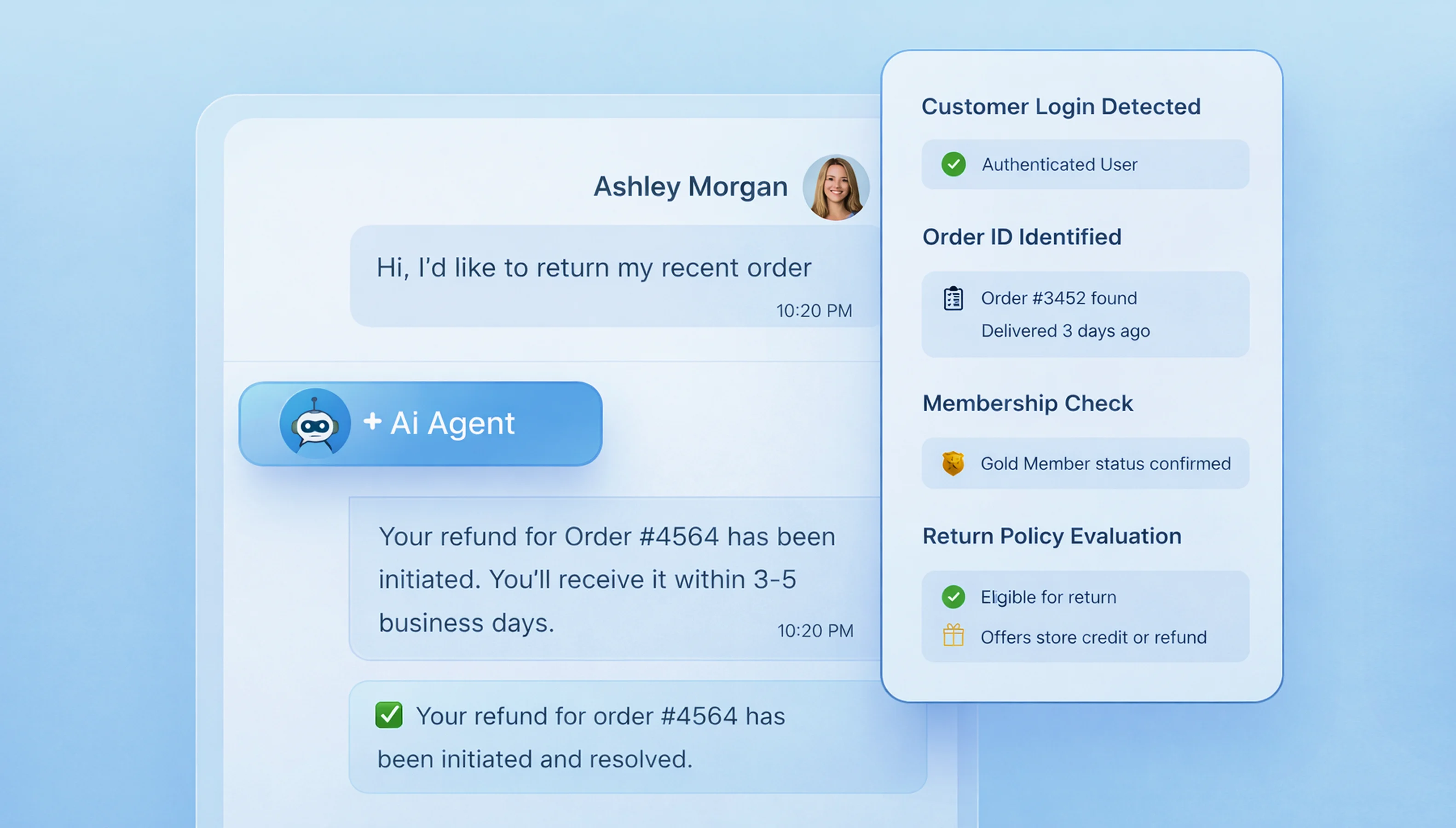
The agent checks return eligibility against your policies, generates a return label, processes the refund in Stripe or your payment system, updates the order status, and confirms the timeline with the customer - all within the conversation. For amounts above your configured threshold, it prepares the complete refund package for human one-click approval. Refund processing time drops from 48 hours to under 4 minutes.
Best for: Any business where returns and refunds consume 20%+ of support team capacity.
Billing, Subscription, and Payment Management
Invoice retrieval, plan changes, subscription upgrades and downgrades with pro-rata calculations, payment method updates, and failed payment recovery. The agent handles the full billing workflow - checking the current plan, calculating the cost difference, executing the migration, adjusting the next invoice, and confirming with the customer. When a payment fails, it triggers an automatic retry, and if that fails, sends a personalized notification with a one-click payment update link.
Best for: SaaS companies and subscription businesses where billing tickets are 15-25% of total volume.
Account Changes with Identity Verification
Password resets, email changes, address updates, and account closures. Every account-level action requires identity verification first - the agent runs your verification flow before executing any change. These queries account for 15-20% of total support volume. Automating them with proper security frees significant agent capacity for complex work.
Best for: Any business where account-related tickets are a predictable, high-volume drain on the team.
Complaint Investigation Across Multiple Systems
A customer writes: "I returned my order two weeks ago, tracking shows delivered, but I never got my refund." The agent investigates across systems: checks return tracking via carrier API, confirms warehouse receipt in your WMS, identifies the refund gap in your payment system, determines whether it is a processing delay or system error, and either triggers the refund immediately or escalates a pre-investigated case to your finance team with every data point attached. The human decides. The agent investigated.
Best for: Operations where complaint resolution currently requires an agent to check 3-5 different systems manually.
Proactive Issue Detection and Customer Outreach
The agent monitors your systems for conditions that will generate tickets if left unaddressed. Shipping delays are caught before customers check - the agent sends a proactive update with revised ETA and resolution options. Payment failures trigger automatic retries and customer notifications. SLA thresholds approaching breach trigger internal alerts and preemptive action. This converts reactive support into proactive customer operations.
Best for: Ecommerce and SaaS companies that want to reduce inbound ticket volume by 15-25% through proactive resolution.
Intelligent Escalation with Resolution Packaging
When the agent encounters a case beyond its authority - a frustrated customer, a legal threat, a novel issue, a high-value exception - it does not cold-transfer. It packages: the full conversation, the customer's account data, every action already taken, its sentiment analysis, and a recommended resolution path. The human agent opens a pre-analyzed case and spends 4 minutes instead of 12.
Best for: Teams where cold transfers and repeated information are the top customer complaint about the support experience.
Agent Assist Mode for Human Teams
Not every deployment starts at full autonomy. The agent can work alongside your human team - summarizing long conversation threads, suggesting response templates based on the ticket category, pulling customer context before the agent opens the ticket, and drafting follow-up messages for human review. This is how most teams start: the AI assists, humans approve, and over time the agent earns autonomy on proven workflows.
Best for: Teams that want to start with AI-assisted support before committing to fully autonomous resolution.
How an AI Support Agent Works: The Customer Journey
Here is what happens when a customer contacts your support - explained through how an AI support agent works as a real customer experience.
Step 1: Customer reaches out and the agent activates instantly
A customer sends a message via chat, email, WhatsApp, SMS, voice, or Slack. Every channel normalizes into a unified format. The agent processes all channels identically - same reasoning, same system access, same quality. There is no queue. No hold time. No "your estimated wait time is 12 minutes."
Step 2: Agent understands what they need
"I was double-charged and I'm frustrated." The NLP layer extracts intent (billing dispute), entities (order number, charge amount), and sentiment (negative, high urgency). The agent does not just read the words - it understands the request, the emotion, and the priority. A frustrated customer with a billing issue gets a different path than a routine order tracking query.
Step 3: Agent pulls the customer's full context
The agent matches the customer to their CRM record and pulls account history, subscription status, lifetime value, previous tickets, and segment. A VIP customer with a refund request gets a different resolution path than a first-time buyer. This context shapes every downstream decision - not just the response, but which actions the agent is authorized to take.
Step 4: Agent searches your knowledge and policies
For policy and product questions, the agent queries your indexed knowledge base using retrieval-augmented generation. Answers are grounded in your documentation - not the model's general training. This is what prevents hallucination. The agent answers from your data, every time.
Step 5: Agent plans the resolution and executes
The agent evaluates intent + context + knowledge + your business rules, then plans and executes the action sequence. A refund below $100 auto-processes in Stripe. Above $500 routes to human approval. A cancellation from a high-LTV customer triggers a retention offer first. The agent does not just decide - it acts. Refunds processed. Records updated. Notifications sent. All validated against your business rules with rollback capability.
Step 6: If the customer needs a human, the handoff is seamless
Complex issues - frustrated customers, legal concerns, high-value exceptions - get routed to your team with the full conversation transcript, customer profile, every action already taken, and a recommended resolution. The customer never repeats themselves. The human agent picks up a pre-analyzed case. We integrate with Zendesk, Freshdesk, Intercom, Salesforce Service Cloud, and custom helpdesk platforms.
Step 7: Every interaction feeds your optimization engine
The agent logs every conversation with a full reasoning trace: what it understood, what it decided, what it did, and whether the customer was satisfied. CSAT is collected. Negative scores trigger human follow-up. This data identifies which products generate tickets, which policies confuse customers, and where your systems create friction - operational intelligence your team never had visibility into.
Benefits of AI Agents for Customer Support
Here is what actually changes when you deploy an AI agent for customer support - measured as business outcomes, not chat quality scores.
Your ticket queue stops growing faster than your team
70% of tickets resolved autonomously. Not deflected. Resolved. The action was completed, the record was updated, the customer confirmed satisfaction. The remaining 30% reach humans with full context, reducing their handling time by 40-60%. Your team works on 30% of tickets with 100% of their attention - instead of 100% of tickets with divided attention.
Your customers stop waiting and start getting answers
Sub-30-second first response. The agent is already querying your CRM and executing the workflow before the customer finishes reading the first reply. No queue. No hold. No "we will get back to you." A customer submitting a refund request at 11 PM gets their money back by 11:01 PM.
Your support costs drop from $12 per ticket to under $2
The cost difference is structural, not marginal. AI agent tickets cost under $2 each - including system queries, action execution, and response generation. At 5,000 tickets per month with the majority resolved autonomously, monthly support costs drop by 40-60%. Payback period: 2-4 months.
Your policies get enforced the same way every time
The agent applies your refund rules, escalation thresholds, and verification requirements identically on every ticket, every shift, every day. No exceptions that were not configured. No policy drift between shifts or between agents. Refund leakage drops. Compliance improves. Audit trails cover every decision.
Your escalations stop being cold transfers
Every escalation includes conversation context, customer profile, actions already taken, sentiment analysis, and recommended next steps. Human handling time drops from 12 minutes to 4 minutes. No cold transfers. No customer repeating their issue for the third time.
Your after-hours support stops being an autoresponder
The agent resolves tickets at 2 AM the same way it resolves them at 2 PM. Same reasoning. Same system access. Same brand voice. 40% of after-hours queries are resolved before your team arrives in the morning. No more "we received your request and will respond within 24 hours" - the request was already resolved.
In short: An AI support agent does not just reduce ticket volume. It reduces cost per ticket, reduces handling time on escalations, eliminates after-hours gaps, enforces policies consistently, and gives you operational intelligence about why customers contact you in the first place.
Industries Deploying AI Agents for Customer Support
AI agents for customer support look different in ecommerce than in healthcare. Here is what production deployments handle across key verticals.
Ecommerce and D2C
Your support team toggles between Shopify, your carrier dashboard, Stripe, and Zendesk to answer one customer question. An AI support agent connects all four and handles the full post-purchase experience autonomously.
- Order tracking with live carrier data - delivery ETAs, exception detection, proactive delay notifications
- Full return processing - eligibility check, label generation, refund execution, inventory update
- Duplicate charge investigation and automated refund processing
- Cart recovery with personalized follow-up based on customer LTV and browse history
- Cross-channel support across web, WhatsApp, and Instagram with full context continuity
- One D2C brand: two-thirds of tickets resolved autonomously, average resolution time dropped from 4 hours to 45 seconds
SaaS and Product Companies
High churn starts with slow support. Your users hit a billing issue, wait hours for a response, and cancel. An AI support agent resolves subscription and billing tickets in seconds - keeping customers before they consider leaving.
- Subscription management - plan changes, pro-rata billing, payment updates, cancellation with retention offers
- In-product troubleshooting from documentation via RAG at the moment of confusion
- Bug report intake with structured context capture - browser, OS, error logs, screenshot
- Onboarding guidance that walks new users through setup, reducing time-to-value
- Churn prediction and proactive re-engagement based on usage patterns
- One SaaS company: resolution time dropped from 4 hours to under 1 minute, CSAT improved from 3.6 to 4.4
Healthcare
Every patient call touches scheduling, insurance, intake, and prescriptions across 5-10 different systems. An AI support agent handles the administrative burden end to end - so clinical staff focus on patients, not phone queues.
- Appointment scheduling, rescheduling, and waitlist management with provider availability
- Insurance verification and prior authorization checks - completed before the patient arrives
- Prescription refill coordination across patient portal, pharmacy, and provider
- Post-visit follow-up and care plan reminders via SMS or WhatsApp
- All deployments HIPAA-aware with BAA, PHI handling, and complete audit logging
Financial Services
Customers expect instant resolution on disputes, fraud alerts, and payment issues - not a 20-minute hold time followed by a case number and a 5-day wait. An AI support agent handles the full workflow with bank-grade security built in.
- Transaction dispute workflow - evidence collection, case creation, provisional credit
- Fraud alert verification - the agent contacts the customer, confirms or flags the transaction
- KYC document processing - upload, validation, completeness check, status tracking
- Payment failure recovery - retry, notification, payment method update, escalation
- All deployments with SOC 2 architecture and bank-grade encryption
Logistics and Supply Chain
When a shipment is delayed, the right response involves five systems and three stakeholders - and your coordinator is on the phone with someone asking for a tracking update. An AI support agent handles it before the customer even calls.
- Shipment exception management - delay detection, root cause, customer notification with resolution options
- Delivery rescheduling and address changes executed in real time through your TM
- Damage claim workflow - evidence collection, carrier dispute, replacement coordination
- Multi-carrier tracking - live status from FedEx, DHL, UPS in a single conversation
- Proactive SLA monitoring with preemptive action when thresholds are at risk
AI Chatbot vs AI Agent for Customer Support
A chatbot answers questions. An agent resolves tickets. Here is the difference in AI customer service, and when each makes sense for your support operations.
| Feature | AI Chatbot | AI Agent for Customer Support |
|---|---|---|
| Core function | Answers questions from knowledge base | Resolves tickets end-to-end across systems |
| System access | Read-only integrations | Read + write + trigger + orchestrate |
| Refund request | Explains your refund policy | Processes refund, updates records, confirms with customer |
| Order tracking | Retrieves status from fulfillment API | Retrieves status, detects exceptions, initiates resolution workflow |
| Billing change | Tells customer how to change their plan | Changes plan, calculates pro-rata, adjusts invoice, confirms |
| Escalation | Passes conversation transcript | Passes transcript + customer context + actions + recommendation |
| After hours | Answers questions 24/7 | Resolves tickets 24/7 with full action capability |
| Error handling | Fallback to human or generic response | Self-corrects, retries, escalates with context |
| Cost per interaction | $0.05-0.30 | $0.80-1.50 (includes execution) |
| Best for | FAQ, simple queries, information retrieval | Multi-step workflows, action execution, cross-system resolution |
In summary: If your support need is answering customer questions from a knowledge base, a chatbot is the right solution it is cheaper and faster to deploy. If your support need is resolving tickets that touch multiple systems, require actions (refunds, account changes, billing), and need reasoning beyond scripted flows, an AI agent is the right investment. Many teams start with a chatbot and upgrade to an agent once they outgrow what a chatbot can handle. We build both see our AI chatbot for customer support use case page.
Common Challenges in AI Agent Deployment - and How We Solve Them
Over 40% of agentic AI projects will be canceled by end of 2027 due to escalating costs, unclear value, or inadequate risk controls (Gartner). Here are the five most common failure modes and how Bitontree prevents them.
Challenge 1: The agent takes wrong actions
An incorrect refund or unauthorized account change has real operational consequences. This is the #1 fear that blocks agent deployment.
How Bitontree solves this: Every action validates against your business rules before execution. Confidence scoring routes uncertain decisions to humans. Configurable permission matrix - autonomous, approval-required, and blocked actions. Rollback capability on every execution. Sub-2% error rate in production.
Challenge 2: The agent makes things up
Hallucination - the agent generates a confident answer that is fabricated. A customer asks about your return policy and gets a made-up 90-day window when your policy is 30 days.
How Bitontree solves this: Retrieval-augmented generation grounds every response in your actual documentation. When the agent cannot find a relevant source, it acknowledges uncertainty and escalates. Sub-2% hallucination rate.
Challenge 3: Escalation loses context
Most AI-to-human handoffs are cold transfers. The customer repeats everything. The experience is worse than waiting for a human from the start.
How Bitontree solves this: Every escalation includes the full conversation, customer profile, actions already taken, sentiment analysis, and recommended resolution. Human handling time drops by more than half.
Challenge 4: Customer data is exposed to the model
Support conversations contain PII - names, card numbers, medical records. Sending this to an LLM unredacted creates compliance violations.
How Bitontree solves this: PII redaction before any data reaches the language model. The LLM never sees raw customer data. HIPAA, SOC 2, and GDPR architectures available. Your data never trains models for other clients.
Challenge 5: No visibility into agent performance
Without measurement, quality drifts and nobody notices. Over 40% of AI projects fail because value is unclear.
How Bitontree solves this: Full reasoning trace on every ticket. Real-time dashboard: resolution rate, escalation reasons, action counts, cost per ticket, CSAT. Weekly optimization reviews for 90 days post-deployment.
How We Implement an AI Agent for Customer Support
Here is how we implement an AI support agent - the process that consistently delivers autonomous resolution on the majority of routine tickets within 90 days.
Step 1: Support audit and use case mapping
We analyze 90 days of your ticket data. Identify the top 20 query types by volume. Map which can be resolved autonomously, which need partial automation, and which must go to humans. Define success metrics and the measurement framework. We also review your current support stack, integration landscape, and compliance requirements.
Step 2: Agent reasoning design and permissions
We design the decision logic per ticket type. Define autonomous, approval-required, and blocked actions. Map every system integration. Set escalation boundaries with your support leadership. This is where the agent's judgment is configured - not just its answers, but its authority.
Step 3: Integration and RAG pipeline
We connect the agent to your CRM, helpdesk, billing, OMS, and knowledge base. Build the RAG pipeline for policy and product grounding using LangChain with Pinecone or Weaviate. Every integration includes error handling, retry logic, and fallback behavior. Test against 200+ real tickets from your history.
Step 4: Build, test, and parallel run
Build in 2-week sprints. Hallucination testing against ground truth. Action validation against business rules. PII redaction verification. Load testing at 3x your peak volume. Then 1-2 weeks of parallel run - the agent processes real tickets alongside your team for validation before going live.
Step 5: Phased deployment and optimization
10% of traffic in week one. 50% in week two. 100% in week three. Daily monitoring throughout. Weekly optimization reviews for 90 days. Prompts tuned, thresholds adjusted, new workflows added based on production data. The agent gets better every week from real customer interactions.
The Conclusion
Your support team is not the problem. The work is. Your agents spend most of their day on tickets that follow the same pattern, touch the same systems, and end with the same resolution - over and over. An AI agent for customer support handles that work end to end: refunds processed in seconds, order tracking queries resolved without a human, billing changes executed automatically, and escalations that arrive pre-investigated with full context. Your team gets back the time they are currently wasting on work a system should handle - and your customers get resolutions instead of wait times.
Bitontree builds AI agents for customer support that resolve tickets - not just answer questions. We study your ticket data, identify the highest-impact automation opportunities, integrate with the systems your team already uses (Zendesk, Salesforce, Stripe, Shopify, and your custom platforms), and deploy an agent that improves every week from production data. Whether you are starting with agent-assist mode or going fully autonomous from day one, we engineer the reasoning, the integrations, the guardrails, and the monitoring - so your agent works in production, not just in a demo.
Start with a free support operations audit. We analyze your ticket patterns, map the use cases with the highest ROI, and deliver a deployment plan with architecture, timeline, and projected cost savings - before you commit to anything.
Frequently Asked Questions
What is an AI agent for customer support?

An AI agent for customer support is a system that receives support requests, reasons about what needs to happen, retrieves live data from your CRM and business systems, executes actions (refunds, account changes, ticket routing), and confirms the resolution with the customer - autonomously for routine cases.
How many tickets can an AI agent resolve without humans?
70% in a typical deployment. High-volume businesses see 75-85%. Complex B2B environments see 55-65%. These are true resolutions - action completed, record updated, customer confirmed.
What does an AI customer support agent cost?
Cost depends on scope: the integrations, channels, data sources, and compliance requirements involved. We scope every engagement against your stack and give you a clear plan and timeline after a free AI fit assessment, before any commitment.
How does the agent handle escalation?
Configurable triggers: customer requests human, frustration detected, VIP segment, confidence below threshold, action above approval limit. Every escalation includes full conversation, customer context, actions taken, and recommended next steps.
What systems does it integrate with?
Salesforce, HubSpot, Zendesk, Freshdesk, Intercom, Jira, ServiceNow, Shopify, WooCommerce, Stripe, Chargebee, WhatsApp Business API, Twilio, Slack, Teams, Confluence, Notion - and any system with a REST or GraphQL API. Bidirectional.
How long does deployment take?
6-8 weeks for single-channel. 8-10 weeks for multi-channel with integrations. 10-14 weeks for enterprise with compliance. Every engagement starts with a free support audit.
What if the agent makes a mistake?
Every action validates against business rules before execution. Confidence scoring routes uncertain decisions to humans. Rollback capability on every action. Sub-2% error rate. Weekly reviews catch patterns early.
Is it HIPAA aligned?
Yes for healthcare deployments. BAA-covered infrastructure, PII/PHI redaction before LLM, encrypted data, audit logging. SOC 2 and GDPR architectures available for all deployments.
Will it replace our support team?
No. It replaces the repetitive work your team should not be doing. Humans handle complex escalations, VIP relationships, and cases requiring empathy. Most clients report higher satisfaction and lower turnover.
Can I start with agent-assist mode before going fully autonomous?
Yes. Most teams start with the agent suggesting responses and packaging context for human review. Over time, proven workflows are promoted to autonomous execution. This is the safest path to full deployment.
Related AI Agent Use Cases

AI Agent for E-commerce
Drives product discovery, order support, and personalized shopping experiences across channels.

AI Agent for Healthcare
Automates patient interactions, eligibility checks, and clinical workflows with accuracy and compliance.

AI Agent for HR
Manages employee queries, onboarding, and HR processes with real-time, policy-aware responses.