


Customer support is the most common deployment target for AI chatbots and for good reason. 80% of routine customer interactions will be fully handled by AI in 2026, according to CoSupport AI. Businesses that have deployed AI chatbot for customer support report 30-50% reduction in support tickets, 95% lower cost per interaction, and 24/7 availability without hiring additional agents.
But most businesses get the implementation wrong. They deploy a template chatbot that follows a script, breaks on the first unexpected question, and frustrates customers more than it helps. The goal is to automate customer support the result is a support tool that generates tickets instead of resolving them.
This guide covers what an AI chatbot for customer service actually does, how it works under the hood, the specific use cases it handles across industries, the measurable benefits it delivers, and how to implement one that resolves 70-85% of conversations without human involvement. We also build lead generation chatbots and appointment booking chatbots but customer support is where most businesses start.
What Is an AI Chatbot for Customer Support?
An AI chatbot for customer support is a conversational AI system that uses natural language processing and large language models to understand customer questions, retrieve relevant information from your knowledge base and business systems, and generate accurate responses in natural language all in under two seconds. It is the most widely deployed type of customer service chatbot in 2026.
Unlike rule-based chatbots that follow pre-scripted decision trees, AI-powered support chatbots understand intent. A customer can ask "where's my stuff?" or "I haven't received my order yet" or "tracking update please", the bot understands all three are the same request and pulls the relevant order data from your system. This is what separates a modern AI chatbot for customer service from a scripted FAQ page with a chat bubble.
Modern AI support chatbots are built on three core technologies:
Large language models (LLMs) like GPT-4o, Anthropic Claude, or Meta Llama that generate natural, contextual responses instead of selecting from templates.
Retrieval-augmented generation (RAG) that grounds every response in your actual documentation help articles, product manuals, policy documents so the bot answers from your data, not from its general training.
System integrations that connect the bot to your CRM, order management system, ticketing platform, and payment system so it can pull live data and execute actions mid-conversation.
The result is a support system that resolves most customer queries autonomously, escalates complex issues to human agents with full context, and operates 24 hours a day without scaling headcount.
Why Customer Support Needs AI Chatbots
AI customer support teams are under more pressure in 2026 than at any point in the last decade. Ticket volumes grow 15-20% year over year. Customer expectations for response time have compressed from hours to seconds. And the economics of human-only support no longer work at scale. The AI chatbot for customer service market is projected to reach $15 billion this year, yet most implementations still fail because they deploy templates instead of custom-built systems.
The volume problem
60-70% of incoming support tickets are repetitive. Order status. Password resets. Return policies. Billing inquiries. Shipping ETAs. These are the same five questions asked a thousand different ways. Your $55,000/year agents are spending 80% of their day copying and pasting the same answers.
The cost problem
The average cost of a human-handled support ticket is $6-12. At 5,000 tickets per month, that is $30,000-60,000 in monthly support labor. An AI chatbot handles the same interaction for $0.05-0.50. Gartner projects $80 billion in contact center labor cost reductions by end of 2026 as AI adoption scales.
The availability problem
40% of customer queries arrive outside business hours. Every unanswered query is potential churn. 23% of customers switch to a competitor after a single bad support experience. A support chatbot works at 2 AM on a Sunday the same way it works at 2 PM on a Tuesday.
The scalability problem
When ticket volume spikes product launches, holiday seasons, service outages human support teams cannot scale fast enough. Hiring and training a new agent takes 4-6 weeks. A chatbot handles 10x normal volume instantly without hiring a single temporary agent.
The retention problem
Support agent turnover averages 30-45% annually. Each replacement costs $10-15K to hire and train. Agents burn out because they spend their days on repetitive work. When a chatbot handles the repetitive 70%, agents focus on complex cases that actually require their skills. Turnover goes down.
Key Use Cases of AI Chatbots in Customer Support
AI chatbots for customer support go far beyond simple FAQ handling. Here are the specific use cases that modern support chatbots handle in production deployments for support ticket automation and ticket deflection.
Automated ticket resolution
The chatbot resolves routine tickets autonomously by retrieving answers from your knowledge base using retrieval-augmented generation. Shipping policies, return windows, product specifications, account information, billing queries the bot answers from your actual documentation in under two seconds. When grounded through RAG, hallucination rates stay below 2%.
Real-time order tracking and status updates
The chatbot connects to your order management system Shopify, WooCommerce, custom OMS, or ERP and provides real-time order status, shipment tracking, delivery ETAs, and carrier information mid-conversation. The customer does not need to navigate to a separate tracking page or wait for an agent to look it up.
Intelligent ticket routing and escalation
When the bot cannot resolve an issue, it does not just drop the customer into a queue. It creates a structured ticket with the complete conversation transcript, customer history, issue category, sentiment score, and recommended resolution path. It routes to the right agent or team based on issue type, priority level, and agent availability.
Sentiment-driven escalation
The chatbot detects customer frustration through sentiment analysis, word choice, punctuation patterns, conversation trajectory. When it identifies an angry or frustrated customer, it escalates immediately to a human agent with a priority flag and the full conversation context. Compliance-sensitive topics, VIP accounts, and queries above the bot's confidence threshold trigger automatic escalation.
Return and refund processing
The chatbot walks customers through the return process end to end. It checks return eligibility against your policy rules, generates return labels, initiates refund processing, and updates the order system, all within the conversation. One e-commerce client reduced return processing time from 48 hours to under 4 minutes after deploying this capability.
Account management and password support
Password resets, account updates, billing inquiries, subscription changes, and payment method updates are handled through secure, authenticated conversation. These queries alone can account for 15-20% of total support volume. Automating them frees a significant portion of agent time.
Proactive customer outreach
The chatbot does not wait for customers to complain. It sends proactive notifications: shipping delay alerts before the customer asks, renewal reminders before subscriptions lapse, payment failure notifications with one-click resolution, and post-purchase satisfaction surveys.
Multilingual customer support
The chatbot auto-detects the customer's language on the first message and responds fluently in 10+ languages with context-aware translation. Not word-for-word translation, culturally adapted responses that adjust tone, formality, and idioms per locale.
CSAT collection and feedback routing
After every resolved interaction, the chatbot collects a satisfaction rating. Negative scores are flagged for immediate agent follow-up. Every rating feeds your analytics dashboard so you can see satisfaction trends by query type, time of day, and resolution method.
Self-service knowledge base access
Instead of forcing customers to search through a static help center, the chatbot acts as an intelligent interface to your entire knowledge base. Customers describe their problem in natural language, and the bot retrieves the most relevant articles using semantic search, not keyword matching.
Not sure whether you need a chatbot or an agent? A chatbot answers and routes; an AI agent for customer support goes further and executes actions like refunds and account changes end to end.
How AI Chatbots for Customer Support Work: Technical Architecture
Understanding the technical architecture helps you evaluate vendors, set realistic expectations, and make informed decisions about what to build. Here is how a customer support chatbot works from the moment a customer types a message to the moment they get an answer.
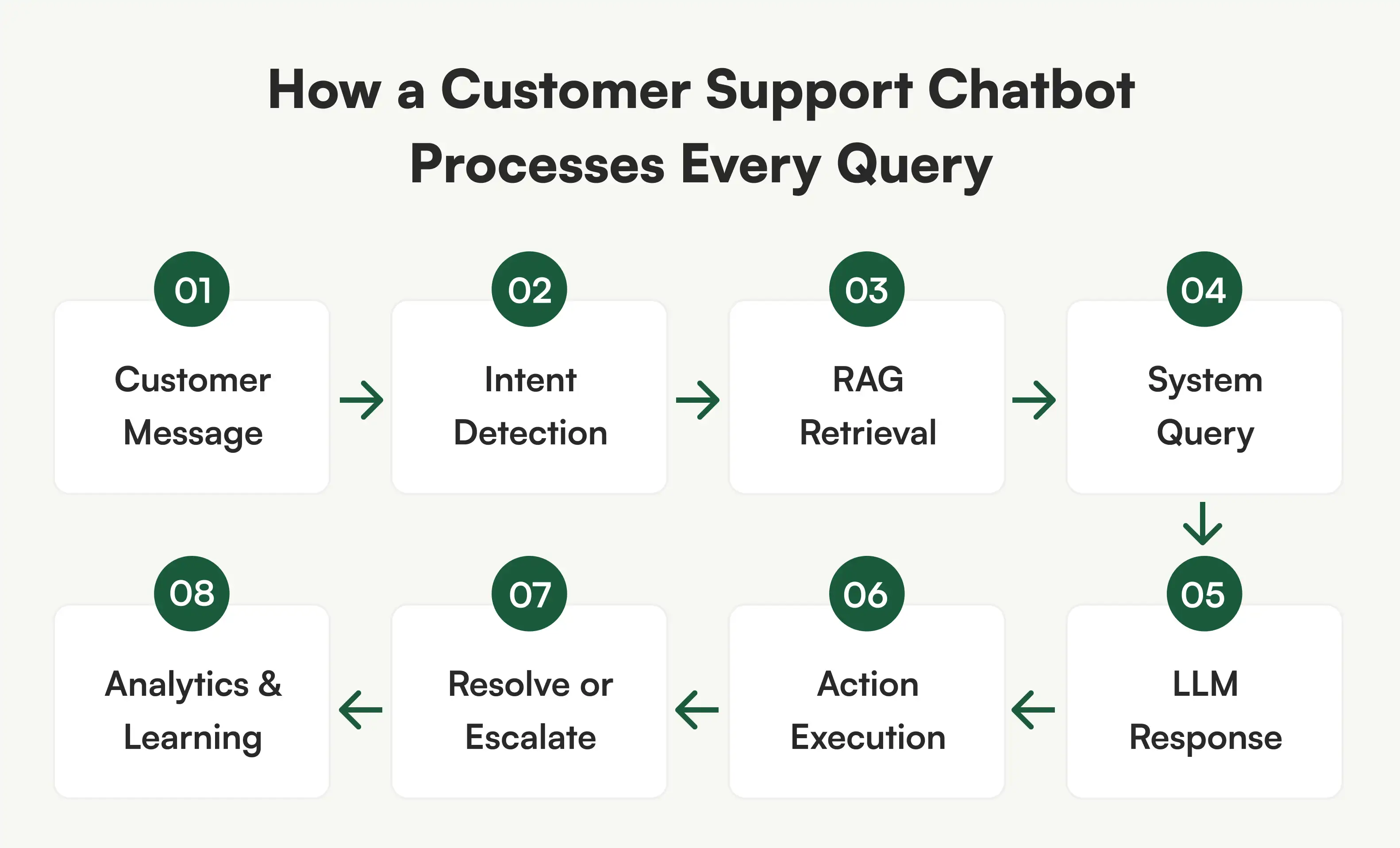
Step 1: Multi-channel input
The customer sends a message via your website chat widget, WhatsApp Business API, Slack, Microsoft Teams, SMS, email, Instagram DM, or phone. The channel does not matter. Our approach uses a single AI backend that processes all channels through a unified conversation layer. The customer's context follows them if they switch channels mid-conversation.
Step 2: Natural language understanding and intent detection
The NLP layer parses the customer's message to extract intent, entities, and sentiment. "Where's my order #45231?" is classified as an order-status query with entity extraction on the order number. "I want to return the shirt I bought last week" is classified as a return request with product and time-range context. The system handles slang, typos, mid-sentence corrections, and topic changes.
Step 3: Knowledge retrieval through RAG
For questions that require information from your documentation, the bot uses retrieval-augmented generation. The customer's query is converted into a vector embedding, compared against your indexed knowledge base stored in a vector database like Pinecone or Weaviate, the most relevant document chunks are retrieved, and those chunks are fed to the LLM as context. Retrieval logic runs through LangGraph. This grounding step prevents hallucination the bot answers from your data, not from its general training.
Step 4: Live system queries
For account-specific questions, our query your business systems in real time through API integrations. Order status from Shopify. Billing information from Stripe. Ticket history from Zendesk. Customer profile from Salesforce or HubSpot. This happens mid-conversation, transparently.
Step 5: LLM response generation
Our uses GPT-4o, Anthropic Claude, Meta Llama, or a fine-tuned model to generate a natural, contextual response grounded in the retrieved data. System prompt engineering defines the bot's personality, tone, and brand voice. The response is validated against confidence thresholds before being sent.
Step 6: Action execution
The bot does not just answer questions it takes action. It creates tickets in your helpdesk, updates CRM records, initiates refunds, generates return labels, books appointments, and triggers multi-step workflows. Every action includes error handling and fallback logic.
Step 7: Resolution or human handoff
If resolved, the bot confirms with the customer, collects a CSAT rating, and logs the interaction. If human intervention is needed, the bot creates a structured handoff: full conversation transcript, customer context, issue classification, sentiment analysis, and recommended next steps. Zero context lost.
Step 8: Continuous learning and analytics
Every conversation feeds the analytics engine. Top query categories, resolution rates, escalation reasons, containment rates, and satisfaction scores are tracked in real time. This data identifies new automation opportunities and drives continuous improvement.
Benefits of Using AI Chatbots for Customer Support
Here is what actually changes when you invest in customer support automation and deploy an AI chatbot for customer support not in theory, but in production.
Your customers stop waiting
The number one complaint in customer support is wait time. Email responses take 4-12 hours. Live chat queues hit 15 minutes during peak. An AI chatbot responds in under two seconds, every time, regardless of how many people are asking questions simultaneously. No queue. No hold. No "we'll get back to you." Customers who get instant answers are measurably more satisfied our deployments consistently hit CSAT scores of 4.3 out of 5 or higher.
Your agents stop doing repetitive work
Right now, your best agents spend 80% of their day answering the same questions: order status, return policy, password reset, billing inquiry. That is not what you hired them for. When a chatbot handles ticket deflection for the repetitive 70%, your agents work on complex cases that actually require human judgment product escalations, refund negotiations, technical troubleshooting. The work becomes more meaningful. Burnout drops. Retention improves. One SaaS client saw their agent team go from dreading Monday mornings to handling fewer but more engaging cases.
Your support costs drop without cutting quality
A human-handled support ticket costs $6-12 to resolve. The same ticket handled by an AI chatbot costs $0.05-0.50. That is not a marginal savings. That is what AI customer support delivers a structural shift in your cost model. If you process 5,000 tickets per month and the chatbot resolves 60% of them, you are saving $18,000-30,000 monthly and that is before factoring in reduced overtime, lower hiring costs, and fewer training cycles. One of our clients reinvested those savings into proactive customer success, which reduced churn by 12%. See our to estimate your savings.
You stop losing customers after business hours
40% of support queries arrive when your office is closed. Every one of those is a customer who needed help and got silence instead. Some wait until morning. Many do not. An AI chatbot for customer service handles after-hours queries with the same accuracy and speed as peak-hour queries. For one healthcare client, deploying 24/7 chatbot coverage eliminated 100% of abandoned after-hours calls and improved new patient conversion by 28% because inquiries were answered instantly instead of going to voicemail.
You handle traffic spikes without panic hiring
Customer support automation handles 10x normal volume instantly with zero additional cost. Black Friday. Product launches. Service outages. Viral moments. When ticket volume doubles overnight, most support teams scramble to hire temporary agents at premium rates, with inconsistent quality, after weeks of training. One of our e-commerce clients handled their entire Black Friday surge at 4x normal volume without hiring a single temporary agent.
Every conversation becomes data you can use
Human agents take notes. Sometimes. AI chatbots log every single interaction full transcript, customer intent, resolution path, sentiment score, and outcome. This is not just record-keeping. It is product intelligence. You can see which features generate the most support tickets, which policies confuse customers, which products have the highest return rates, and which hours produce the most frustrated callers. Our clients use this data to improve products, update documentation, and fix operational gaps that they never knew existed.
Your support experience becomes consistent everywhere
With human agents, quality varies by person, by shift, by mood. A Monday morning agent gives different answers than a Friday afternoon agent. An AI chatbot gives the same accurate answer every time whether the customer is on your website, WhatsApp, Slack, or calling on the phone. Same tone. Same accuracy. Same brand voice. One system powering every channel. Customers who interact with your brand across multiple touchpoints get a seamless experience, not a fragmented one.
Industries Using AI Chatbots for Customer Support
Customer service chatbots are deployed across every industry where repetitive conversations cost time and money. A chatbot for customer service looks different in healthcare than it does in e-commerce. Here is what the bot handles in each vertical.
E-commerce and Retail
E-commerce support teams handle the same five queries all day long. An AI chatbot resolves most of them before a human ever sees them:
- Real-time order tracking and delivery ETA updates pulled directly from Shopify, WooCommerce, or your custom OMS
- Return eligibility checks, automated label generation, and refund initiation end to end, no agent involvement
- Product sizing, compatibility, and specification questions answered from your product catalog
- Abandoned cart recovery through timed follow-up messages with objection handling
- Personalized product recommendations based on browsing behavior and purchase history turning support into revenue
SaaS and Product Companies
SaaS churn often starts with poor support. An in-product chatbot trained on your documentation catches problems before customers reach for the cancel button:
- Feature how-to guidance and step-by-step walkthroughs delivered inside the product at the moment of confusion
- Billing inquiries, plan comparison, and subscription changes handled without waiting for an account manager
- Bug report intake with automatic context capture browser, OS, page URL, screenshot so your engineering team gets actionable tickets
- Onboarding flows that guide new users through first-time setup, reducing time-to-value and preventing early-stage churn
- Integration troubleshooting using your API documentation and common error patterns from resolved tickets
Healthcare
Healthcare support involves sensitive data, regulatory compliance, and patients who need help outside office hours. Every deployment operates within HIPAA-aware infrastructure:
- Our handles appointment scheduling, rescheduling, and cancellations with real-time provider availability from your practice management system
- Insurance verification and eligibility checks completed before the patient arrives eliminating front desk phone calls
- Prescription refill request intake, status tracking, and pharmacy coordination
- Post-visit follow-up instructions and care plan reminders delivered via SMS or WhatsApp
- Patient portal navigation help login issues, document access, test result inquiries available 24/7
Finance and Banking
Financial services customers expect instant, secure answers. Every deployment includes bank-grade encryption and regulatory compliance:
- Account balance, transaction history, and statement downloads through authenticated, encrypted conversation
- Payment dispute initiation with guided document collection and automatic case creation
- KYC document submission with format validation, completeness checking, and status tracking
- Fraud alert verification the bot contacts the customer, confirms or flags the transaction, and escalates confirmed fraud instantly
- Loan application tracking, pre-qualification inquiries, and payment schedule management
Logistics and Supply Chain
When shipments are delayed, everyone wants answers at the same time. A logistics support chatbot pulls live data so every answer is current, not cached:
- Shipment tracking across multiple carriers via API FedEx, DHL, UPS, USPS, and custom carriers in a single conversation
- Delivery rescheduling and address change requests processed in real time through your TMS
- Proof of delivery retrieval with delivery photos, signatures, and timestamps
- Damage claims filing with guided evidence collection photos, shipment details, invoice references and automatic case routing
- Proactive delay notifications sent before the customer asks, with updated ETAs and resolution options
Legal Services
Law firms lose potential clients to slow intake processes. A legal support chatbot handles the first conversation instantly:
- Client intake with guided case detail collection case type, timeline, involved parties, and relevant documents
- Conflict database checking before routing the inquiry to an attorney, preventing wasted consultation time
- Case status updates pulled from your case management system clients check progress without calling the office
- Consultation scheduling with real-time attorney calendar availability and automated confirmation
- Document-related questions answered through RAG, retrieving relevant passages from contracts, filings, and case documents with source citations
Customer Support Chatbot Integrations We Build With Your Existing Tools and Platforms
Your support chatbot is only useful if it connects to the systems your team already uses. A standalone bot that cannot read ticket history, pull order data, or update your CRM creates more work, not less. Every customer support chatbot we build includes bidirectional integrations the bot reads data from your platforms and writes back to them in real time.
Here is what we connect to and what the integration actually does.
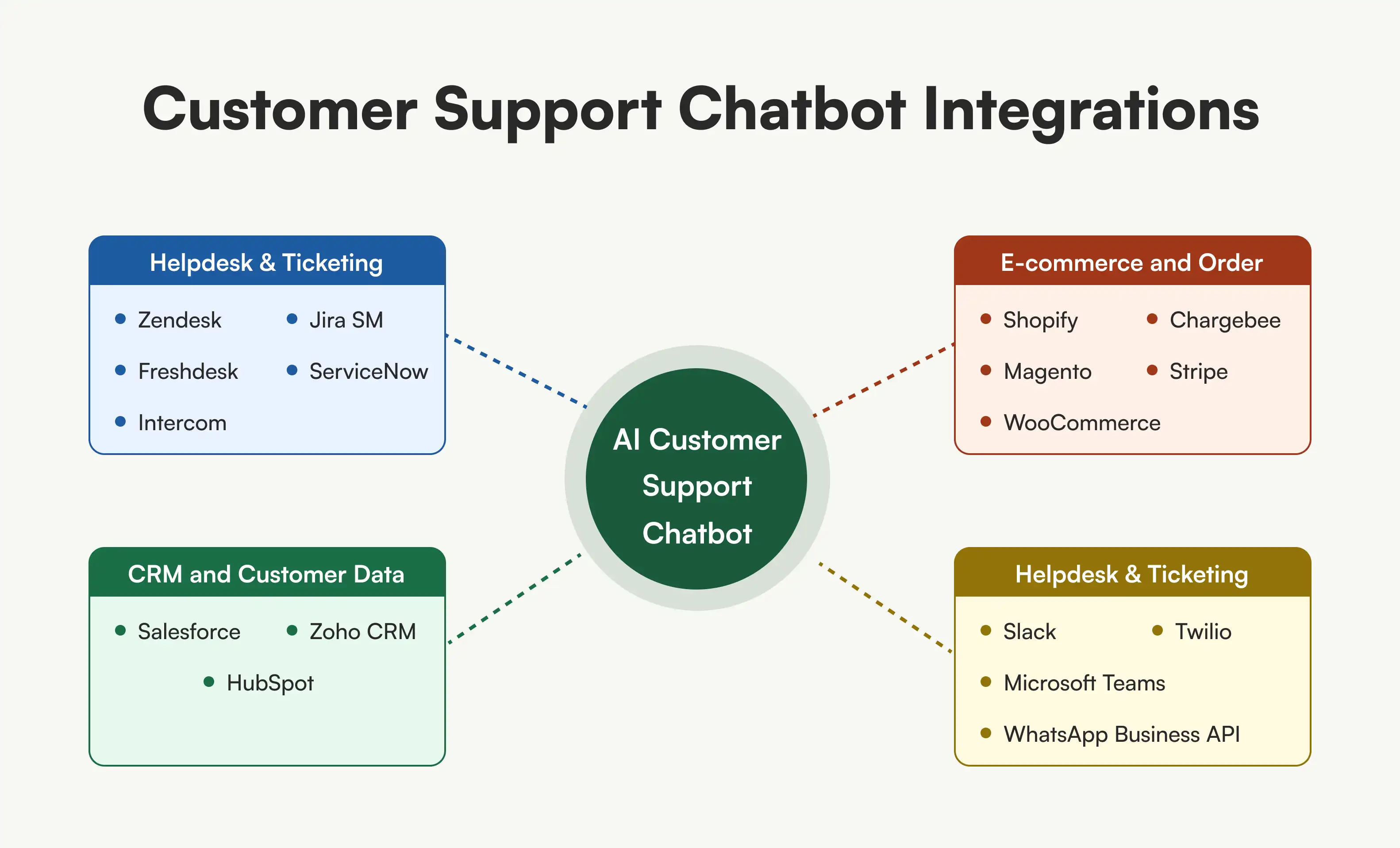
Helpdesk and Ticketing
- Zendesk - Bot reads ticket history and customer context, creates new tickets with full conversation transcript and sentiment score, updates ticket status, adds internal notes, and routes to the right agent group based on issue type and priority.
- Freshdesk - Same bidirectional sync: ticket creation, status updates, customer profile lookup, SLA-aware routing, and canned response triggering for hybrid handoff scenarios.
- Intercom - Bot operates inside Intercom's Messenger, accesses conversation history, creates and tags tickets, and triggers Intercom workflows.
- Jira Service Management - Ideal for internal IT support chatbots. Bot creates issues, assigns severity, attaches logs, and updates status as resolution progresses.
- ServiceNow - Enterprise ITSM integration for incident creation, change request tracking, and knowledge article retrieval through ServiceNow's API.
CRM and Customer Data
-
Salesforce - Bot pulls customer profile, account history, open opportunities, and case records mid-conversation. Creates new cases, logs activities, and updates contact records in real time. Works with both Sales Cloud and Service Cloud.
-
HubSpot - Contact lookup, deal stage tracking, ticket creation, and lifecycle stage updates. The bot knows whether the person asking a question is a free user, a paying customer, or an enterprise prospect - and adjusts its response accordingly.
-
Zoho CRM - Customer record access, deal tracking, and support ticket creation with automatic field mapping from the conversation.
E-commerce and Order Management
-
Shopify - Real-time order status, shipment tracking, return eligibility checks, refund initiation, and customer order history lookup. The bot answers "where's my order?" with live data, not a template.
-
WooCommerce - Same order management capabilities through WooCommerce REST API: order lookup, status updates, product inventory checks, and automated return processing.
-
Magento / Adobe Commerce - Enterprise e-commerce integration for complex catalog structures, multi-store order management, and customer account operations.
-
Stripe / Chargebee - Billing inquiries, subscription status, payment method updates, invoice retrieval, and failed payment resolution. The bot handles "why was I charged?" without involving an agent.
Communication Channels
-
WhatsApp Business API - Full conversational support on WhatsApp with rich media (images, documents, location), quick replies, and list messages. Single bot brain, native WhatsApp experience
-
Slack - Internal support chatbot for employee IT help, HR questions, and knowledge base access. Lives in your Slack workspace, responds in threads, and files tickets in your helpdesk
-
Microsoft Teams - Same internal support capability for Teams-first organizations. Integrates with Azure AD for authenticated employee identification
-
Twilio - SMS-based support and voice AI through Twilio's programmable messaging and voice APIs. Handles phone-based customer interactions with speech-to-text and text-to-speech
Common Challenges in Customer Support Chatbot Deployment and How We Solve Them
Deploying a chatbot for customer service is not without risks. Here are the five most common challenges and how Bitontree's engineering approach addresses each one.
Challenge 1: The chatbot makes things up
The biggest risk with LLM-powered chatbots is hallucination the bot generates a confident answer that is completely wrong. This happens when the model generates responses from its general training data instead of your actual documentation. A customer asks about your return policy, and the bot invents a 90-day window when your actual policy is 30 days. That single wrong answer creates a support ticket, a refund dispute, and a trust problem.
How Bitontree solves this: Every chatbot we build uses retrieval-augmented generation that grounds every response in your actual documents. The bot does not answer from its general knowledge it retrieves from your knowledge base, your help articles, your policy documents. When the bot cannot find a relevant source, it says "I'm not sure about that" and offers to connect with a human agent. We maintain sub-2% hallucination rates across all production deployments through proper RAG architecture, confidence scoring, and response validation layers. Read our guide on.
Challenge 2: Customers get stuck in loops
Poor conversation design creates bots that cannot handle unexpected questions. The customer asks something outside the script, the bot responds with a generic fallback, the customer rephrases, and the bot gives the same fallback again. The conversation goes in circles. The customer gives up frustrated or worse, leaves entirely.
How Bitontree solves this: We design every conversation path before writing a single line of code. Happy paths, error states, edge cases, fallback responses, and escalation triggers are all mapped. We test against 200+ real customer queries from your actual ticket history not hypothetical scenarios. The bot always has a path forward, including graceful escalation to a human when it reaches the limits of what it can resolve.
Challenge 3: The handoff to humans is clumsy
Many chatbots drop the customer into a generic queue when they escalate. The human agent has no context. The customer repeats everything they already told the bot. The experience is worse than if they had spoken to a human from the start.
How Bitontree solves this: Every escalation in our system transfers the full conversation transcript, customer profile, issue classification, sentiment analysis, and recommended next steps to the human agent. The agent sees everything the bot saw. The customer never repeats themselves. Escalation triggers are fully configurable: customer requests a human, bot detects frustration, compliance topic raised, confidence below threshold, or VIP account detected.
Challenge 4: Customer data is exposed to the AI model
Support conversations contain sensitive information names, account numbers, payment details, medical records. If this data is sent directly to an LLM, it creates security and compliance risks. For healthcare and financial services clients, this is a regulatory violation.
How Bitontree solves this: We implement PII redaction before any customer data reaches the language model. The LLM never sees raw personally identifiable information. For healthcare clients, we build on HIPAA-aware infrastructure with BAA-covered cloud, encrypted data at rest and in transit, role-based access controls, and complete audit trails. For financial services, we build to SOC 2 standards. You choose where your data is stored. We never use your customer data to train models for other clients.
Challenge 5: You cannot tell if the chatbot is actually working
Many businesses deploy a chatbot and have no way to measure its impact. They count conversations but do not know how many were actually resolved. They see ticket volume change but cannot attribute the change to the bot. Without clear metrics, there is no way to optimize or justify the investment.
How Bitontree solves this: Every chatbot we deploy ships with a real-time analytics dashboard that tracks the metrics that matter: containment rate (what percentage resolved without a human), first response time, CSAT on bot-handled interactions, escalation rate with reasons, cost per resolution, and top query categories. We run weekly performance reviews for the first 90 days and provide monthly analytics reports after that. You see exactly what is working, what is not, and what to optimize next.
How to Implement an AI Chatbot for Customer Support
Knowing how to implement a customer support chatbot correctly is the difference between 70% containment and 30% containment. It is not a plug-and-play operation. Here is the approach that consistently delivers results.
Step 1: Support audit and use case mapping
Analyze your last 90 days of ticket data. Identify the top 20 query types by volume. Map which can be automated, which require integrations, and which must always go to a human. Define measurable success metrics.
Step 2: Conversation design
Design every conversation path. Happy paths, error states, edge cases, fallback responses, and escalation triggers. Design the bot persona and brand voice. Account for how real customers actually communicate vague questions, topic changes, frustration.
Step 3: Knowledge base and RAG pipeline setup
Ingest your help articles, product documentation, FAQ content, and resolved ticket data into a retrieval-augmented generation pipeline. Document chunking, embedding generation, vector storage, and retrieval logic. Test accuracy against 200+ real queries.
Step 4: System integration
Connect the chatbot to your helpdesk, CRM, order management system, payment platform, and communication channels. Every integration includes error handling, retry logic, and fallback behavior.
Step 5: Testing
Hallucination testing with adversarial prompts. PII redaction verification. Load testing at 3x peak volume. Integration testing across every connected system. Security and compliance review.
Step 6: Phased deployment and optimization
10% traffic in week one, 50% in week two, 100% in week three. Daily monitoring. Weekly performance reviews for 90 days. Continuous retraining based on new patterns.
Frequently Asked Questions
What is an AI chatbot for customer support?

An AI chatbot for customer support is a conversational AI system that uses natural language processing and large language models to understand customer questions and resolve them automatically. It connects to your knowledge base, CRM, and order management system to provide accurate, real-time answers grounded in your actual data making it the most widely deployed type of AI chatbot for customer service in 2026.
How many support tickets can a customer support chatbot resolve automatically?
A properly built AI support chatbot resolves 70-85% of conversations without human involvement through ticket deflection. Businesses with high FAQ volumes see 75-85% containment. Complex B2B environments typically see 55-65%
How many support tickets can a customer support chatbot resolve automatically?
A properly built AI support chatbot resolves 70-85% of conversations without human involvement through ticket deflection. Businesses with high FAQ volumes see 75-85% containment. Complex B2B environments typically see 55-65%.
How does the chatbot handle escalation to human agents?
Escalation triggers are configurable: customer requests a human, bot detects frustration via sentiment analysis, query matches a human-only category, customer is a VIP, or bot confidence is below threshold. The human agent receives the full conversation transcript, customer profile, and recommended next steps.
Can the chatbot integrate with my helpdesk?
Yes. We build bidirectional integrations with Zendesk, Freshdesk, Intercom, ServiceNow, Jira Service Management, HubSpot Service Hub, and any platform with an API. The bot reads customer data, creates tickets, adds notes, and routes to agents automatically.
How long does it take to deploy a support chatbot?
A starter FAQ chatbot deploys in 4-5 weeks. Multi-channel with integrations takes 6-8 weeks. Enterprise deployments take 8-12 weeks. Every engagement starts with a free support audit.
What happens if the chatbot gives a wrong answer?
Every response is grounded in your documentation through retrieval-augmented generation. When confidence is below threshold, the bot acknowledges uncertainty and offers human escalation. Wrong answers are flagged automatically and trigger retraining. Hallucination rates stay below 2%.
Will customers know they are talking to a bot?
We recommend transparency. The bot introduces itself as an AI assistant and offers human escalation at any time. Customers prefer fast, accurate bot answers over waiting hours for a human to deliver the same information.
Related Use Cases

AI Knowledge Base Chatbot
Build a RAG chatbot that turns your docs into instant, accurate answers. This AI knowledge base chatbot cites every source and refuses out-of-scope questions.
AI Multilingual Chatbot
Build an AI multilingual chatbot that detects language and replies in a matched tone across 30+ languages. Serve every market from one bot and knowledge base.
AI Voice Chatbot
Build an AI voice chatbot that handles inbound and outbound calls: intent recognition, live transfers, and post-call summaries. Available 24/7, no hold times.